Author: Abdul Moeed

  • Removing Dull Patches of Content from Your Blogs for Better Ranking

    Removing Dull Patches of Content from Your Blogs for Better Ranking

    removing dull patches of content

    When it comes to boosting the SEO by optimizing content, the strategy is simple. But most people undermine the potential of optimized content and start with other SEO factors.

    Optimizing existing content is nothing but removing dull patches of content from your blogs. I understand that you might be thinking that this is a small practice and is not that effective, but trust me, it is. To get started, avoid falling for the trap of publishing dull or filler content. These uninspired sections can hurt your SEO, increase bounce rates, and disengage your audience. 

    The good news is that you do not need to overhaul your entire blog post, as with the right strategy and a little help from the modern AI tools, you can polish your content and breathe new life into stale paragraphs and boost your blog’s performance. 

    How to Spot Dull Patches

    Instead of directly working with the content, even without knowing whether it is the faulty one or not, might not bring you the desired results. It is important to spot the dull patches in your content so that you can specifically work on them and leave the rest of the content as it is. 

    To identify the dull patches, you may look out for

    • Paragraphs that don’t advance your main idea
    • Sentences that convey the main idea repetitively
    • Jargon or filler content that adds no true value to the content
    • Parts of the article that, as the writer, you do not want to read again

    If you are skimming through your content and leaving some parts out, then there are chances that your readers will also do the same.

    A quicker and smarter way to identify dull patches in your content is to get help from online tools. You can use Google Sentiment Analysis, which is a hidden yet very effective tool for content optimization. Alternatively, you can use the Hemingway app to find out the difficult-to-read patches in your content.

    Manual Techniques to Tweak Weak Sections

    We understand that manually working and scraping the dull content can be a time-consuming and arduous task. Online AI-based tools have made the process much easier and more efficient than ever. 

    1. Trim the fat

    Read your content thoroughly, and once you have identified the area that has unnecessary information, you may start trimming the fat. 

    You need to cut filler phrases and vague language. When doing this, remember that your aim is not to shorten the content, but it is to achieve clarity and precision in your work. 

    2. Add Examples or Data 

    If your content has a lot of weak paragraphs, or even if there are a few, you may understand that it is because of the fact that they lack substance. 

    You may strengthen these paragraphs by adding statistics and examples. By suggesting adding examples and statistics, we do not mean that you may use any random information available offline or online, as a lack of authenticity might lower the quality of your content and might also affect your credibility in the reader’s eyes.

    It is important to only add examples or data from credible resources so that it ensures that the overall quality of the content improves and your credibility gets better. 

    3. Improve Transitions

    One of the most common issues with dull content is that it has abrupt transitions between sentences, and most importantly, between sentences. 

    It is important to add logical transitions to guide your readers through the ideas smoothly so that they can easily read and understand the content. However, you must keep a special check on this point when working with content that has extra sections.

    4. Change Sentence Structure

    Sometimes it happens that when writing the content, we unintentionally follow the same pattern of sentence structure, which makes the content sound boring and repetitive, even though it is not, but it appears to be. 

    To make your content interesting and engaging, it is important to use a mixture of sentence types such as compound, complex, and simple. 

    Also, use a variety of sentences, such as long and short, so that you can easily maintain the readability of your content, and it is more likely to be accessible to a wider range of audiences. 

    Use AI Tools for Smarter, Faster Editing

    We understand that the manual techniques can be tiring, but they are effective and can surely help you get the desired results. 

    However, the use of AI tools can help you get things done faster with the editing process. The best part of using these online tools is that they offer you the creative phase and ideas that you might not have considered earlier. 

    AI Paraphraser: Rework The Sentences For Clarity and Precision 

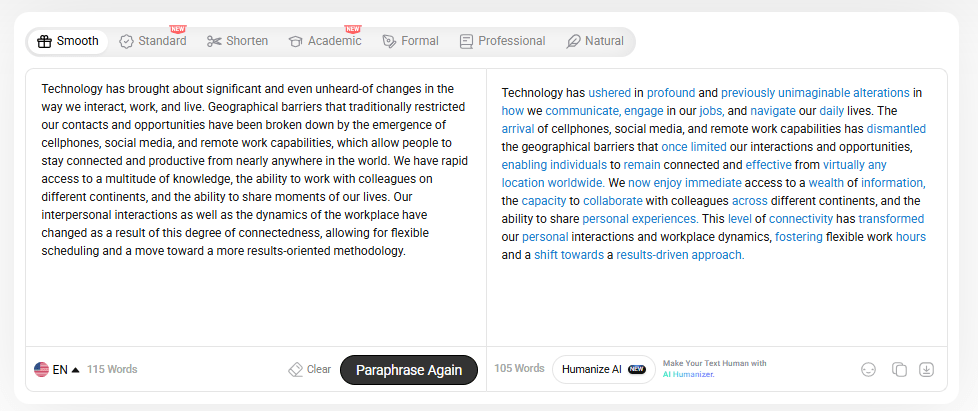
    Instead of manually working and struggling with the content to make it engaging, using an AI Paraphraser is a concrete solution. The tool helps you rework the sentences and make the bland ones easier to change to natural and formal tones without harming the original intent of the content. 

    We understand that the wordy descriptions can be confusing, especially when it involves working with any technical tool. To help you get a better understanding of how this AI paraphraser works and rephrase the sentences, we have shared a pictorial demonstration below. 
    AI paraphraser

    As you can see in the pictorial demonstration, the tool has done a great job and has efficiently paraphrased the piece of text to ensure that it is clear and precise in whatever it wants to convey. The best part of using this tool is that it does not harm the original intent or idea of the content and ensures that it stays in the content. 

    The AI paraphraser has effectively improved the sentence structure, tone, and natural flow of the content. It has improved the overall look and has removed the dullness from the content. 

    However, it is important to always review the content once to ensure that there are no contextual or grammatical errors in it, as this can also affect the quality and make your content look less authentic. 

    AI Paragraph Generator: Expand And Replace Dull Paragraphs 

    Apart from the AI paraphraser, another effective and simple tool that is useful in removing dullness from the content is the AI paragraph generator.  

    When reading or revising the content, if you feel like some part of the content feels thin or is incomplete, you may use the AI paragraph generator to help you create high-quality and relevant paragraphs based on your topic or input. To get a better understanding of how this tool works, you may have a look at the pictorial demonstration shared below. 
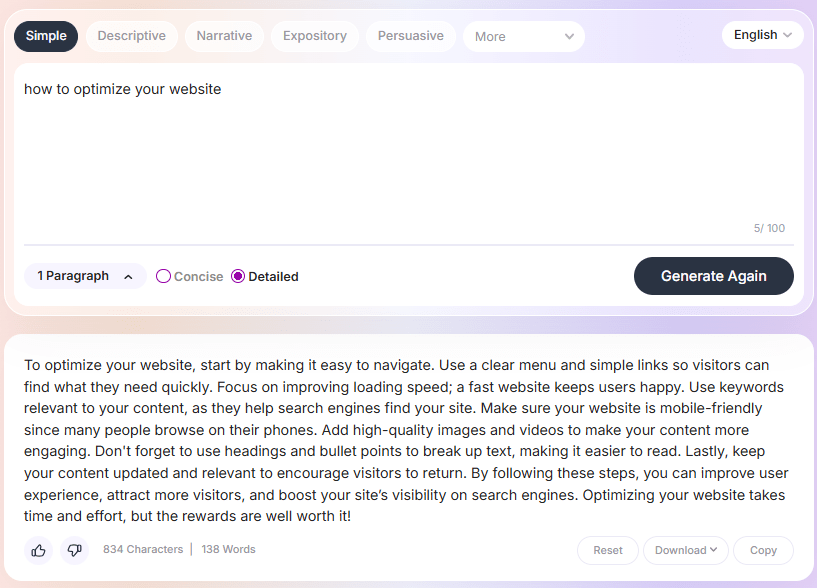
    AI paragraph generator

    As you can clearly see in the pictorial demonstration, the tool has done an exceptional job in creating a relevant and precise paragraph based on our input. 

    The best part of the output is that all the information the tool has generated is content that would add value to your content and is not fluff or any sort of filler content. However, it is important to note that the tool might make any sort of grammatical errors, so it is best to review the final output of the tool once to ensure that there are no mistakes in the final draft. 

    Final Words 

    Improving your blog’s SEO doesn’t always require a full rewrite; sometimes, it’s as simple as removing or enhancing the dull parts of your content. 

    By identifying weak sections, trimming unnecessary words, adding meaningful examples, and improving flow, you can significantly boost your content’s quality. AI tools like paraphrasers and paragraph generators can make this process quicker and more efficient, but always remember to review the final output for accuracy and clarity. 

    With consistent effort and the right tools, your blogs can become more engaging, readable, and SEO-friendly.

  • How to Find Words on a Page: 5 Easy Ways

    How to Find Words on a Page: 5 Easy Ways

    how to find words on a page

    Scrolling through lengthy web pages to locate a specific word or phrase can be time-consuming. Whether you’re searching for a term in a news article, a product on an e-commerce site, or a name in a document, manually scanning the content is inefficient. Research indicates that using built-in browser search functions significantly reduces the time spent locating specific information on a page. This article provides a comprehensive guide on how to find words on a page using 5 straightforward methods, ensuring you can quickly and efficiently locate the information you need.

    How to Find Words on a Page? 5 Effective Methods

    1. Use Keyboard Shortcuts (Windows, Mac):

    You can quickly search for a word on a page by using simple keyboard shortcuts. This method helps you locate specific words or phrases without manually scrolling through the entire webpage. Whether you’re using a Windows PC or a Mac, this approach saves time and effort.

    For Windows:

    • Press Ctrl+F to bring up the search box at the top of the page.
    • Type the word or phrase you want to search in the search field.
    • The search result will show all matches highlighted in yellow across the entire webpage.
    • Use the arrows next to the search box to move between each word occurrence.
    • This method works in nearly every desktop browser, including Chrome, Firefox, and Microsoft Edge.

    For Mac:

    • Press Command + F to activate the Find in Page tool.
    • Enter the specific words or search term in the bar that appears.
    • Matches will be automatically highlighted as you type the word or phrase.
    • Navigate through the results using the arrow icons near the search bar.
    • This works on browsers like Safari, Google Chrome, and Firefox on a page on Mac.

    2. Use Browser Built-in Tools (Windows, Mac):

    Every major web browser comes with built-in tools that allow you to search for a specific word directly on a page. These tools can be accessed via the browser menus, offering a straightforward method even if you forget shortcuts.

    For Windows:

    • Open the web page in Chrome, Edge, or Firefox.
    • Click the icon with three dots in the top-right corner of the browser.
    • Select “Find” or “Find on page” from the dropdown menu.
    • A search bar will appear allowing you to type the word you’re looking for.
    • Words will be highlighted in yellow, and you can scroll through each search result.

    For Mac:

    • Use Safari, Chrome, or another browser you prefer.
    • Open the menu and choose the “Find” option from the “Edit” dropdown.
    • Type in the word or phrase you want directly in the search box.
    • Safari and Chrome highlight results as you type, making it easy to find specific terms.
    • You can use the arrow keys or on-screen arrows to go to the next search match.

    3. Search Words on Mobile Devices (Android, iPhone):

    You can easily understand how to find words on a page using your mobile browser on Android or iPhone. Both platforms support this feature, allowing users to quickly locate a specific word or phrase while browsing.

    For Android:

    • Open the webpage in Google Chrome on your Android phone.
    • Tap the three-dot menu icon in the top-right corner of the screen.
    • Choose “Find in page” from the dropdown options.
    • A search bar will appear where you can enter the desired search term.
    • Chrome will highlight the exact word across the web page as you type.

    For iPhone and iPad:

    • Open the page in Safari on your iPhone or iPad.
    • Tap the Share icon, then scroll and tap “Find on Page”.
    • Use the search field to type in the word or phrase you want.
    • Safari will highlight matches, and you can use arrows to find specific words.
    • This feature is also available in Google Chrome on iOS via the browser menu.

    4. Use Advanced Search Options:

    • Install browser extensions that enhance the search function beyond what the default tools allow.
    • Some tools allow users to search for a specific word across multiple tabs simultaneously.
    • These extensions often include advanced search options like case sensitivity or matching exact word phrases.
    • Use the find tools in extensions for highlighting certain words that are often hard to notice.
    • Many options are compatible with Google Chrome, Firefox, Microsoft Edge, and Safari.
    • You can also search term history and save repeated search for words preferences.
    • Some extensions even offer keyboard shortcuts for faster use.
    • These features work well across devices, including on a webpage on iPhone or iPad.

    5. Use Google Chrome to Search for Words on a Web Page:

    • Use quotation marks around the exact word or phrase you need to search.
    • Use the “site:” operator in Google to search a website you want to search.
    • Include specific keywords alongside “inurl:” to find pages with certain terms in the URL.
    • Combine multiple search terms with AND/OR for more tailored results.
    • Limit results by using “-” to exclude words from your search function.

    FAQs

    1. Can I search for words on a PDF or Word document opened in my browser?

    Yes, use the same Ctrl+F or Command+F shortcut to search within PDF or Word documents displayed in the browser.

    2. Is it possible to search for multiple words at once on a page?

    Some browsers and extensions allow for advanced search options, including searching for multiple words simultaneously.

    3. How do I search for words on a webpage using Safari on iPhone?

    Tap the share icon, select “Find on Page,” and enter the word you’re searching for.

    4. Can I search for words on a webpage using voice commands?

    Some browsers and devices support voice commands, but functionality may vary; check your browser’s features.

    5. Are there browser extensions that enhance on-page search capabilities?

    Yes, various extensions offer advanced search features, such as highlighting all instances of a word or searching across multiple tabs.

  • What is Link Popularity? The Role in SEO Rankings

    What is Link Popularity? The Role in SEO Rankings

    link popularity

    Imagine crafting exceptional content, yet your website remains buried in search engine results. This scenario often stems from low link popularity, a critical factor in SEO rankings. Research indicates that pages with numerous high-quality backlinks tend to rank higher in search results. Link popularity refers to the number and quality of external links pointing to your website, signaling its authority to search engines. Enhancing your site’s link popularity can significantly improve its visibility and ranking. This article provides a comprehensive guide on link popularity, its impact on SEO, and strategies to boost it effectively.

    What is Link Popularity?

    Link popularity refers to the number and quality of backlinks pointing to a web page or site. It serves as a vote of confidence from external sources, signaling content value to a search engine. A strong link profile includes high-quality backlinks, varied link sources, and contextual relevance. Search engine rankings rely significantly on the volume and quality of links a page receives. Both link quantity and authority matter, but quality outweighs numbers. A well-maintained profile demonstrates trust and credibility. Backlinks from reputable domains increase the chances of ranking higher in search results, improving overall SEO efforts.

    Why is Link Popularity Important in Search Engine Optimization (SEO)?

    Link popularity directly impacts SEO rankings by influencing how search engines evaluate content credibility. Inbound links from trusted websites enhance domain authority and pass link juice to target pages. High-quality and relevant backlinks signal that a web page offers useful information. Search engine algorithms analyze the number of backlinks and their link quality to determine rank positions.

    Consequently, earning backlinks from authoritative sources boosts visibility. A consistent link building effort strengthens SEO strategy and helps secure long-term traffic. Strong link popularity is crucial for staying competitive in organic search. It emphasizes trust, relevance, and authority in digital visibility.

    The Importance of Link Quality and Domain Popularity:

    Link quality and domain popularity significantly influence a site’s SEO ranking and overall performance. High-quality backlinks from reputable domains weigh more than numerous low-value links. Search engines evaluate the relevance and authority of domains linking to your site. A trusted backlink profile contributes to long-term SEO stability and improved rankings. While link quantity still matters, quality and contextual fit play a larger role.

    Building link relationships with respected websites elevates your domain’s reputation. Links pointing from related, authoritative sources add genuine value. Hence, prioritizing link quality enhances both trustworthiness and visibility across search engine results consistently and sustainably.

    5 Ways to Increase Link Popularity

    1. Create Relevant Content That Earns Natural Backlinks:

    Content that provides real value encourages other websites to link to your content naturally and consistently. When others link to your site, it strengthens your site’s credibility and improves domain trust. Content relevance and authority greatly influence your position in search engine optimization and overall visibility. Focus on clarity, usefulness, and topic alignment to attract meaningful links. Additionally, web pages with strong authority pass on more link equity. Consequently, producing high-quality content remains one of the most sustainable ways to improve your link popularity long-term.

    2. Use Guest Posting to Build Authoritative Links:

    Guest blogging remains an effective strategy to gain link popularity through contextual and editorial backlinks. It involves writing content for sites that link back to your site in exchange for visibility and trust signals. Choose high-authority domains to boost link popularity scores and avoid links from low-quality or irrelevant sources. Furthermore, guest posts should focus on audience relevance and topic alignment. Besides backlinks, this method also increases referral traffic and helps search engines understand your content’s authority. Link placement within the article body holds more weight than footer or sidebar placements.

    3. Leverage Broken Link Building Techniques:

    Broken link building involves finding outdated or dead links on other sites and suggesting your content as a replacement. This method not only replaces links pointing to a website that no longer exists but also builds strong link popularity. Use SEO tools like Ahrefs or SEMrush to identify broken links in your niche. Contact webmasters with a polite suggestion to replace the broken link with one that points to your website. Hence, this ethical approach adds value for site owners and boosts your site’s link popularity simultaneously without manipulative tactics.

    4. Avoid Link Farms and Focus on High-Quality Sources:

    Link farms and shady directories may offer quick backlinks but damage your website’s SEO and trustworthiness. Search engines penalize sites using excessive or irrelevant links, which can harm your site’s credibility. Links from the same website repeatedly also provide limited value. Instead, seek reputable domains within your niche that offer editorial, organic backlinks. Therefore, ethical outreach creates sustainable results and long-term benefits. Sites with a link from trusted sources receive more link juice, helping them rank higher in search engines compared to spammy sources.

    5. Promote Your Content Through Outreach and Digital PR Campaigns:

    Outreach to bloggers, influencers, or journalists encourages websites that link to your content to reference your work. This tactic helps build popularity by generating mentions and links pointing to a website from credible domains. Use tailored pitches, provide original insights, and include data to make your content link-worthy. Building link popularity through PR not only enhances brand awareness but also grows your backlink profile. Moreover, timely promotion during trending topics often results in links that pass on more link juice and elevate your SEO performance.

    Common Misconceptions About Link Popularity

    Many believe that it is only about collecting a large number of backlinks quickly. That’s false. Common misconceptions about link popularity include:

    • More links equal better rankings: However, link quality is more important than quantity in SEO.
    • Links from any site work: Links from a random site offer less value than those from authoritative, relevant domains.
    • All backlinks are equal: Link attribute (e.g., nofollow vs dofollow) affects how link equity is passed.
    • Link popularity isn’t necessary anymore: Conversely, it is still a crucial metric for ranking algorithms.
    • Repeated links from the same source help more: Links from the same website offer diminishing SEO returns over time.

    How to Monitor Link Popularity

    To effectively monitor your website’s link popularity, you should track backlinks, referring domains, and link equity. SEO tools like Ahrefs, Moz, and SEMrush allow users to analyze links pointing to a website and evaluate link quality. These platforms generate a link popularity score based on the number of links, anchor text, and domain popularity. You can also detect broken links that may hurt rankings and identify top-performing web pages with high link popularity. Monitoring your link profile regularly helps you maintain strong SEO performance and refine your link building strategies effectively.

    Conclusion

    Link popularity is a method that helps improve SEO rankings by signaling credibility and trustworthiness. Search engines evaluate links to a website based on quality, relevance, and source authority. This popularity is still a powerful factor in boosting rankings for those terms you target. Quality matters more in terms of SEO than popularity from low-quality or irrelevant sources. SEO tools like Ahrefs or Moz can track link popularity using accurate metrics and historical data. Page strength is often determined by the page rank and the diversity of backlinks. What strategies do you currently use to improve your site’s link popularity?

    For effective techniques to boost your site’s authority, check out this guide on ecommerce link building strategy.

    FAQs

    1. What is domain authority, and how is it related to backlinks?

    Domain authority is a metric indicating a website’s credibility. It’s influenced by the quality and quantity of backlinks.

    2. How can I check my website’s backlinks?

    Use SEO tools like Ahrefs, SEMrush, or Moz to analyze your backlink profile. These tools provide insights into link sources and quality.

    3. Can too many backlinks from the same domain hurt my SEO?

    Yes, multiple backlinks from a single domain have diminishing returns. Diversify your backlink sources for optimal SEO benefits.

    4. How do I remove harmful backlinks?

    Identify toxic backlinks using SEO tools and request their removal from webmasters. If unsuccessful, use Google’s Disavow Tool.

    5. What’s the role of anchor text in backlinks?

    Anchor text provides context about the linked content. Relevant and varied anchor texts enhance SEO, while over-optimization can be penalized.

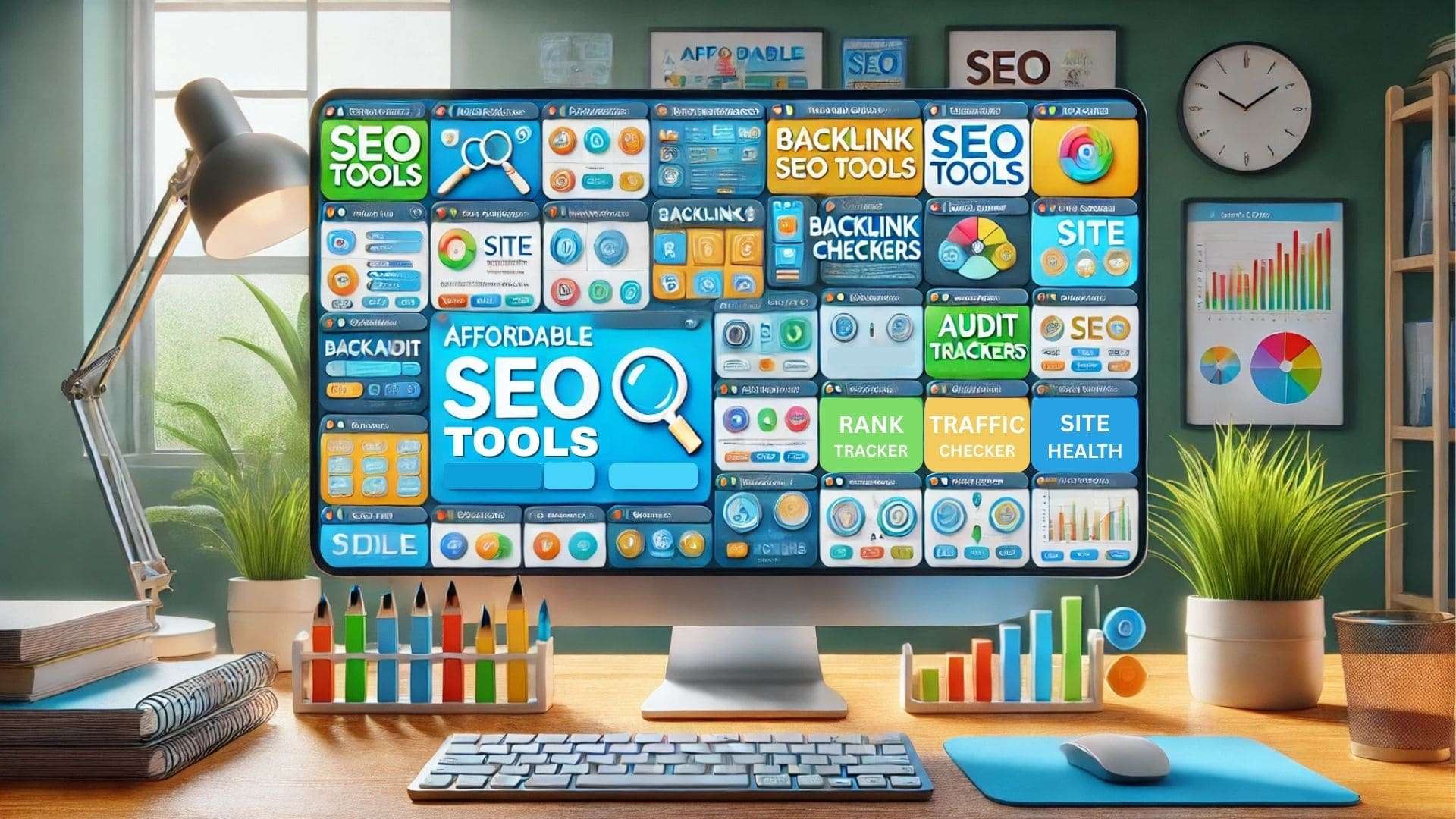
  • 5 Best Affordable SEO Tools in 2025

    5 Best Affordable SEO Tools in 2025

    affordable seo tools

    Finding the right SEO tool can feel overwhelming when expensive tools dominate the market. Most beginners and small businesses face challenges due to budget limits, lack of technical knowledge, or too many tools to choose from. In 2024, 61% of small business owners dropped SEO tools due to high monthly costs. That means affordability is not just a wish, it’s a real SEO requirement. The good news is that several affordable SEO tools that provide great features now exist. This guide shares tools to create, analyze, and optimize your SEO efforts, whether you’re new to SEO or experienced.

    What Makes an SEO Tool Affordable and Effective in 2025?

    An SEO tool becomes effective in 2025 when it offers comprehensive SEO features at an affordable price. Small businesses expect rank tracking, on-page SEO analysis, and a reliable keyword research tool without bloated costs. Free versions and free trials are now standard, especially for technical SEO and SEO audit capabilities.

    Comparatively, an affordable SEO tool should still support optimization for search engine results and SEO content clarity. Moreover, tools that combine all-in-one SEO solutions with scalable support stand out more. Accordingly, usability, depth of analysis, and consistent updates define the best SEO tools on the market today.

    How Small Businesses Define Value in SEO Software

    Small businesses often value SEO software that simplifies complex SEO efforts without overwhelming their limited resources. Keyword research, rank tracking, and SEO audit tools must work efficiently within budget constraints. Free SEO tools or those offering a generous free version make a significant impact initially. Furthermore, affordable SEO tools with built-in on-page SEO features help target relevant search results accurately.

    Additionally, usability and real-time SEO performance reporting also add measurable value. Hence, when small companies find an affordable SEO solution that delivers results consistently, they prioritize retention. Eventually, the balance between cost, support, and features dictates the tool’s real value.

    5 Best Affordable SEO Tools For Small Businesses

    1. Semrush:

    Semrush remains one of the best affordable SEO tools with full-suite features and competitive data insights. It supports local SEO, technical SEO audits, and provides essential SEO metrics in a single dashboard. Many SEO professionals use this tool to analyze competitors’ SEO campaigns and streamline daily SEO tasks. (Starting at $129.95/month)

    Key features:

    • Keyword research with competitive insights
    • SEO reporting tools with automated scheduling
    • All-in-one SEO toolkit for small SEO teams
    • Backlink audit and link building suggestions
    • Site audit feature for technical SEO issues

    2. Moz:

    Moz is a reliable SEO platform, particularly for beginners and small businesses needing a user-friendly interface. The tool helps optimize your SEO strategy by highlighting technical SEO issues and tracking keyword performance. Moreover, Moz’s SEO checker offers consistent insights that improve SEO site structure and page rankings. (Starting at $99/month)

    Key features:

    • Keyword suggestions and rank tracking
    • On-page SEO grader for individual URLs
    • SEO analysis with visual graphs
    • Page optimization recommendations
    • Easy-to-use interface for new to SEO users

    3. SEO PowerSuite:

    SEO PowerSuite is an all-in-one SEO software preferred by agencies needing robust offline capabilities. It includes SEO SpyGlass for backlink analysis and supports both free and paid SEO features. Unlike many tools on the market, this platform runs on desktop, making data storage secure and customizable. (Free version available with paid licenses starting at $299/year – approx. $25/month)

    Key features:

    • SEO SpyGlass for backlink audits
    • Technical SEO checker in Website Auditor
    • Supports white-label SEO reporting
    • All-in-one SEO platform for teams
    • Offers a comprehensive SEO toolkit offline

    4. Mangools:

    Mangools is known for simplicity and effective SEO insights for small teams. It combines five tools in one suite to meet basic SEO requirements affordably. Beginners often favor it because it balances design, usability, and core features without the cost of expensive tools. (Starting at $29.90/month)

    Key features:

    • KWFinder for keyword research and SEO data
    • SERPChecker for search engine result analysis
    • Backlink Miner for link building efforts
    • SERPWatcher for rank tracking
    • On-page SEO data simplified for beginners

    5. Ubersuggest:

    Ubersuggest stands out among cheap SEO tools that provide actionable data for small SEO campaigns. It helps with SEO tasks like content ideas, backlink audits, and keyword suggestions. Comparatively, this tool provides essential SEO features without charging as much as full-scale platforms. (Starting at $29/month)

    Key features:

    • SEO insights based on competitors’ SEO strategies
    • Keyword tracking with daily updates
    • Site audit for technical SEO performance
    • Content ideas from top-performing pages
    • Built-in reporting tools for regular SEO analysis

    Best Cheap SEO Tools That Offer Full-Suite Features

    Some of the best SEO tools in 2025 combine multiple features in one affordable platform. Tools like SEO PowerSuite, Mangools, and Ubersuggest offer keyword research, backlink tracking, and SEO reporting tools altogether.

    Accordingly, these tools support SEO professionals, agencies, and small businesses with consistent SEO data. Unlike tools that require separate purchases, these affordable SEO tools offer a complete SEO solution without excessive upselling.

    Most of them even support technical SEO audits and SEO plugin integrations to strengthen overall SEO efforts. Eventually, the right tools improve visibility while staying within a small business budget.

    Free Performance Tracking and Keyword Research Tool

    1. Google Search Console:

    Google Search Console is a webmaster tool that provides essential SEO data for site performance and indexing. It highlights technical SEO issues, identifies optimization opportunities, and helps SEO professionals track organic search traffic. Moreover, it plays a crucial role in local SEO performance monitoring.

    Key features:

    • Free SEO platform for site owners
    • Real-time indexing status and crawl reports
    • Keyword insights from search results
    • Technical SEO checker with Core Web Vitals
    • Click-through rate (CTR) and impression tracking

    2. Google Keyword Planner:

    Google Keyword Planner is a free tool ideal for keyword research and PPC SEO strategies. Small businesses use it to find search volume estimates and identify high-performing keywords at low cost. Furthermore, it supports SEO campaigns when combined with other SEO tools available in the market.

    Key features:

    • Free keyword research tool
    • Volume trends across multiple locations
    • Competitor keyword comparisons
    • Cost-per-click (CPC) data for ads and SEO
    • Ideal tool for new to SEO users with limited budget

    Conclusion

    Many tools on the market promise great results, but only a few truly match real-world SEO needs. This list focused on tools to help with technical SEO audits, keyword tracking, and content strategy. Cheap SEO tools that provide complete features allow beginners and small businesses to stay competitive. Experienced SEO professionals also rely on these tools to analyze results and reduce unnecessary spending.

    Whether you’re starting your SEO journey or scaling campaigns, using the right platform matters. Have you used these tools before or do you have a favorite that deserves to be on this list?

    To better understand the long-term value of search visibility, this guide explains exactly why SEO is important for any online strategy.

    FAQs

    1. How do SEO tools improve ranking?

    SEO tools help identify issues, optimize content, and track keyword performance for better search visibility.

    2. Can I use multiple SEO tools at once?

    Yes. Many SEO professionals use a combination of tools for content, audits, and backlink tracking.

    3. Is there an all-in-one SEO platform for small businesses?

    Yes. SEO PowerSuite and Mangools offer affordable all-in-one SEO solutions for small business needs.

    4. How often should I run SEO audits?

    Run technical SEO audits monthly. This helps you catch issues early and keep your site optimized.

    5. Do SEO tools help with local SEO?

    Absolutely. Tools like Semrush and Moz include features that support location-based SEO campaigns effectively.

  • WordPress Admin Bar Not Showing? 5 Steps to Fix it

    WordPress Admin Bar Not Showing? 5 Steps to Fix it

    wordpress admin bar not showing

    If you’ve noticed the WordPress admin bar not showing when logged in, you are not alone. This common issue can make managing your site frustrating, especially when you rely on the toolbar for quick access to the WordPress dashboard. Many users face this after installing new plugins, switching themes, or updating core files. It may seem like a minor glitch, but it often signals deeper conflicts or setting misconfigurations. Fortunately, the issue is usually easy to fix. This guide walks you through 5 clear steps to get your admin bar working again.

    Common Causes Behind the WordPress Admin Bar Not Showing

    The WordPress admin bar not showing is a common issue that can happen on either the front or back end. This toolbar plays a vital role by providing shortcuts to the WordPress dashboard, logout options, and quick access to site management tools. However, certain changes to your WordPress site can quietly cause the admin bar to go missing, without any obvious warning. For many users, small technical glitches like this are exactly why the question “Why Is WordPress So Hard To Use?” often comes up, but in reality, WordPress is not that hard to use once you understand how themes, plugins, and core settings interact with each other.

    Often, users notice that the toolbar is gone when viewing the site, although everything works fine in the admin area. This issue can stem from your current theme, plugins, or settings in the user profile. Below are some specific reasons this may happen.

    Theme Conflicts That Disable the Admin Bar:

    Your WordPress theme controls how the site appears, but some themes include code that hides the admin bar. Specifically, developers might add a line of code in the functions.php file that disables the toolbar on the front end. 

    Although this might improve frontend visuals, it affects the overall WordPress dashboard experience for logged-in users. Consequently, any recent theme change can be the reason behind the admin bar not showing.

    Hence, checking the theme settings or reverting to a default layout helps quickly isolate what’s causing the issue.

    Plugin Settings That Interfere With Admin Display:

    Some WordPress plugins unintentionally clash with how the toolbar functions or is displayed across the site. For instance, security or UI customization plugins may contain features that override or block the admin bar visibility. 

    Furthermore, a plugin might alter user roles or dashboard access, thereby disabling the toolbar on the WordPress website. If you’ve installed new plugins recently or updated existing ones, they might be causing the issue.

    So, try deactivating them one by one and see if the WordPress admin bar reappears on the viewing site.

    User Profile Settings That Hide the Admin Bar:

    There is an option within each user profile that controls whether to show toolbar when viewing site. Surprisingly, this gets unchecked automatically in some setups, especially after role changes or user imports. 

    Thus, if your admin bar is not showing, you should first head to your profile settings. Ensure the “Show Toolbar When Viewing Site” box is checked.

    Otherwise, the WordPress admin bar won’t show up, regardless of plugins or theme configurations. This setting often gets overlooked, but it’s one of the most common root causes.

    Steps to Fix the Missing Admin Bar Issue

    Step 1: Check for Plugin Conflicts

    • Firstly, deactivate all active plugins from your WordPress admin panel to isolate the missing admin bar issue.
    • Then, reactivate each plugin one by one to identify which one is causing the admin bar conflict.
    • Some caching or user role plugins disable the admin bar without clearly stating so in settings.
    • If the admin bar reappears after disabling a plugin, you’ve found the one causing the problem.
    • Create a full WordPress backup beforehand to restore your site if anything goes wrong during testing.

    Step 2: Review User Profile Settings in WordPress

    • Go to your WordPress admin area, click Users, and edit your specific user profile.
    • Scroll down to the toolbar option and make sure “Show Toolbar When Viewing Site” is checked.
    • If the admin bar won’t show, unchecking and rechecking this box can sometimes fix the issue.
    • This missing admin bar problem often affects certain roles or users due to profile misconfigurations.
    • Afterwards, save changes and log out then back in to see if the admin bar appears again.

    Step 3: Switch to a Default WordPress Theme

    • Sometimes the current theme is causing the bar to hide by adding a line of code to functions.php.
    • Switch to a default WordPress theme like Twenty Twenty-Four to test this admin bar issue in WordPress.
    • If the admin bar is still not showing after the theme switch, the problem lies elsewhere.
    • Conversely, if the bar returns, you now know your theme was causing the missing admin bar.
    • You can later re-enable your theme after removing or editing the line that hides the admin toolbar.

    Step 4: Check for Errors in functions.php or Custom Code

    • Open your theme’s functions.php file from a text editor or via the WordPress admin dashboard.
    • Look for any code like show_admin_bar(false); which directly disables the admin bar for all users.
    • Delete or comment out this code to fix the admin bar from disappearing unexpectedly.
    • Code customizations, especially from tutorials or snippets, are often causing the missing admin bar issue.
    • Always back up your WordPress core files and theme before editing any code that affects the wp admin.

    Step 5: Clear Caches and Browser Data

    • Use a caching plugin or hosting settings in your WordPress hosting account to flush all server-side caches.
    • Then, clear your browser cache to ensure the admin bar is not hidden due to outdated browser files.
    • Occasionally, the admin bar goes missing because of old cached scripts or CSS conflicts.
    • Likewise, if you use a CDN, purge all cached content for the front end of the site.
    • Finally, refresh the page while logged in to check if the admin top bar is now visible.

    Additional Troubleshooting Tips For WordPress Admin Bar Not Showing Up

    Inspecting JavaScript Errors in the Console:

    Open your browser’s developer tools and check for any visible WordPress errors in the console area. Sometimes a broken script affects sections of the WordPress admin, including showing the admin bar correctly. Moreover, a JavaScript conflict can trigger a white bar at the top of the screen when logged in.

    Reinstalling Core WordPress Files Without Losing Data:

    Go to your WordPress admin, then visit Dashboard > Updates to reinstall the WordPress core files. This can help fix issues affecting your admin bar, especially if a corrupted update caused the error earlier. Before doing this, create a complete WordPress backup through your WordPress hosting account just in case.

    Conclusion

    Running aWordPress website often involves fixing issues like plugin errors, theme glitches, or missing features. The WordPress admin bar not showing is one of those common problems that users face across different roles. It may seem minor, but it affects productivity, especially when managing tasks from the admin dashboard. Thankfully, the steps to resolve it, such as checking profile settings, switching themes, and clearing caches, are clear and easy to follow. Regular maintenance and backups can help prevent this from recurring. What’s the most frustrating WordPress issue you’ve had to fix recently?

    FAQs

    1. How can I fix the admin bar issue without coding?

    Use the Health Check plugin to troubleshoot and identify conflicts without altering code.

    2. Is it necessary to switch themes to fix the admin bar?

    Temporarily switching to a default theme can help determine if your current theme is the issue.

    3. Will clearing the cache help restore the admin bar?

    Yes, clearing browser and site caches can resolve display issues related to the admin bar.

    4. Can I use CSS to hide or show the admin bar?

    While possible, it’s better to manage the admin bar through WordPress settings to avoid conflicts.

    5. What if none of the fixes work?

    Consider reinstalling core WordPress files or seeking assistance from your hosting provider for persistent issues.

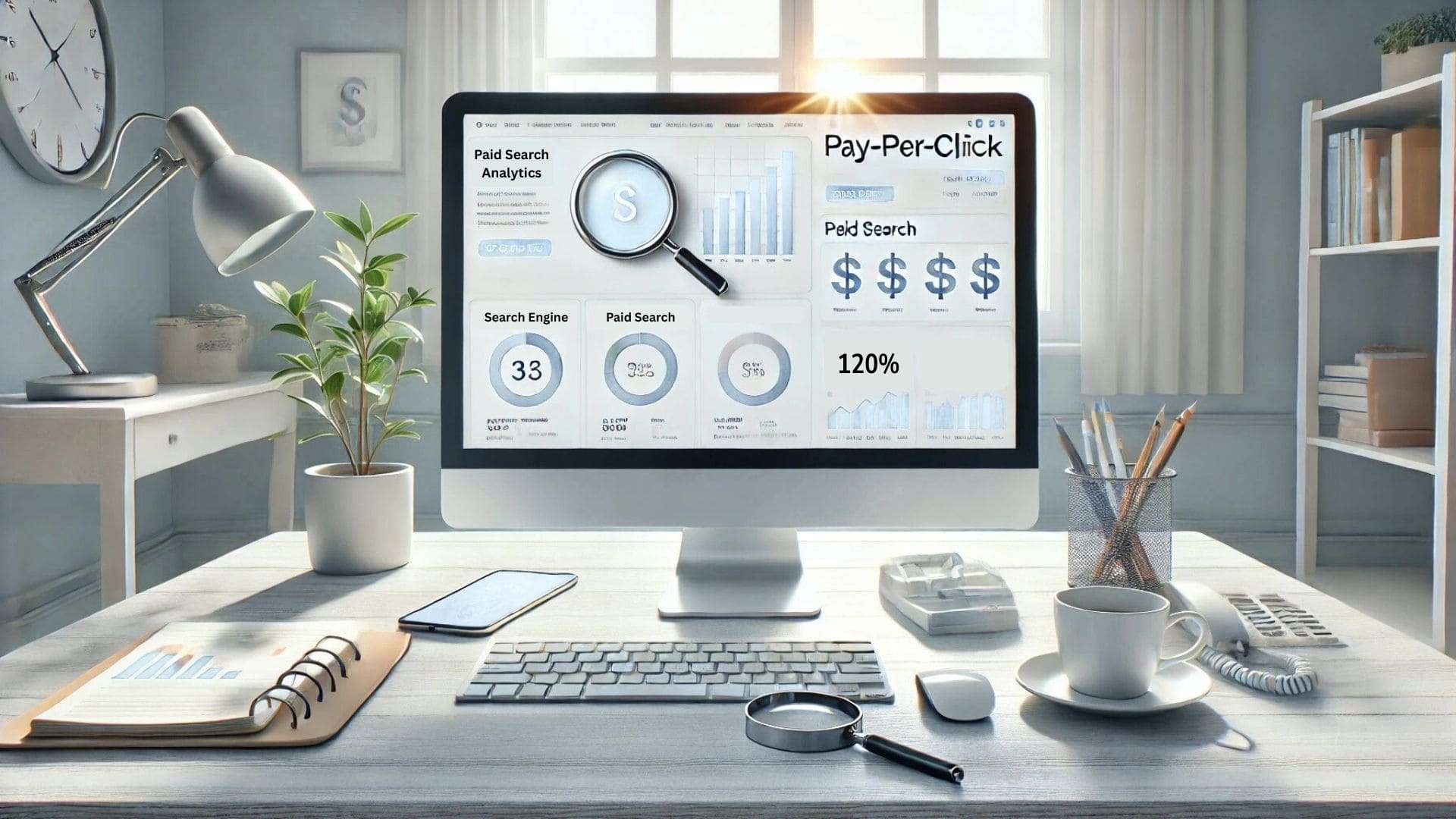
  • What Is Paid Search Analytics? How It Boosts PPC

    What Is Paid Search Analytics? How It Boosts PPC

    paid search analytics

    Many businesses invest heavily in Google Ads and PPC campaigns but struggle to assess their true impact. Without clear insights, it’s challenging to determine if paid search ads are effectively driving conversions or merely consuming budget. Analyzing metrics such as click-through rates and conversion rates is essential for optimizing paid search performance. That is where paid search analytics delivers real value. By leveraging tools like Google Analytics, marketers can gain valuable insights into their paid search campaigns, enabling data-driven decisions that enhance PPC effectiveness. This article provides a comprehensive guide on utilizing paid search analytics to boost your PPC strategies.

    How Paid Search Analytics Connects to PPC Growth

    Paid search analytics helps marketers measure PPC success by monitoring how paid search campaigns are performing. When users search specific terms on platforms like Google and Bing, paid search ads appear at the top of the search results. These paid results generate traffic from your paid search strategy and can be tracked directly through your Google Ads account.

    Analyzing your paid search data within tools like Google Analytics reveals how effective your ads are performing. This helps improve the relevance of your ads and the overall performance of your PPC campaigns across all marketing channels.

    Using Google Analytics to Monitor Paid Search Campaigns

    Google Analytics plays a major role in analyzing the performance of your paid search campaigns. Once integrated with your Google Ads account, you can evaluate traffic from your paid search and compare it with organic search. The platform helps monitor how your ads on search engines like Google behave when users search targeted keywords.

    Paid traffic in GA4 offers insights into how each search engine marketing effort is converting. Reports in Google Analytics highlight how specific paid search ads are performing. With these insights, you can assess the effectiveness of your paid ads and refine your digital marketing strategy.

    Making the Most of Google Analytics 4 for PPC

    Tracking paid search in GA4:

    Google Analytics 4 enables advertisers to track paid search traffic in GA4 using improved attribution models. Linking your Google Ads campaign to GA4 helps measure the success of your paid search engine marketing efforts. Each time a user searches and clicks your ad, GA4 logs the action across platforms like Google Ads. The system categorizes this under paid traffic and maps it to campaign goals.

    You can analyze the paid search based on which ad appears and how users interact with it. This enhances your PPC advertising strategy through more accurate data insights from within your Google Analytics account.

    Viewing paid search traffic in GA4 reports:

    Reports in Google Analytics 4 give detailed visibility into paid search campaigns and search volume performance. You can see how paid traffic behaves differently from organic, based on user searches. The GA4 interface allows filtering paid and organic search traffic side by side. Campaign-level breakdowns show paid search traffic in GA4 segmented by keywords, devices, and channels.

    These insights reveal how relevant your ads are and guide adjustments within Google Ads. It’s also possible to track whether your ad appears for competitive terms, enhancing your ability to manage a successful PPC campaign with accurate paid traffic metrics.

    Comparing GA4 vs Universal Analytics for PPC insights:

    GA4 offers more advanced features than Universal Analytics when analyzing your paid search performance. While Universal Analytics focused on session-based data, GA4 tracks users across devices and platforms like Google Ads. GA4 includes new metrics that help measure the performance of your PPC campaigns more effectively. You can better analyze paid search traffic by using event-based tracking and audience segmentation.

    GA4 simplifies attribution reporting for paid search engine marketing, allowing faster analysis of how ads are performing. This means advertisers now get clearer insights into paid search traffic and better tools for campaign adjustments across marketing channels.

    Tools That Help Analyze Paid Search Performance

    • Google Ads Report – Gives direct performance metrics from your Google Ads campaign and search terms results.
    • Google Analytics 4 – Tracks paid and organic search behaviors, providing deeper visibility into paid traffic in GA4.
    • SEMrush – Measures paid search data, helps refine keywords and understand estimated search volume trends.
    • Ahrefs – Analyzes paid and organic keywords, great for knowing about paid traffic competitiveness.
    • SpyFu – Reveals competitor PPC strategies and how their ads are performing on search engines like Google.
    • Optmyzr – Automates PPC campaigns and helps monitor performance of your paid search ads across platforms.
    • Supermetrics – Connects multiple platforms like Google Ads and visualizes your PPC performance through dashboards.
    • Adalysis – Offers actionable insights by analyzing your paid search campaigns and alerting you to issues.

    How Paid Traffic Impacts Search Engine Marketing

    Differences between paid traffic and organic:

    Strategic uses of paid search marketing:

    Paid search marketing allows brands to target specific search terms with ads on search engines like Google. Businesses can control when and where their paid ads appear, ensuring visibility on high-volume keywords. It helps drive traffic from users actively searching for their product or service.

    Platforms like Google Ads allow fine-tuned bidding and keyword adjustments. The strategy is essential when launching a new product, promoting sales, or running time-sensitive campaigns.

    Paid search campaigns are also useful in testing audience responses and increasing reach beyond what organic search can deliver. Every online advertising decision becomes more data-backed and results-driven.

    Steps to Optimize PPC Using Paid Search Analytics

    You can optimize PPC campaigns by analyzing how paid search traffic behaves using tools like Google Analytics 4.

    • Review reports in Google Analytics to measure the success of your search campaigns and the relevance of your ads.
    • Use paid search performance metrics to refine your bidding strategy and targeting.
    • Make sure each ad appears for the right keywords with enough search volume.
    • Segment traffic from your paid search to see what drives conversions.
    • Adjust your Google Ads campaign budget based on which ads are performing.
    • Evaluate paid and organic search results together to balance reach and efficiency across platforms.

    Future Trends in Paid Search Engine Marketing

    Paid search engine marketing is shifting toward smarter automation, real-time optimization, and cross-platform campaign integration. Google and Bing are improving how advertisers manage paid search traffic using AI-based recommendations.

    Reports in Google Analytics 4 will continue evolving to offer even clearer insights. Marketers will prioritize quality score and ad relevance to ensure ads appear where they matter most.

    Search engines like Google are expected to emphasize user intent in their ad ranking systems. As paid and organic search merge visually, advertisers must adapt their strategies to remain visible on every search engine results page. Effective paid search depends on staying updated.

    Conclusion

    Comprehending paid search analytics is vital for maximizing the effectiveness of your PPC campaigns. By analyzing key metrics through platforms like Google Analytics, you can make informed decisions that enhance paid search performance. Integrating these insights into your digital marketing strategy ensures that your paid search ads contribute meaningfully to your business objectives. Are you ready to elevate your PPC campaigns using paid search analytics?

    For easy instructions on checking your feedback, read this helpful guide on Google reviews.

    FAQs

    1. What metrics are crucial in Paid Search Analytics?

    Key metrics include click-through rate (CTR), cost per click (CPC), and conversion rate.

    2. How does Google Analytics 4 differ from Universal Analytics for PPC?

    GA4 offers event-based tracking and enhanced cross-platform insights compared to session-based Universal Analytics.

    3. Can Paid Search Analytics help reduce advertising costs?

    Yes, by identifying underperforming ads and reallocating budget to more effective campaigns.

    4. Is Paid Search Analytics applicable to platforms other than Google Ads?

    Absolutely, it can be applied to any platform offering paid search advertising, like Bing Ads.

    5. How often should I review my Paid Search Analytics data?

    Regularly, ideally weekly, to make timely adjustments and improvements to your campaigns.

  • Google Discover Not Working? 5 Best Ways to Fix it

    Google Discover Not Working? 5 Best Ways to Fix it

    google discover not working

    You open your phone expecting updates, but the feed is frozen, Google Discover not working again. This issue has disrupted content access for many Android users, especially after recent app changes. In several cases, minor tweaks like outdated settings or app cache have caused the feed to fail. The good news is there are effective ways to fix it without much hassle. You can resolve the problem by making a few critical adjustments in your phone and app settings. This article gives you a step-by-step guide with the five best methods to solve Google Discover not working issues.

    Reasons Why Your Google Discover Feed Not Working Properly

    Google Discover not working may stem from several overlooked issues affecting Android users across different device setups. Sometimes, outdated versions of the Google app or misconfigured home settings cause the feed to freeze or remain blank. Moreover, background data restrictions or issues with Google Play Services can interrupt content refresh and prevent personalized news from loading. Occasionally, the feed may get stuck on a spinning icon without loading due to app cache problems. Besides, when search history is disabled or you’re using Discover without an account, the app might show irrelevant or no updates.

    Likewise, if you recently added a work account, Google Discover may pause updates until preferences sync correctly. Surprisingly, even mobile data and Wi-Fi inconsistencies affect Discover’s performance. Therefore, it’s necessary to troubleshoot promptly and ensure all permissions are active to restore relevant content to your home screen.

    5 Best Ways to Fix Google Discover Not Working Issue

    1. Check If Google Discover Is Enabled:

    Check If Google Discover Is Enabled
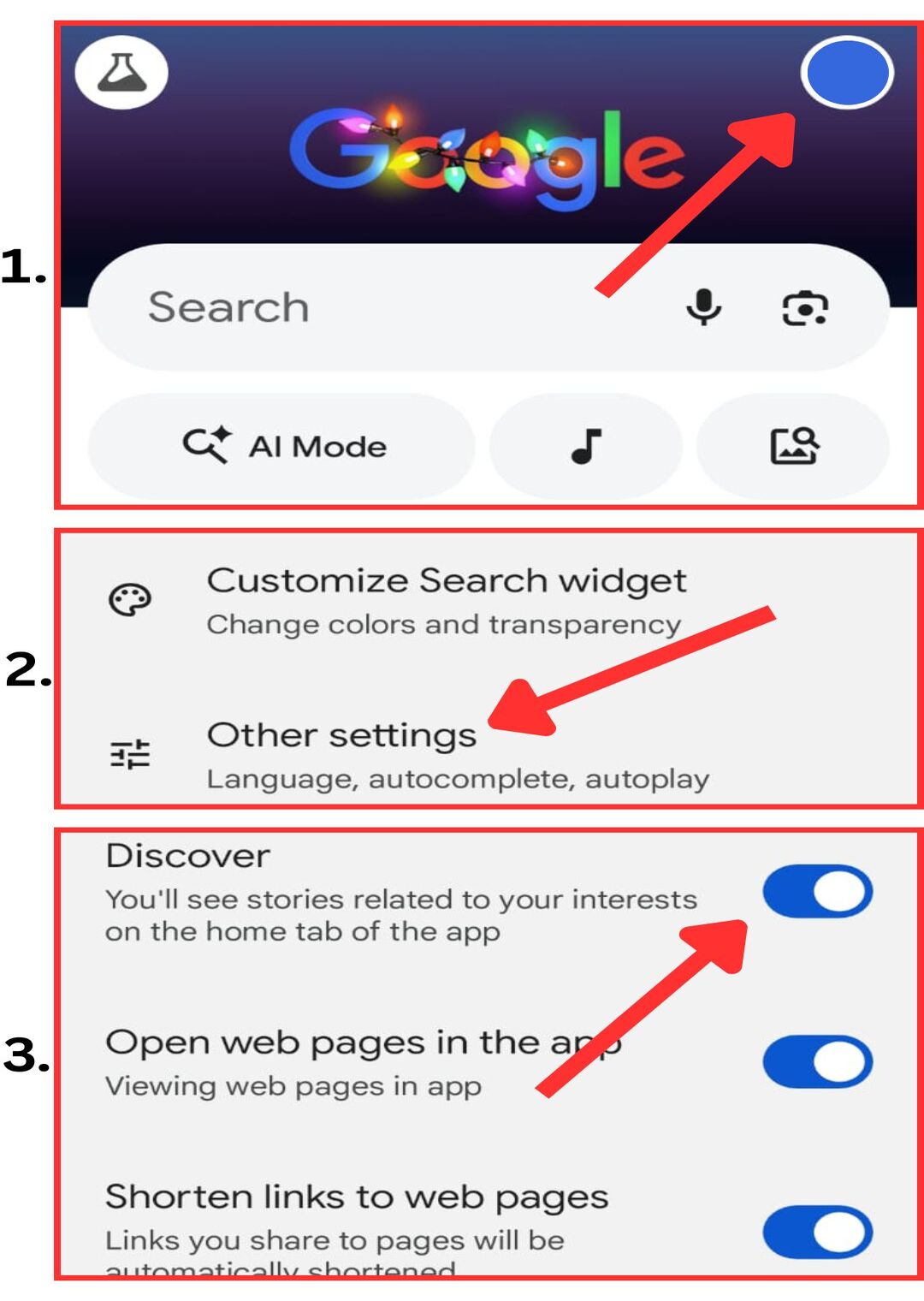
    • First, open the Google app on your phone to access your personalized feed and settings.
    • Next, tap on your profile icon located at the top-right corner of the screen and then go to Settings to manage your account and app preferences.
    • In the Settings menu, scroll down and select Other settings where additional options and features of the app are available.
    • Look for the Discover option within this menu. If it is not enabled, simply tap on it to turn the feature on for your account.
    • Finally, close the Google app completely and restart it.

    2. Clear Cache and Restart Your Phone:

    Clear Cache and Restart Your Phone
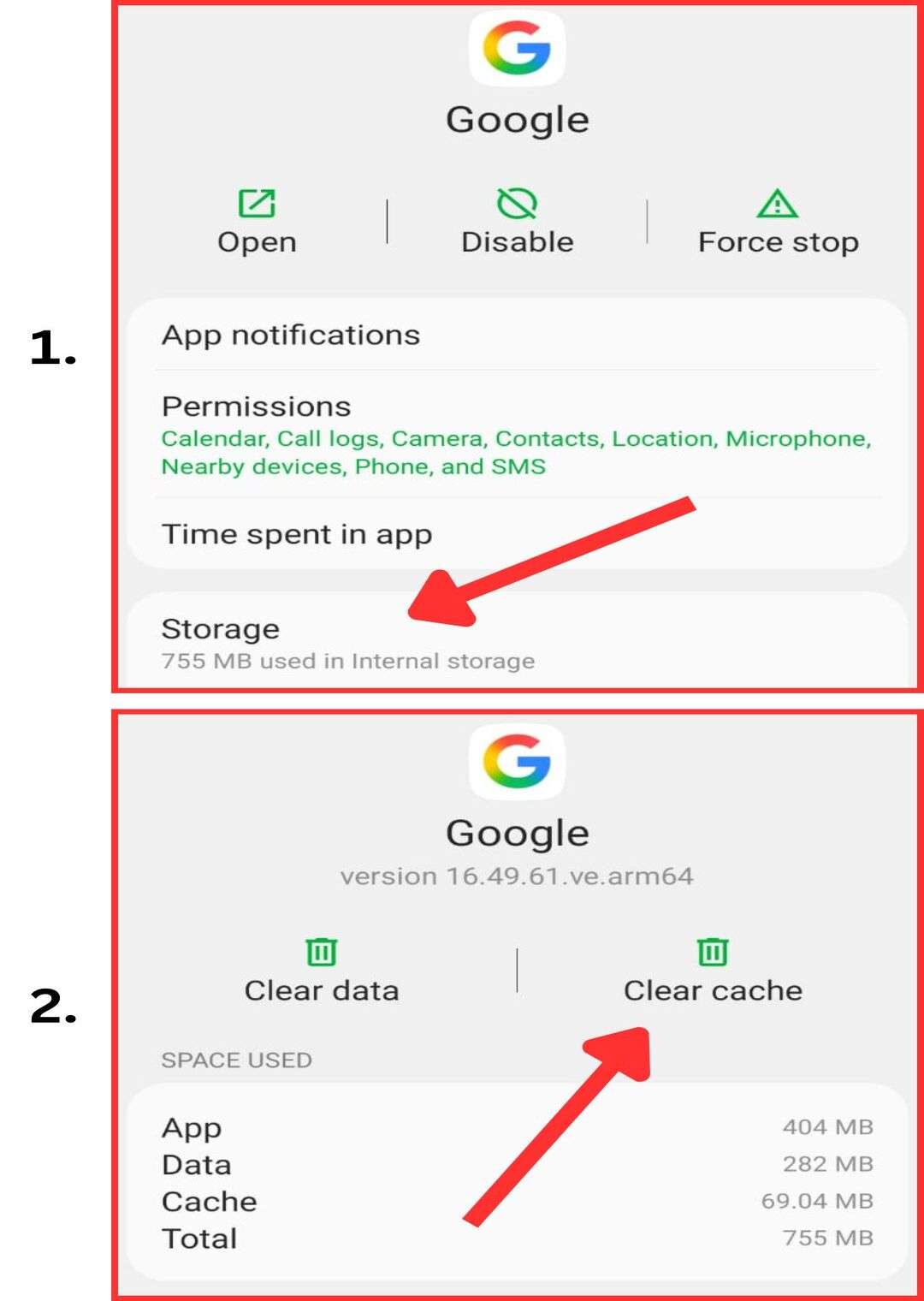
    • Go to your phone’s Settings and open Apps or App Management.
    • Find and select the Google app, then tap on Storage.
    • Clear the cache and data to remove temporary files that may be causing issues.
    • Restart your phone to flush any lingering cache files and refresh system processes.
    • If the issue continues, repeat the cache-clearing process for Google Play Store and Google Play Services, as they also support Discover’s functionality.

    3. Update or Reinstall the Google App:

    Update or Reinstall the Google App
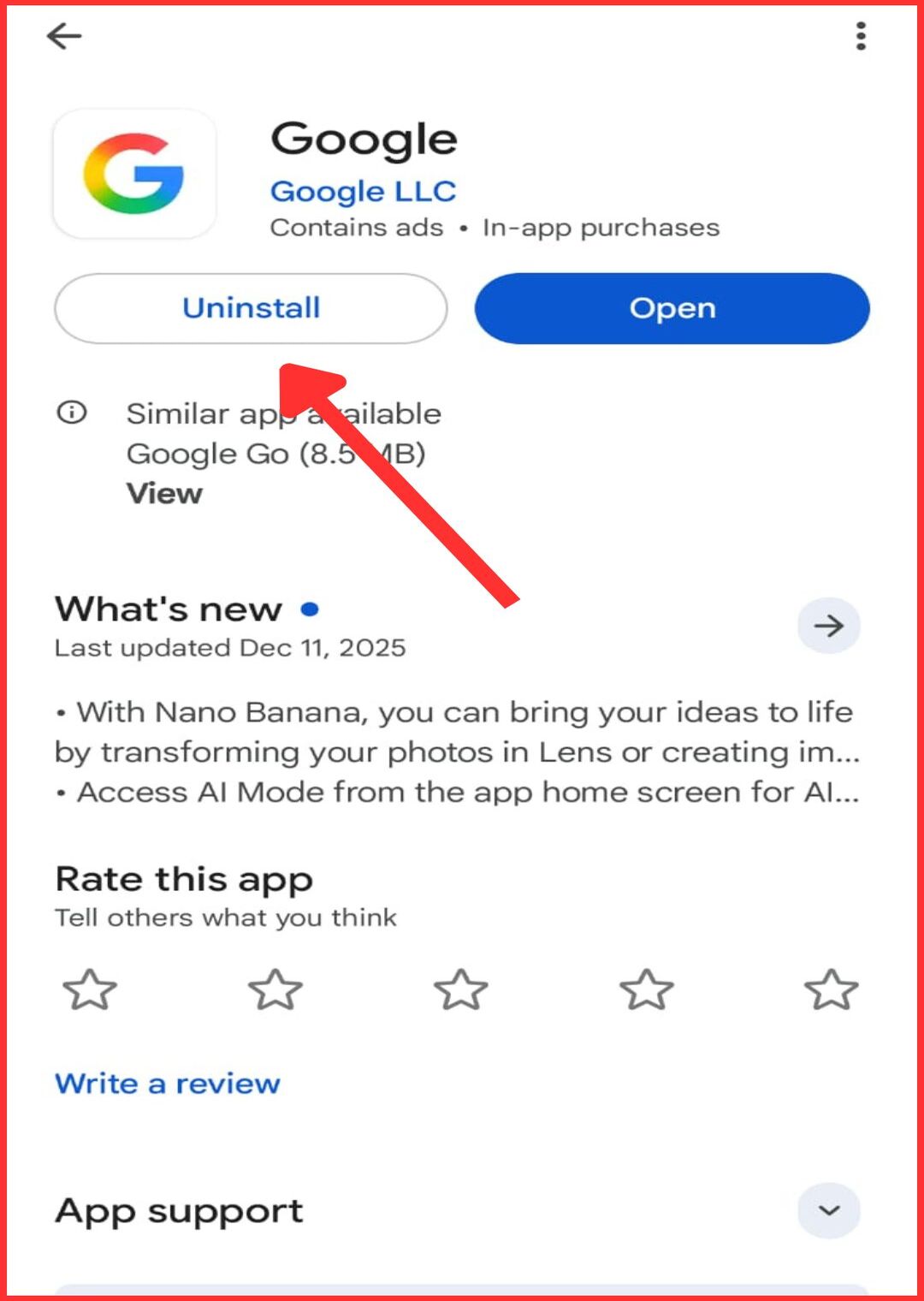
    • Open the Google Play Store on your Android device and search for the Google app.
    • Check if an update is available and install the latest version immediately.
    • Using an outdated Google app can prevent the Discover feature from working properly.
    • If updating does not fix the issue, uninstall the Google app and then reinstall it from the Play Store.
    • Updating or reinstalling ensures better compatibility with your device and resolves bugs caused by system mismatches or outdated code.

    4. Troubleshoot Connection and Sync Issues:

    Troubleshoot Connection and Sync Issues
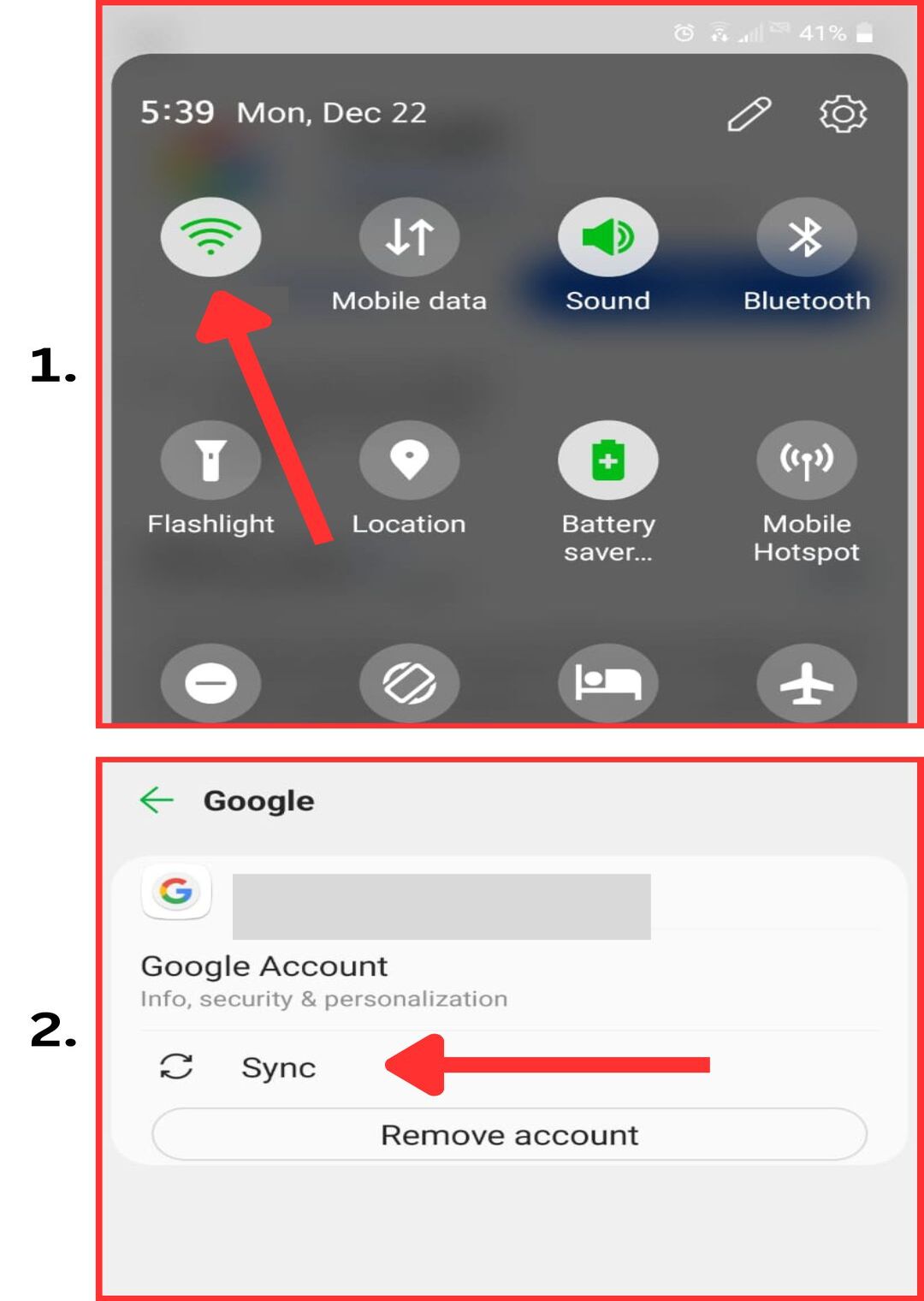
    • Make sure background data is enabled so the Google app can refresh content even when it is not actively open.
    • Check that your phone has a stable internet connection through either mobile data or Wi-Fi.
    • Confirm that your Google account is properly signed in and syncing correctly, as Discover does not work without an active account.
    • Temporarily disable any VPNs, firewalls, or network filters that may be blocking data synchronization.
    • Verify that you are not connected to a restricted network that prevents Google Discover from fetching and displaying content.

    5. Uninstall the Google APP updates:

    Uninstall the Google APP updates
    • Open your phone’s Settings and go to Apps or App Management.
    • Find and select the Google app from the list of installed applications.
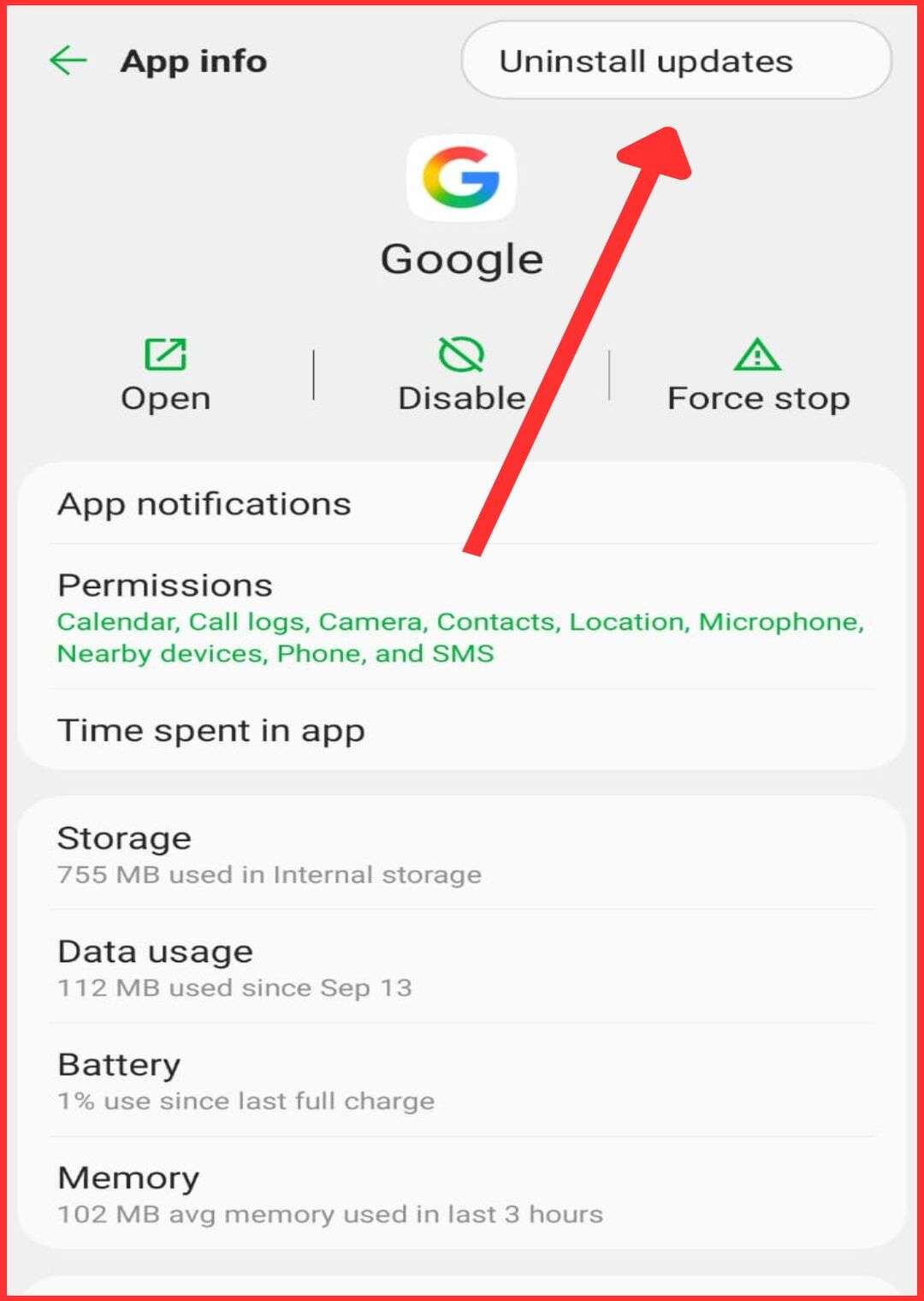
    • Tap on the option to uninstall updates, which will restore the app to its factory version.
    • After uninstalling the updates, open the Google Play Store and update the Google app again.
    • This method is especially useful if the Google Discover feed stopped working after a recent update and other fixes did not resolve the issue.

    Conclusion

    If Google Discover Feed has left your screen blank or endlessly loading, you are not alone. Most of these problems are caused by improper settings, sync errors, or outdated versions of the app. You can usually fix the issue by clearing cache, restarting your device, or reinstalling the app updates. These small adjustments make a big difference in restoring content flow and performance. Regular maintenance helps prevent future disruptions and keeps the feed running smoothly. Now that you’ve seen the most effective fixes, which method worked best for you to solve Google Discover not working on your phone?

    If you’re interested in changing how directions sound, take a look at this guide on switching Google Maps voice.

    FAQs

    1. Is my internet connection affecting Discover?

    A stable internet connection is essential; switch between Wi-Fi and mobile data to test.

    2. Does background data need to be enabled?

    Yes, enabling background data ensures Discover can fetch and update content.

    3. Can a work account interfere with Discover?

    Some work accounts have restrictions; switching to a personal account may help.

    4. How often should I clear cache for optimal performance?

    Clearing cache monthly can prevent issues and maintain app performance.

    5. Can I use Discover without a Google account?

    Discover requires a signed-in Google account to provide personalized content.

  • How to Change Voice on Google Maps? 3 Easy Steps!

    How to Change Voice on Google Maps? 3 Easy Steps!

    how to change voice on google maps

    Many users find the default voice on Google Maps distracting or unclear during turn-by-turn navigation. Changing the voice can improve clarity, enhance focus, and provide a more comfortable driving experience. Whether on an Android device or iPhone, it is easy to access voice settings and select a preferred voice or accent. You can also adjust language settings for better pronunciation of street names. This guide shows how to change voice on Google Maps quickly for smoother, personalized voice navigation.

    Why to Change Google Maps Voice?

    Personalizing Your Navigation Experience:

    Changing the Google Maps voice on your Android phone or iPhone personalizes your navigation experience easily. Besides, using a different voice makes driving directions more comfortable, especially when compared to the default tone in the Google Maps app or similar apps like Apple Maps and Waze.

    Enhancing Clarity and Language Preferences:

    Adjusting the navigation voice and language settings on Google Maps navigation makes directions clearer and easier to follow. Particularly, changing the iPhone language or Android settings ensures that street names and instructions match your understanding, especially when using the Google Assistant voice for assistance.

    Improving Device Compatibility and Performance:

    Updating the Google Maps voice on your Android or iPhone improves app performance and prevents glitches significantly. Moreover, changing voices through navigation settings refreshes the system, ensuring smoother audio output compared to older files, similarly to updates done in apps like Apple Maps and Waze.

    Experimenting with Fun and Functional Voices:

    Selecting a different voice in Google Maps can make your navigation fun and functional concurrently. Surprisingly, using voices from voice selection options or experimenting with voice options available on Android or iOS settings adds excitement and makes long drives with Google Maps navigation more enjoyable.

    How to Change Voice on Google Maps in 3 Easy Steps?

    For Android:

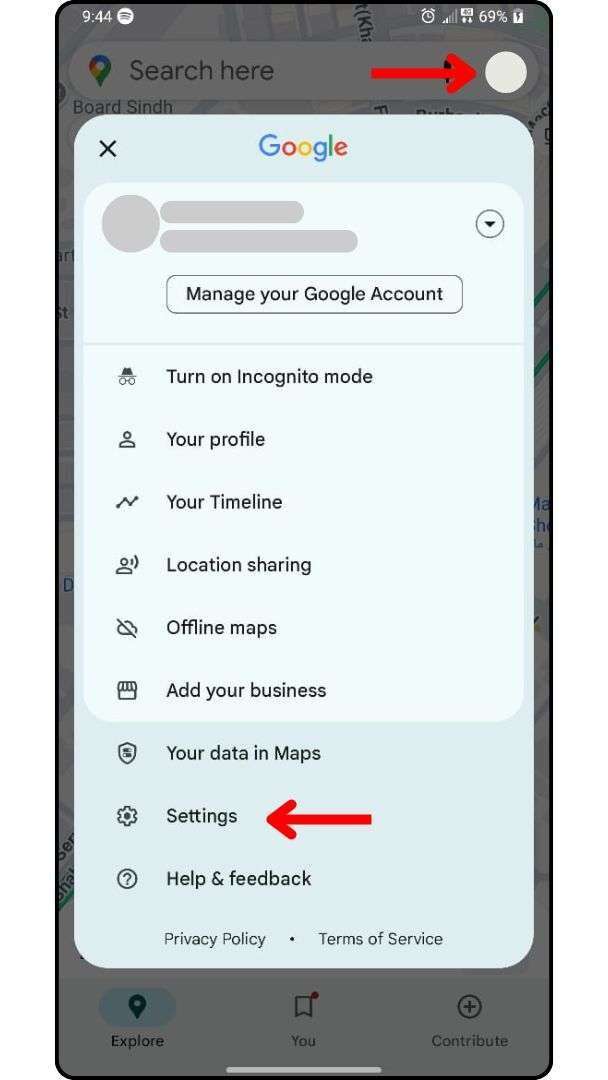
    Step 1: Open Google Maps, tap on your profile icon, and then select Settings.

    Google Maps Voice Setting

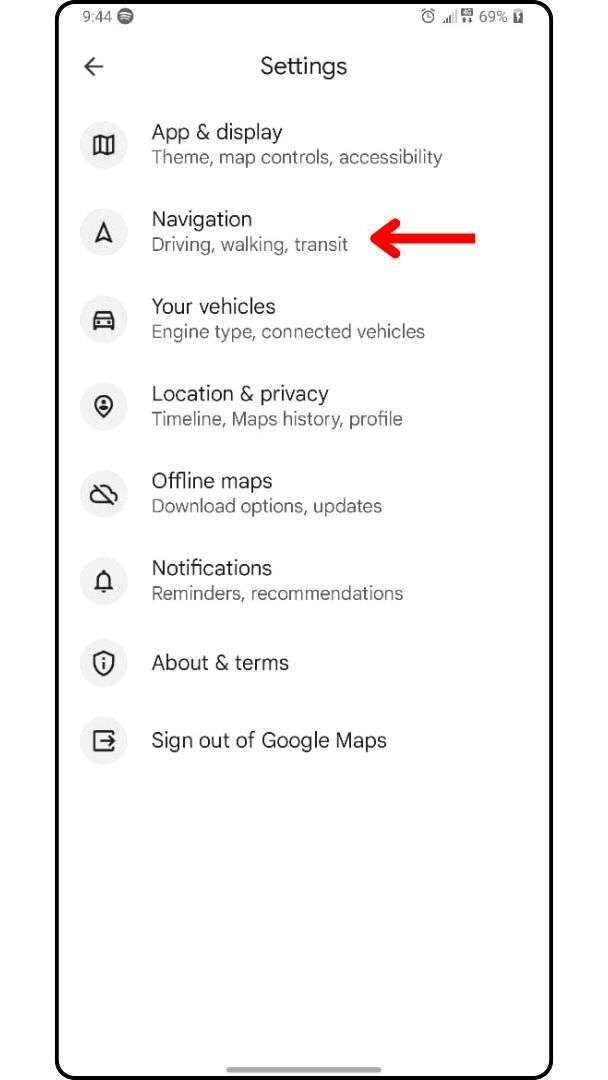
    Step 2: In Settings, click on Navigation.

    Navigation

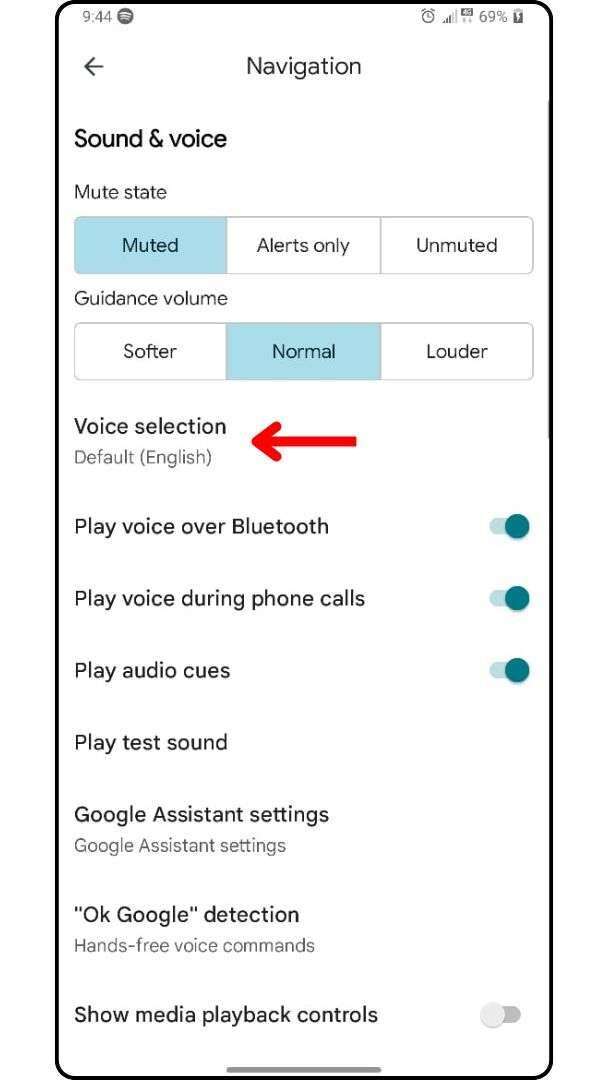
    Step 3: Under the Navigation, click on Voice Selection and choose your suitable voice.

    Voice Selection

    For iPhone:

    Step 1: Open the Google Maps for iPhone and tap the profile icon from the top left corner.

    Step 2: Click on Settings, then go to Navigation settings, and select Voice selection or language in Google Maps.

    Step 3: Choose a preferred voice or different language, and change your voice for a fresh turn-by-turn experience.

    Tips for a Better Voice Navigation Experience

    Here are tips to improve your Google Maps navigation experience significantly:

    • Always update your Google Maps app for the newest voice options and text-to-speech upgrades.
    • Adjust the device language beforehand to make street names sound clearer during trips.
    • Customize the voice settings to select a new voice for a refreshing change of pace.
    • Use Apple Maps instead temporarily if you face difficulties while using Google Maps support.
    • Prefer voices that match your driving conditions like loud, clear voices for highway road trips.

    Troubleshooting Common Issues When Changing Google Maps Voice

    If your change voice on Google Maps settings are not saving, check your default navigation settings immediately. Besides, ensure that Google Maps voice on iPhone or Android is updated to the latest version available. Additionally, change your language or region manually if voice sounds incorrect or distorted after updates. Sometimes Google Assistant voice settings interfere, so modify them directly through the device’s general voice settings menu. If the new voice still does not work, restart your navigation app or reset language in Google Maps.

    Conclusion

    Changing the voice on Google Maps lets users take control of their navigation experience with just a few steps. It is simple to switch from the default voice to a preferred voice with clearer tone or different accent. You can also adjust the device language or modify text-to-speech settings to match your region or personal needs. Android and iOS users can customize voice options to make maps easier to follow during road trips or daily commutes.

    Additionally, you may use Siri to guide your trip or switch to Apple Maps temporarily for testing different voices. Whether you prefer a male or female voice, voice settings in Google Maps allow full control over turn-by-turn directions. So, now that you know how to change voice on Google Maps, will you stick with the default or try something new for better clarity?

    If you’re interested in improving your search experience, you can also check out these tips on using Google advanced image search.

    FAQs

    1. Are there different accents available in Google Maps voice options?

    Yes, voice settings allow users to pick different accents depending on the region and language selected.

    2. What if Google Maps voice is silent or missing?

    Check volume settings, re-enable voice navigation, and verify your device’s audio permissions are active.

    3. Can I use a voice changer with Google Maps directions?

    Google Maps does not support external voice changers, but voice tones can be changed in-app settings.

    4. Is it possible to use Siri voice for Google Maps?

    Yes, iPhone users can set Siri to handle voice navigation by changing the default assistant settings.

    5. Can I switch to Apple Maps if I don’t like Google Maps voice?

    Yes, you can use Apple Maps instead and set it as your default app for navigation and directions.

  • What is Brand Bidding? A Complete Guide

    What is Brand Bidding? A Complete Guide

    What is Brand Bidding

    Many businesses wonder why they lose control over their brand name even in paid search results. Recent studies show that competitors and affiliates often bid aggressively on brand keywords, creating brand confusion and raising CPC. What is Brand Bidding? It is a marketing strategy where advertisers bid on branded search terms to secure top positions. Whether you work with affiliate partners or manage PPC campaigns, protecting your brand name is essential. This complete guide will explain best practices, brand protection strategies, and ethical ways to manage brand bidding effectively.

    What Is Brand Bidding and Why It Matters?

    Brand bidding involves placing a bid on your brand name or brand keywords directly on a search engine like Google to maintain visibility and control your online reputation. Google Ads campaigns that bid on your brand help secure the top spots in search results, especially when customers actively search for your brand. PPC marketers prefer to focus on brand bidding because it ensures dominance on the results page and improves click-through rates significantly.

    Branding partners for Dubai startups can help new companies and startups, especially in competitive markets like the UAE, ensure that their brand bidding strategies align with overall brand identity and market positioning. Indeed, bidding strategies that target brand terms are quite different compared to general keyword strategies used in traditional paid search campaigns.

    How Affiliate Marketing Leverages Brand Bidding

    Affiliate partners often bid on your brand to promote your products while enhancing online brand awareness significantly. Affiliate brand bidding makes sure your brand name and brand keywords dominate the top search results, helping capture more conversions through paid search efforts. Specifically, bidding on brand terms by affiliates can add to your marketing success, but only when done carefully and monitored properly.

    Common practices in affiliate brand bidding include:

    • Setting specific rules for ad creation to maintain consistent branding across search engine results.
    • Controlling landing page content to ensure it accurately reflects your brand name and product promises.
    • Managing bids across different search engine platforms like Google to avoid unnecessary bidding wars that raise costs.
    • Allowing affiliates to bid on brand terms cautiously within your affiliate program policies to protect your brand.
    • Supervising affiliates closely to prevent misuse of your brand keywords and preserve your brand reputation.

    Moreover, bidding on your brand keywords by affiliates can widen your brand ad presence, but without clear oversight, it can unintentionally create internal competition that inflates CPC. Consequently, it is important to implement strict control mechanisms so that affiliate-driven brand bidding complements rather than harms your digital marketing efforts.

    Earlier, many businesses did not monitor affiliate behavior, but now tight brand control is critical for safeguarding product names in competitive markets. Altogether, collaborating with affiliates can strengthen your marketing strategy, provided the agreements explicitly protect your core brand identity.

    Why You Should Bid on Your Brand Name?

    Businesses that bid on your brand name achieve greater brand presence and control over critical user searches. PPC brand bidding prevents competitors from stealing your clicks and damaging your hard-earned brand recognition. Moreover, when affiliates start bidding on your brand terms, conflicts can arise unless you monitor their campaigns carefully.

    Indeed, managing your brand name as a keyword ensures consistency in brand messaging and strengthens your online visibility. Hence, brands must engage in it directly to maintain a strong brand image against growing market competition.

    Effective Brand Bidding Strategies in PPC Campaigns

    Effective Brand Bidding Strategies in PPC Campaigns

    Smart marketers using effective brand bidding techniques optimize their campaigns for maximum conversion and protection. Initially, you must bid on keywords related to your brand terms and prioritize your top-performing brand campaigns accordingly. Furthermore, crafting precise ad copy and matching it with a relevant landing page boosts your brand loyalty significantly.

    Additionally, use anti-brand bidding practices like trademark protection to reduce the chance of brand confusion online. Overall, structured bidding strategies drive better results for both brand defense and marketing expansion. For more ways to strengthen your brand presence, read our full guide on Top Ecommerce Link Building Strategies.

    Bidding on Competitor Brand Terms Ethically

    Companies bidding on competitor brand terms must act cautiously to avoid potential legal issues and penalties. Although you can bid on competitor brand terms, you must never mislead users or damage the competitor’s brand integrity. Explicitly, clear brand messaging and proper disclosure prevent lawsuits linked to false representation in search engine marketing.

    Nevertheless, ethical brand bidding practices still allow businesses to increase exposure while following legal and moral standards. Thus, marketers should pursue competitor targeting without risking brand equity or corporate reputation.

    Common Brand Bidding Practices to Avoid Trademark Infringement

    Protecting your brand from trademark infringement is critical when you allow others to engage in brand bidding. Companies must focus on safe and ethical practices to prevent affiliate abuse and legal problems.

    • Monitor all campaigns to detect brand bidding violations quickly and accurately.
    • Clearly define affiliate terms and conditions around bidding on brand terms and using brand names.
    • Work with affiliate partners who respect your brand presence and avoid unauthorized brand confusion.
    • Implement anti-brand bidding rules into affiliate contracts to safeguard brand equity and brand loyalty.
    • Use brand monitoring software to ensure affiliates bidding practices stay compliant with your standards.
    • Act swiftly if affiliates violate policies to prevent brand reputation damage or trademark infringement.

    Benefits of Brand Bidding for Business Growth

    Brand bidding plays a critical role in strengthening a company’s marketing strategies and driving sustainable business expansion. Properly controlled brand bidding increases visibility, defends market share, and builds customer loyalty over time.

    • Bidding on your brand name increases brand recognition and captures more high-intent user searches.
    • Paid search brand campaigns protect brand messaging and keep competitors from bidding on your brand terms.
    • Engaging in brand bidding improves brand equity by securing top positions across major search engine platforms.
    • PPC brand bidding supports faster brand awareness growth while reducing wasted ad spend on irrelevant traffic.
    • Smart bidding strategies boost brand loyalty and encourage repeat business from loyal existing customers.
    • Managing brand bidding campaigns effectively builds trust and credibility that strengthens long-term customer relationships.

    Preventing Unauthorized Brand Bidding by Affiliates

    Unauthorized affiliate brand bidding can harm your marketing efforts if clear preventive measures are not enforced early. Businesses must protect brand image carefully by setting strict rules and monitoring affiliate activities closely.

    • Create strict affiliate program terms that prohibit bidding on competitor brand terms and brand confusion tactics.
    • Regularly review affiliate bidding activities to detect brand bidding violations early and address them swiftly.
    • Implement brand monitoring tools that track brand name as a keyword across multiple search engine campaigns.
    • Educate affiliates about acceptable bidding practices to protect your brand presence and marketing integrity.
    • Penalize affiliates who violate bidding agreements to maintain control over how your brand is represented.
    • Work with affiliate partners who respect brand messaging and help uphold your digital marketing reputation.

    Tips for Creating Effective Brand Bidding Ads

    Creating powerful brand bidding ads requires strategic focus to capture attention and convert high-intent searchers effectively. Well-optimized brand ads support stronger brand image, better conversion rates, and a dominant presence in search results.

    • Use your brand name clearly in both ad headlines and descriptions to build stronger brand recognition.
    • Write compelling ad copy that emphasizes key product features, unique selling points, and brand value propositions.
    • Ensure your landing page experience is consistent with brand campaigns to avoid brand confusion or user drop-off.
    • Optimize brand ad extensions like sitelinks, callouts, and structured snippets to enhance brand presence visibly.
    • A/B test ad variations regularly to determine which messages generate higher CTR and better overall results.
    • Monitor competitor campaigns to adjust your own bidding strategies for brand protection and visibility.

    Managing Affiliate and Direct Brand Bid Conflicts

    Direct conflicts arise when affiliate marketing partners unintentionally compete against your main brand bidding campaigns in auctions. Hence, brands must supervise affiliates bidding activities regularly to avoid cannibalizing primary campaigns or raising overall CPC rates. Although some brands allow affiliates to bid on brand terms, strict enforcement policies prevent accidental harm to brand recognition.

    Clear affiliate terms and conditions are necessary for maintaining harmony between direct marketing and third-party promotions. Managing this balance fortifies brand equity and secures consistent top rankings in critical user searches.

    Conclusion

    What is Brand Bidding becomes a critical discussion when businesses try to protect brand loyalty and digital presence. Without strong brand bidding strategies, competitors can easily capture your customers and distort your brand messaging. Smart bidding on brand terms offers control, visibility, and prevents unauthorized affiliates from harming brand reputation. Effective PPC brand bidding campaigns reinforce brand equity and improve marketing ROI significantly over time. Now that you understand the essentials of brand bidding, how do you plan to safeguard your brand in search engines?

    FAQs

    1. Is brand bidding legal?

    Yes, brand bidding is legal; however, misuse can lead to trademark infringement or brand confusion issues.

    2. Can competitors bid on my brand keywords?

    Competitors can bid on your brand keywords unless restricted by trademark policies or specific platform regulations.

    3. How do I stop affiliates from brand bidding?

    Implement clear affiliate terms, utilize brand monitoring tools, and enforce contractual agreements to prevent unauthorized brand bidding.

    4. How do I detect unauthorized brand bidding?

    Use brand monitoring platforms to track search engine results and identify unauthorized use of your brand keywords.

    5. What happens if I don’t bid on my brand?

    Not bidding on your brand can allow competitors or affiliates to dominate search results, potentially harming your brand reputation.

  • 100+ Best Quality Over Quantity Quotes

    100+ Best Quality Over Quantity Quotes

    Quality Over Quantity Quotes

    Quality over quantity quotes remind us that having more does not always mean having better. Often, it’s the fewer but meaningful choices that bring real value. That rarely proves true. People invest time collecting things, friendships, and even achievements. Yet they miss what’s meaningful and intentional. 

    “Deeper friendships contribute more to mental well-being than large social circles.”

    That’s a major insight. Steve Jobs famously believed that doing less with precision creates the best quality work anyone can offer. This guide brings you a carefully selected collection of quotes. These lines prioritize quality over quantity beautifully. You will find and save ideas that support a shift in mindset, one based on clarity and purpose. These quality over quantity quotes will motivate you to value depth, connection, and thoughtful decisions in all areas. From building friendships to choosing what to invest in, the right mindset always leads to happiness and peace.

    Why Quality Over Quantity Always Wins

    “Quality over quantity” is not just a phrase, it is a mindset that elevates every decision. Whether building friendships, designing your best work, or choosing what to invest in, fewer but richer experiences always offer deeper value. Pinterest’s best ideas and inspiration often celebrate clarity, intention, and meaningful choices that reflect a smarter life. When you prioritize quality, you empower a life rooted in connection, not noise. It is about choosing what truly matters and letting go of what does not. Consequently, you live more intelligently, with efficiency and intention guiding each purchase and every relationship.

    The Importance of Fewer, Better Things:

    Pinterest’s best ideas often showcase quality over quantity quotes that inspire clarity and intentional living. You will frequently find and save ideas that say it is better to have fewer things with deeper meaning. Quotes emphasizing quality over quantity quotes also reflect the value of intelligent decisions and minimalist priorities. Rather than amassing more, many prefer fewer, efficient tools or connections. These quotes underline the happiness found in simplicity. Quality over quantity quotes challenge the mindset of excess, encouraging you to value one authentic friendship over ten empty ones. These shared words shift your focus toward what truly matters.

    The Role of Excellence in Intelligent Living:

    Living intelligently means prioritizing excellence over excess, even if it results in fewer outcomes or slower progress. Jim Rohn and Steve Jobs both advocated quality control in life’s work and choices. Instead of spreading yourself thin, focus on one meaningful project that empowers real impact. Intelligent people do not chase everything, they choose what deserves their attention and energy. Albeit slower at times, that mindset leads to the best quality outcomes. Smart living values purpose over performance numbers. Correspondingly, it allows space for depth, reflection, and authentic connection. Therefore, excellence becomes a habit, not a rare exception. That’s intentional, not accidental.

    How Intention Shapes What Truly Matters:

    Intention sets the direction for everything you create, buy, or build, especially when you prioritize quality. People with clarity of purpose often experience more happiness and achieve more meaningful results. Instead of chasing quantity over quality, they invest in what truly matters, whether that’s one great idea or one strong tribe. When you live with intention, you start to see that fewer distractions bring more peace. You’d rather have one friend who empowers you than many who don’t care. Eventually, your mindset shifts to creating your best work with fewer distractions and more clarity. That’s how you elevate your life smartly.

    100+ Best Quality Over Quantity Quotes

    Timeless Quotes Emphasizing Quality Over Quantity:

    These timeless expressions reflect wisdom, inspire clarity, and remind us that excellence is always more important than quantity.

    1. “Quality means doing it right when no one is looking.” – Henry Ford
    2. “It is quality rather than quantity that matters.” – Lucius Annaeus Seneca
    3. “The best things in life are not things.” – Art Buchwald
    4. “Quality is never an accident. It is always the result of intelligent effort.” – John Ruskin
    5. “Be a yardstick of quality.” – Steve Jobs
    6. “Simplicity is the ultimate sophistication.” – Leonardo da Vinci
    7. “Quality over quantity – it’s about time you stop counting things and start making things count.” – Anonymous
    8. “One loyal friend is worth ten thousand relatives.” – Euripides
    9. “The ability to simplify means to eliminate the unnecessary so that the necessary may speak.” – Hans Hofmann
    10. “It is better to be alone than in bad company.” – George Washington
    11. “Perfection is not attainable, but if we chase perfection, we can catch excellence.” – Vince Lombardi
    12. “Don’t count the things you do, do the things that count.” – Zig Ziglar
    13. “The things that matter most should never be at the mercy of things which matter least.” – Goethe
    14. “Excellence is not a skill, it’s an attitude.” – Ralph Marston
    15. “Measure what is measurable, and make measurable what is not so.” – Galileo Galilei
    16. “Quality begins on the inside… then works its way out.” – Bob Moawad
    17. “You can’t do a good job if your job is all you do.” – Anonymous
    18. “Good design is as little design as possible.” – Dieter Rams
    19. “Quality is remembered long after the price is forgotten.” – Aldo Gucci
    20. “Clarity is the counterbalance of profound thoughts.” – Luc de Clapiers
    21. “The bitterness of poor quality remains long after the sweetness of low price is forgotten.” – Benjamin Franklin
    22. “Invest in things that make your soul shine.” – Anonymous
    23. “True efficiency is choosing the right thing to do, not doing more of everything.” – Jim Rohn
    24. “Create with the heart; build with the mind.” – Criss Jami
    25. “Choose quality. Always.” – Unknown

    Quality Not Quantity in Friendships and Relationships:

    These quotes emphasize why a strong connection often matters more than how many people you know.

    1. “It is not the number of friends, but the quality of friends that counts.” — Charles R. Swindoll
    2. “I would rather have one friend who calls me at 3 AM than a hundred who don’t.” — Unknown
    3. “True friendship is seen through the heart, not through the eyes.” — Friedrich Nietzsche
    4. “The best mirror is an old friend.” — George Herbert
    5. “Lots of people want to ride with you in the limo, but true friends take the bus.” — Oprah Winfrey
    6. “One loyal friend is worth ten thousand relatives.” — Euripides
    7. “A friend to all is a friend to none.” — Aristotle
    8. “Friendship isn’t about whom you’ve known the longest. It’s about who walked in and stayed.” — Unknown
    9. “The only way to have a friend is to be one.” — Ralph Waldo Emerson
    10. “Friends are the siblings God never gave us.” — Mencius
    11. “There are no strangers here; Only friends you haven’t yet met.” — William Butler Yeats
    12. “True friendship comes when the silence between two people is comfortable.” — David Tyson
    13. “Good friends are like stars. You don’t always see them, but they’re always there.” — Christy Evans
    14. “Real friendship is when your friend comes over to your house and then you both just take a nap.” — Unknown
    15. “The most beautiful discovery true friends make is that they can grow separately without growing apart.” — Elisabeth Foley
    16. “Friendship multiplies the good of life and divides the evil.” — Baltasar Gracián
    17. “A true friend never gets in your way unless you happen to be going down.” — Arnold H. Glasow
    18. “Friendship is born at that moment when one person says to another: ‘What! You too?’” — C.S. Lewis
    19. “Friendship is a single soul dwelling in two bodies.” — Aristotle
    20. “It is one of the blessings of old friends that you can afford to be stupid with them.” — Ralph Waldo Emerson
    21. “A single rose can be my garden… a single friend, my world.” — Leo Buscaglia
    22. “A good friend is like a four-leaf clover; hard to find and lucky to have.” — Irish Proverb
    23. “No road is long with good company.” — Turkish Proverb
    24. “True friends are always together in spirit.” — L.M. Montgomery
    25. “Friendship is always a sweet responsibility, never an opportunity.” — Khalil Gibran

    Best Quality Quotes for Everyday Inspiration:

    These quotes reflect the best quality of thoughts that promote inspiration, intention, and quality not quantity living. Whether it’s work, personal growth, or lifestyle, these quotes highlight clarity, excellence, and the value of living meaningfully.

    1. “Quality means doing it right when no one is looking.” — Henry Ford
    2. “Be a yardstick of quality. Some people aren’t used to an environment where excellence is expected.” — Steve Jobs
    3. “Quality is never an accident; it is always the result of intelligent effort.” — John Ruskin
    4. “The bitterness of poor quality remains long after the sweetness of low price is forgotten.” — Benjamin Franklin
    5. “Strive not to be a success, but rather to be of value.” — Albert Einstein
    6. “Excellence is not a skill, it’s an attitude.” — Ralph Marston
    7. “Don’t count the things you do, do the things that count.” — Zig Ziglar
    8. “Simplicity is the ultimate sophistication.” — Leonardo da Vinci
    9. “It’s not the load that breaks you down, it’s the way you carry it.” — Lou Holtz
    10. “The essence of strategy is choosing what not to do.” — Michael Porter
    11. “You can do anything, but not everything.” — David Allen
    12. “Do it with passion or not at all.” — Rosa Nouchette Carey
    13. “Quality is more important than quantity. One home run is much better than two doubles.” — Steve Jobs
    14. “Perfection is not attainable, but if we chase perfection we can catch excellence.” — Vince Lombardi
    15. “Being busy is not the same as being productive.” — Robin Sharma
    16. “Ordinary people think merely of spending time, great people think of using it.” — Arthur Schopenhauer
    17. “Wisdom is the reward you get for a lifetime of listening when you’d have preferred to talk.” — Doug Larson
    18. “Success usually comes to those who are too busy to be looking for it.” — Henry David Thoreau
    19. “Don’t mistake activity with achievement.” — John Wooden
    20. “Focus on being productive instead of busy.” — Tim Ferriss
    21. “Less but better.” — Dieter Rams
    22. “Efficiency is doing better what is already being done.” — Peter Drucker
    23. “It is not the strongest of the species that survive, but the most adaptable.” — Charles Darwin
    24. “If you chase two rabbits, you catch none.” — Russian Proverb
    25. “Excellence is doing ordinary things extraordinarily well.” — John W. Gardner

    Inspirational Quotes to Prioritize What Matters:

    These inspiring quality over quantity quotes help you recognize the value of intention, mindset, and doing your best work. Each quote urges you to prioritize what truly matters, even if that means choosing fewer things with deeper meaning.

    1. “Things which matter most must never be at the mercy of things which matter least.” — Johann Wolfgang von Goethe
    2. “You have to decide what your highest priorities are and have the courage to say no.” — Stephen R. Covey
    3. “What you do every day matters more than what you do once in a while.” — Gretchen Rubin
    4. “Energy flows where attention goes.” — Tony Robbins
    5. “If you want to make an easy job seem mighty hard, just keep putting off doing it.” — Olin Miller
    6. “It’s not hard to make decisions when you know what your values are.” — Roy Disney
    7. “Don’t be busy, be productive.” — Unknown
    8. “Happiness is not having what you want. It is appreciating what you have.” — Unknown
    9. “Do more things that make you forget to check your phone.” — Unknown
    10. “Focus on what matters and let go of what doesn’t.” — Unknown
    11. “The key is not to prioritize what’s on your schedule but to schedule your priorities.” — Stephen R. Covey
    12. “He who is not courageous enough to take risks will accomplish nothing in life.” — Muhammad Ali
    13. “Discipline is choosing between what you want now and what you want most.” — Abraham Lincoln
    14. “You can’t do a good job if your job is all you do.” — Katie Thurmes
    15. “What we think, we become.” — Buddha
    16. “Your future is created by what you do today, not tomorrow.” — Robert Kiyosaki
    17. “Success is liking yourself, liking what you do, and liking how you do it.” — Maya Angelou
    18. “A meaningful life is not being rich, being popular, being highly educated or being perfect.” — Unknown
    19. “Life is really simple, but we insist on making it complicated.” — Confucius
    20. “When you stop chasing the wrong things, you give the right things a chance to catch you.” — Lolly Daskal
    21. “If it costs you your peace, it’s too expensive.” — Unknown
    22. “Don’t let the noise of others’ opinions drown out your own inner voice.” — Steve Jobs
    23. “Slow down and everything you are chasing will come around and catch you.” — John De Paola
    24. “Nothing is more important than reconnecting with your bliss.” — Deepak Chopra
    25. “Sometimes the smallest things take up the most room in your heart.” — A.A. Milne

    Quality Control of the Mind and Life:

    Quality control is not just for products, it also applies to your mindset, habits, and daily choices. These quotes reflect how to elevate your life by staying selective and being efficient with what you allow in.

    1. “Your mind is a garden. Your thoughts are the seeds. You can grow flowers or weeds.” — William Wordsworth
    2. “You are what you think. All that you are arises from your thoughts.” — Buddha
    3. “Rule your mind or it will rule you.” — Horace
    4. “Self-control is strength. Right thought is mastery. Calmness is power.” — James Allen
    5. “Happiness depends upon ourselves.” — Aristotle
    6. “You must be the master of your own destiny.” — Napoleon Hill
    7. “The soul becomes dyed with the color of its thoughts.” — Marcus Aurelius
    8. “You can’t stop the waves, but you can learn to surf.” — Jon Kabat-Zinn
    9. “Don’t believe everything you think.” — Unknown
    10. “The mind is everything. What you think you become.” — Buddha
    11. “The best way out is always through.” — Robert Frost
    12. “It’s not the daily increase but daily decrease. Hack away at the unessential.” — Bruce Lee
    13. “The quieter you become, the more you can hear.” — Ram Dass
    14. “Clarity precedes success.” — Robin Sharma
    15. “The greatest weapon against stress is our ability to choose one thought over another.” — William James
    16. “Guard your thoughts and you guard your life.” — Unknown
    17. “You become what you consume.” — Unknown
    18. “Sometimes, removing things is more powerful than adding more.” — Unknown
    19. “The mind reflects the quality of what you feed it.” — Unknown
    20. “It is not what we do occasionally that shapes our lives but what we do consistently.” — Tony Robbins
    21. “Success is nothing more than a few simple disciplines, practiced every day.” — Jim Rohn
    22. “Discipline your mind and others will not need to.” — Unknown
    23. “Energy and persistence conquer all things.” — Benjamin Franklin
    24. “Mental clarity means physical mastery.” — Unknown
    25. “Fewer distractions mean greater clarity, and with clarity comes purpose.” — Unknown

    Final Thoughts on Why Quality Is More Important Than Quantity

    Undoubtedly, quality not quantity, is a principle that holds enduring value across all aspects of life. Whether you are building friendship, creating your best work, or choosing what to prioritize, depth always beats excess. A strong connection formed with intention lasts longer than countless surface-level interactions.

    As Steve Jobs once emphasized, doing fewer things well leads to true excellence. You would rather have one meaningful relationship than dozens that lack substance. Quotes emphasizing quality over quantity continue to inspire better choices. So, instead of collecting more, focus on what truly matters; this mindset leads to lasting happiness and clarity.