Category: Marketing

  • How Long Does TikTok Shop Take to Ship?

    How Long Does TikTok Shop Take to Ship?

    How Long Does TikTok Shop Take to Ship

    Waiting weeks for an online order with no update is enough to ruin anyone’s shopping excitement. Many shoppers now ask, How Long Does TikTok Shop Take to Ship?, especially with the app’s growing popularity. Unlike Amazon’s two-day model, TikTok’s shipping varies by seller, method, and fulfillment partner. Some sellers handle orders themselves, while others trust TikTok Shop’s in-house system. TikTok does offer tracking, but delays still frustrate users. To help you shop confidently and avoid confusion, this guide explains every shipping method and timing in detail. That way, you’ll know what to expect before you buy.

    What Influences TikTok Shop Shipping Time

    TikTok Shop shipping time depends chiefly on factors like seller location, order volume, and shipping method. Some sellers on TikTok may use local couriers, while others ship from overseas warehouses. Additionally, shipping carriers selected by each store affect the overall delivery process. Buyers should also consider whether the product qualifies for free shipping or a faster shipping option.

    TikTok Shop items processed on weekends may face delays due to non-business days. Likewise, holiday seasons or flash sales can significantly slow the shipping process. Therefore, always check the order details and estimated delivery time before making a purchase.

    How Long Does TikTok Shop Take to Ship?

    Generally, TikTok Shop orders take 2 to 5 business days to ship within the same country. However, this timeline may vary depending on the shipping service and location of the seller. If you’re wondering how long does TikTok Shop take to ship, the answer often depends on how quickly the seller processes the order after payment. Buyers placing multiple TikTok Shop orders from different sellers might receive deliveries on separate dates. Although most shipments follow a standard timeframe, delays can happen due to carrier issues or customs. So, always verify shipping time and method chosen at checkout to estimate how long it takes to deliver.

    Typical TikTok Shop Delivery Time:

    Most orders from TikTok Shop arrive in 4 to 9 business days, depending on your region and shipping method.

    International Delivery Time for TikTok Orders:

    International orders from TikTok Shop usually take 7 to 21 business days based on customs and courier speed.

    Track TikTok Shop Orders:

    TikTok provides authentic tracking details under your order history using verified shipping carriers like YunExpress or DHL.

    Factors That Affect TikTok Shop Shipping Time

    TikTok shipping time varies significantly based on several critical elements that influence each transaction’s outcome. Sellers on TikTok Shop may use different carriers, and each shipping method determines how fast items arrive. 

    Additionally, TikTok global shipping depends heavily on logistics coordination, especially for cross-border sellers with slower fulfillment processes. Items on TikTok Shop may also experience delays when demand peaks during viral product trends or seasonal spikes. 

    Seller Location and Shipping Method:

    How long TikTok Shop orders take depends largely on the seller’s location and the selected shipping method, as items on TikTok Shop shipped locally tend to arrive faster, whereas TikTok global shipping often extends the wait time. Sellers on TikTok Shop typically offer either standard shipping or express shipping, depending on their logistics setup and whether built-in shipping label creation is enabled for smoother fulfillment.

    Business Days vs. Calendar Days:

    TikTok Shop to deliver typically takes 2 business days or more, as delivery time for TikTok Shop orders excludes weekends and recognized holidays. Shipping and delivery estimates are calculated in business days, not calendar days, which many users misunderstand. Always check the estimated delivery window before placing TikTok orders, especially when sellers offer free shipping or discounted shipping fees, to avoid timing issues.

    TikTok Shop Shipping Delays:

    Shipping delayed notifications often occur when TikTok shipping work is interrupted due to carrier delays, backlogs, or seller-side inaction. Although standard shipping generally takes 2–5 business days, TikTok Shop’s delivery times vary widely depending on how the product is shipped and fulfilled. Tracking your TikTok Shop order provides real-time updates, especially helpful when stuff takes longer than usual to ship or arrive due to unexpected delays.

    TikTok Shop Shipping Methods

    Conclusion

    If you’ve ever questioned How Long Does TikTok Shop Take to Ship?, you’re definitely not alone. While some products ship quickly with TikTok’s fulfillment, others rely on slower seller-handled shipping. Timing depends on shipping labels, seller location, and whether tracking is available. Despite varying speeds, buyers continue to trust TikTok Shop due to transparency, deals, and growing reliability. Knowing the expected delivery window prevents disappointment and makes your checkout decisions smarter. This guide outlines every available method so your TikTok shopping experience feels safer and more predictable. Have you experienced fast or delayed shipping on TikTok Shop lately? Let us know below!

    FAQs

    1. Can TikTok Shop ship internationally?

    Some sellers offer international shipping, but delivery times vary by region and shipping provider.

    2. What happens if my TikTok order never arrives?

    You can request a refund or open a dispute directly through your TikTok Shop account.

    3. Are express shipping options available on TikTok Shop?

    Yes, select sellers offer UPS, FedEx, or priority shipping that delivers in 1–3 business days.

    4. How do I know which shipping method was used?

    Check the order details section or your shipping confirmation for the selected shipping method.

    5. Does TikTok Shop have a guaranteed delivery date?

    No, TikTok Shop doesn’t guarantee delivery dates—even for express or TikTok-fulfilled orders.

  • How to Block Someone on TikTok? Easy Steps to Follow

    How to Block Someone on TikTok? Easy Steps to Follow

    How to Block Someone on TikTok

    If unwanted users constantly bother you on TikTok, it becomes exhausting to ignore or tolerate negativity. Many users search for ways to block someone on TikTok quickly and discreetly. You can learn how to block someone on TikTok easily with a simple process. This 2025 guide outlines steps using TikTok’s block feature from the user’s profile or comment sections. You’ll also learn how blocking users on TikTok affects their ability to view your profile or interact with content. The complete easy steps guide below in the article.

    What Happens When You Block Users on TikTok?

    When you block someone on TikTok, that user can no longer view your TikTok profile. Additionally, they can’t comment on your videos or interact with any new content you post. Blocked accounts won’t show in your follower count, nor will they see your activities. Moreover, their previous likes or multiple comments might disappear from your TikTok video posts. Users on TikTok who are blocked are silently removed from your online presence. Consequently, they can’t message or tag you either. Blocking on TikTok is a private action, so the blocked user isn’t notified at any point.

    How to Block Someone on TikTok? Easy Steps to Follow

    If you want to block a TikTok user who keeps showing up in your comment sections or sends repeated messages, learning how to block someone on TikTok is essential. The platform makes it simple to block users directly from their TikTok profile or through activity on a TikTok video. Whether you’re dealing with unwanted attention or just managing your blocked accounts, this step-by-step guide will help you take full control while using TikTok in 2025.

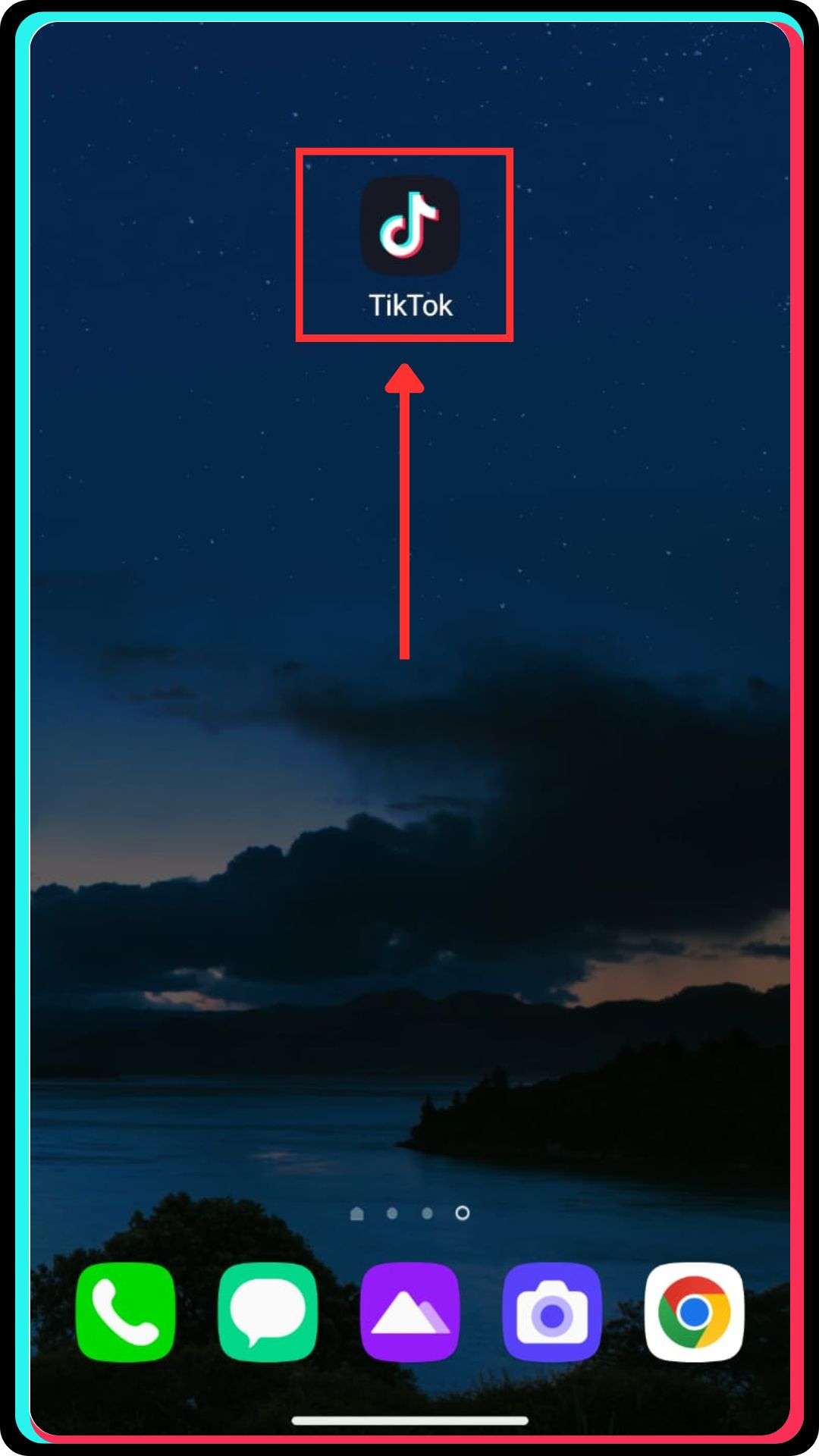
    Step 1: Open the TikTok App

    Open the TikTok App
    • Open the TikTok app using your mobile device.
    • Ensure you’re signed into the correct TikTok account.

    Step 2: Locate the TikTok User

    Locate the TikTok User
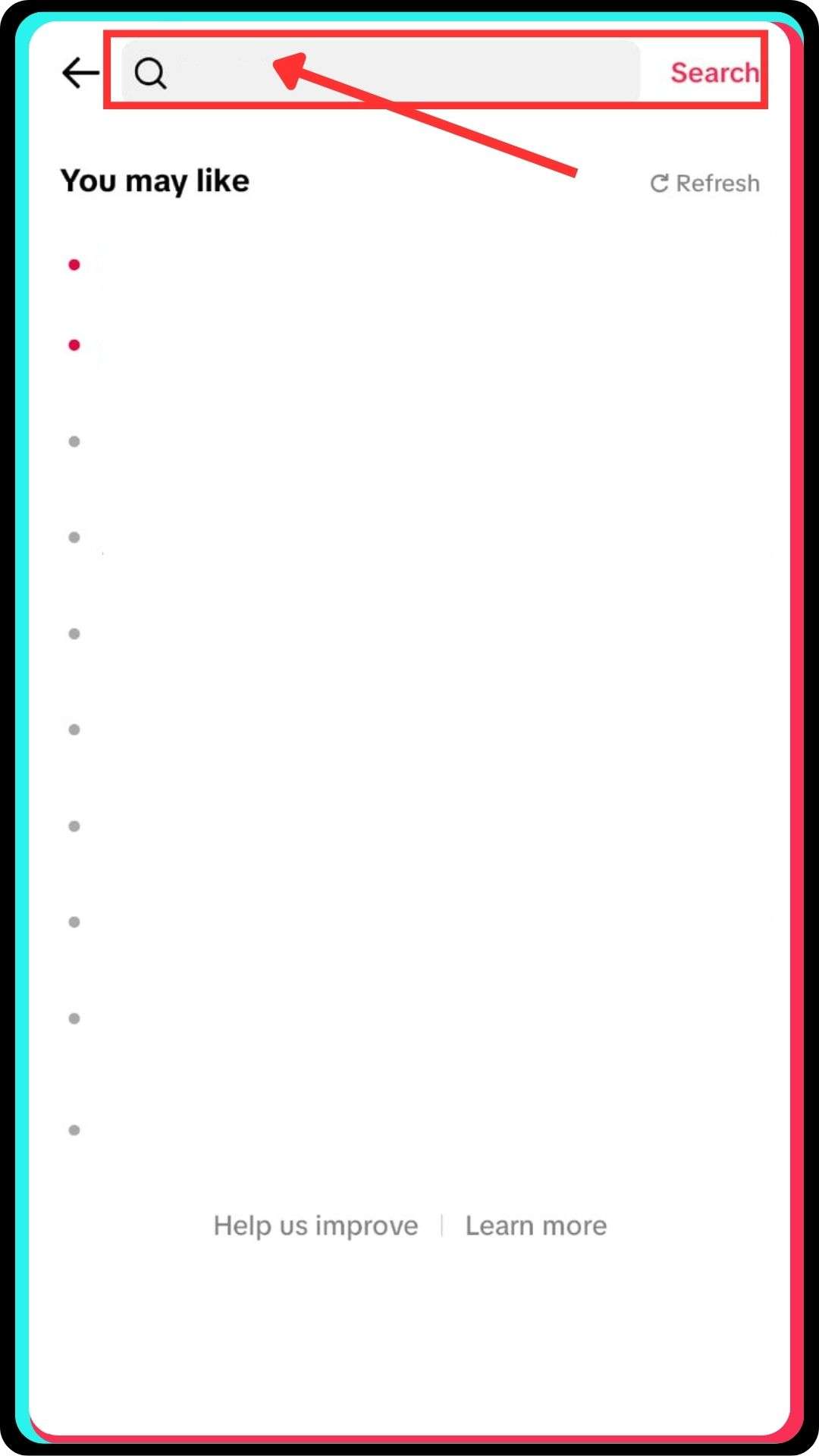
    Use the search bar to find the TikTok user
    • Use the search bar to find the TikTok user you want to block.
    • Alternatively, tap their username from a TikTok video or multiple comments.

    Step 3: Visit Their Profile Page

    Visit Their Profile Page
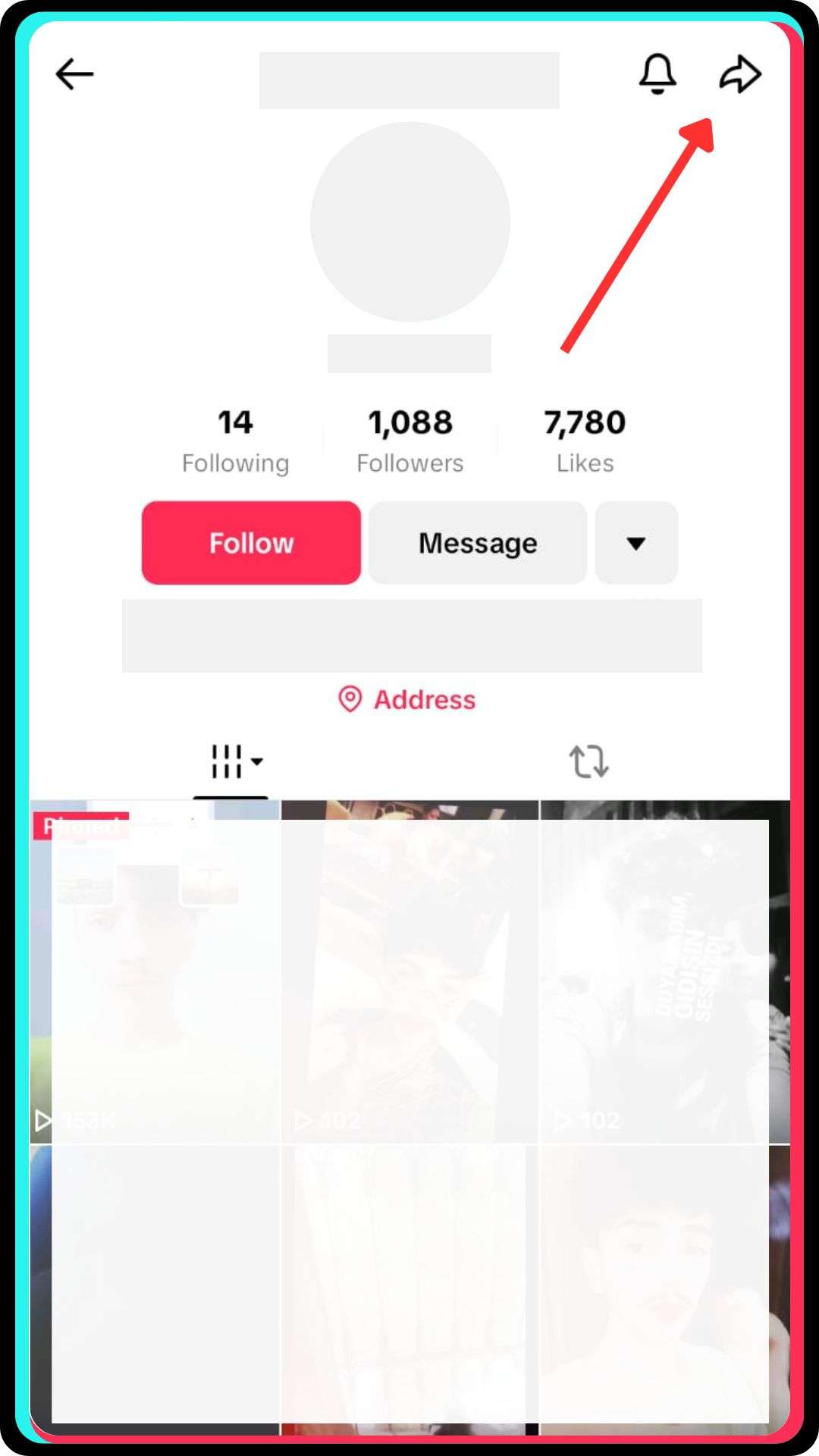
    • Tap their name to go to their TikTok profile.
    • Then tap the share icon in the top right corner.

    Step 4: Block the User

    Block the User
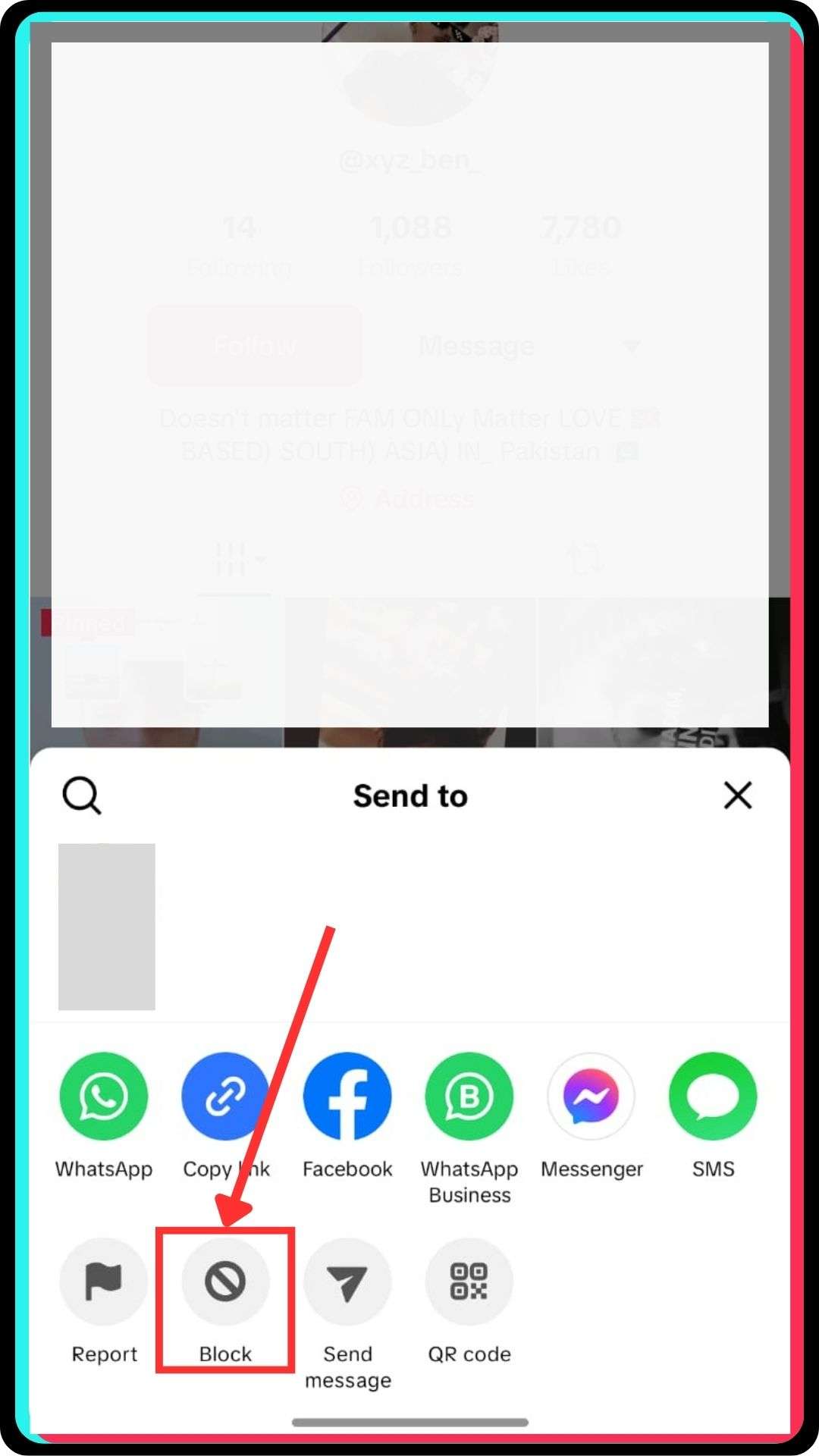
    • Select “Block” from the list that appears.
    • Confirm your action to move them to your blocked list.

    See Blocked Accounts on TikTok

    See Blocked Accounts on TikTok

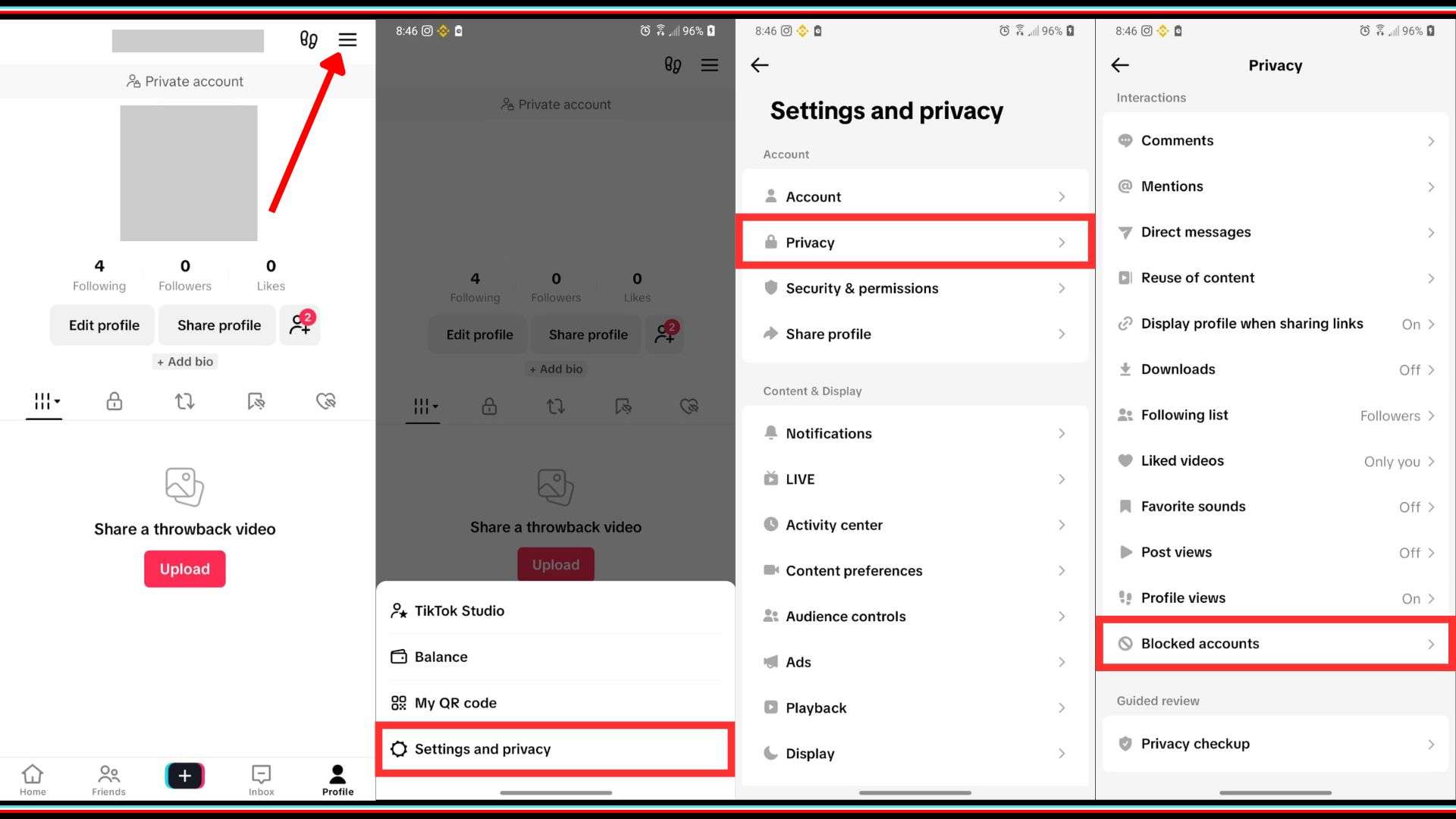
    To see blocked users on TikTok, open the TikTok mobile app and go to your profile page. Then tap the three lines in the top-right corner and head into your privacy settings. Scroll until you find the blocked accounts section, which lets you manage users discreetly. TikTok doesn’t notify users when they’ve been blocked, nor does it show your profile to them. Blocked users won’t be able to follow, message, or interact with your content on TikTok. This block feature allows you to control unwanted TikTok interactions and maintain a positive viewing experience without interruption.

    Steps to Unblock Someone on TikTok?

    • Open the TikTok mobile app and log into your TikTok account.
    • Tap the three lines on the top-right corner of your profile page.
    • Go to Privacy, then tap on Blocked accounts to view the full list.
    • Use the search bar to find the specific person you want to unblock.
    • Tap on the user’s profile page and select the Unblock option.
    • Once unblocked, the user can again view your profile and interact with your content.
    • TikTok does not send any notifications when someone is unblocked.
    • You can repeat these steps to easily unblock multiple TikTok users as needed.

    How to Know If You’re Blocked on TikTok

    If someone blocks you on TikTok, their content vanishes and their TikTok account becomes unreachable. You won’t be able to view their profile or comment on their videos, even through the search bar. Additionally, your previous comments may disappear from their posts, and their profile won’t appear in your following list. TikTok doesn’t notify users when they’ve been blocked, so the signs are indirect but noticeable. If you try to visit their profile and receive an error, it’s a clear indication. Although blocking users on TikTok is private, these signs evidently reveal you’ve been blocked without them knowing.

    What TikTok Users Should Know About Account Privacy

    TikTok allows users to control who interacts with their content, including blocking unwanted attention. When someone tries to visit your profile or interact with your content, privacy settings help restrict access. You can manage your following list, decide who can comment, and block anyone trying to follow you. TikTok does not notify users when they’re blocked, ensuring discreet action. Furthermore, users can see blocked users on TikTok and adjust settings accordingly. To maintain a positive experience, knowing how to block someone without them knowing becomes increasingly important for personal content control.

    Contacting TikTok Support for Serious Violations:

    If someone leaves harmful comments or engages in harassment, you should straightaway report the violation. TikTok allows direct contact with their support team for such cases. Furthermore, contacting TikTok Support helps when multiple TikTok accounts target your videos. Although blocking helps reduce interactions, serious violations need formal intervention. You may use the in-app form or visit the official support page. TikTok Support typically responds quickly, especially for safety-related issues that affect your ability to enjoy content on TikTok.

    FAQs

    1. Where do I find my blocked list on TikTok?

    Go to settings and privacy, open Privacy, tap Blocked accounts to view and manage users.

    2. How do I unblock someone on TikTok?

    Visit blocked accounts list, find the user, tap their profile and select Unblock.

    3. Can I block someone who already blocked me?

    You usually cannot block someone who blocked your main account, without alternate access methods.

    4. Why can’t I see the block option?

    The interface moved block option under the share arrow in recent app updates.

    5. Does blocking remove previous comments or likes?

    Yes, past interactions like comments or likes may disappear from your content afterward.

  • The Darkest Hour: What Made These Founders Keep Going

    The Darkest Hour: What Made These Founders Keep Going

    the darkest hour

    Every founder has a breaking point. It’s that silent moment, often unseen and unspoken, when they contemplate walking away from it all. Not because they’re weak, but because building something meaningful is hard. The entrepreneurial journey isn’t just about product-market fit or financial success; it’s about resilience, pain, uncertainty, and pushing forward when nothing makes sense.

    We often celebrate success stories, the funding rounds, the launches, the exits, but we rarely hear what happens in the quietest moments, when founders question everything. These are the moments that shape legacies. Below, eight founders share their darkest hours and what helped them keep going.

    When Legal Battles Threaten to Derail Everything:

    “He came after me legally, claiming ownership of my business… I seriously considered walking away from everything I had built.”

    Alan Katz, Presiding Officiant at Great Officiants, trusted the wrong contractor, and that trust turned into a brutal legal battle. The emotional toll, more than the legal one, nearly broke him. But his team, the gratitude of the couples they served, and even an acupuncturist helped him regain balance. This moment tested more than his ownership; it tested his identity. The resolution wasn’t just a legal victory; it was reclaiming his voice and commitment. That breaking point, he now says, made him a better, stronger leader, one built to last.

    When Industry Dysfunction Becomes the Catalyst for Reinvention:

    “I almost walked away when I realized the real pain in moving wasn’t the boxes — it was the broken system behind them.”

    Bretton Auerbach, CEO of Local Movers, was overwhelmed by an industry riddled with distrust and chaos. But that breaking point became a pivot. Rather than compete as another moving company, he reimagined the business as a free concierge service that vets movers and manages logistics. That shift changed everything. “Burnout became clarity,” he says. His motivation? “An industry too flawed to leave and too important to ignore.” That purpose now fuels a mission built on trust.

    Letting Go of Control Was the First Step Toward Real Growth:

    “I realized the biggest barrier to growth was my own need to control everything.”

    Leury Pichardo, Manager at Digital Ceuticals, shared a transformative lesson learned from his early ventures. In his first automotive content site, Leury played every role—writer, editor, SEO—believing hands-on intensity guaranteed success. But one week off proved otherwise. The business stopped entirely, and he saw the truth: he hadn’t built a company, just a high-stress job. That realization shifted his mindset. He became an architect, not a laborer—systematizing every task, creating SOPs, and empowering others. That’s what made the business scalable, sustainable, and eventually sellable.

    When Financial Desperation Sparks a Tug-of-War Within:

    “One part of me wanted to quit… The other said I’d come too far to stop now.”

    Lisa Martinez started TX Cash Home Buyers with no real estate background, just hunger to learn. But as deals dried up and income vanished, she quietly took a part-time job to stay afloat. It felt like failure. The real battle, though, wasn’t in the finances, it was in her mind. Was this worth it? Should she quit? But something inside reminded her: you only fail if you stop. Today, she’s still here, wiser and stronger. That moment, of internal tug-of-war, proved she had what it takes to stay in the game.

    When Losing Your Job Sparks the Start of a Legacy:

    “I’d just been let go… no warning, no plan B. Then I got offered a role on the Tomb Raider movie — it gave me the funds to start Webheads.”

    JM Littman, founder of Webheads, didn’t dream of entrepreneurship; he was pushed into it. Being fired forced him to think differently. The gig that followed, unexpectedly, was his launchpad. With the money earned, he founded Webheads, a digital agency that has lasted over three decades. It wasn’t confidence that kept him going; it was fear of going back and the exhilaration of building on his terms. From uncertain beginnings came solid foundations, proof that some of the strongest legacies start in the rubble of rejection.

    When Helping One Person Redefines the Entire Mission:

    “I almost walked away from it all until a woman from out of state called sobbing. Her late father’s Tucson home was rotting, full of junk, and yes, a dead rat in the wall.”

    Max Casey, CEO of Unbiased Options Real Estate, was facing the kind of disillusionment that slowly drains purpose. But that desperate phone call changed everything. With no agents willing to help, his team stepped in, managing cleanout, repairs, and ultimately the sale. That one act rekindled his belief in why the work mattered. “This work is about more than property. It’s about showing up when no one else will,” he explains. In states like Arizona, where aging populations are leaving behind homes filled with emotional and logistical baggage, the mission became crystal clear. Casey stayed away from closing too many deals, but brought dignity and closure to families who had nowhere else to turn.

    When Grief and Loneliness Threaten the Will to Lead:

    “My stepson Hamish died… I took the CEO role and never felt lonelier or more desolate in my life.”

    Katherine King wasn’t supposed to be CEO of Dazychain. But tragedy forced a change. Her husband stepped down to grieve, and she stepped up, while dealing with unimaginable loss. The burden of running a company, keeping a team afloat, and navigating deep personal grief nearly broke her. But each small step forward was a triumph. She chose to continue not because she had to, but because she believed in the future. Now, with clarity and gratitude, she leads with greater empathy, proof that even in loss, purpose can rise.

    When Rock Bottom Becomes Day One Again:

    “Starting over is never easy. But we began again with a small $5 project… it was about choosing to move forward.”

    When Andranik Minasyan, CEO of inoRain, shut down his ISP business, he wasn’t sure he’d build again. But with a team of people who believed in him, he decided to take the first step, no matter how small. That step was a $5 freelance job. It wasn’t glamorous, but it reignited momentum. From that moment, they grew inoRain into something bigger. The lesson? Big wins don’t start with fireworks. They start with saying yes, to a small project, to a new chapter, to trying again with better clarity and people who won’t let you fall.

    Conclusion: 

    The thread connecting each of these stories isn’t just survival, it’s significance. These founders didn’t push through because of a sudden breakthrough or external validation. They pushed through because something in them, or around them, reminded them that what they were building mattered. Whether it was a DM from a stranger, a wall of thank-you notes, or the unwavering support of a team, these moments didn’t just save their startups, they redefined their purpose. In the end, grit is quieter than we think. And often, it’s made of a single decision: Don’t stop.

  • How to Find All The Pages on a Website Easily

    How to Find All The Pages on a Website Easily

    how to find all the pages on a website

    Can’t seem to find all the pages on your website? You’re not alone; many website owners face this issue as well. During a website audit, missing pages, especially those that are hidden or orphaned, often go unnoticed. Failing to view all the pages on your site can result in reduced visibility in search results. Pages that Google has indexed or skipped might affect your site’s overall performance. 

    Thankfully, there are proven ways to find every single page using tools like Google Search Console, Google Analytics, or a website crawler. This article will help you learn how to find all website pages easily and efficiently.

    Why you may need to find all pages on a website

    Website owners often need to find all the pages on a website to maintain performance and visibility. Whether you’re planning a website redesign or conducting a website audit, identifying every single page is essential. It helps you view all active, hidden, and orphaned pages within your website structure.

    Orphaned pages are pages that have no internal links pointing to them, making them hard for search engines to crawl. Moreover, knowing how to find indexed pages that Google has already listed improves your ability to optimize them accordingly. Using tools like Google Search Console, Google Analytics, or a website crawler helps uncover pages that may not appear in regular search results.

    Additionally, when your goal is to improve SEO, finding the sitemap or viewing all URLs on a website ensures that a complete list of all pages is available, thereby preventing any important page from being overlooked during the optimization process.

    5 Ways how to find all the pages on a website

    1. Use Google search:

    Use Google search

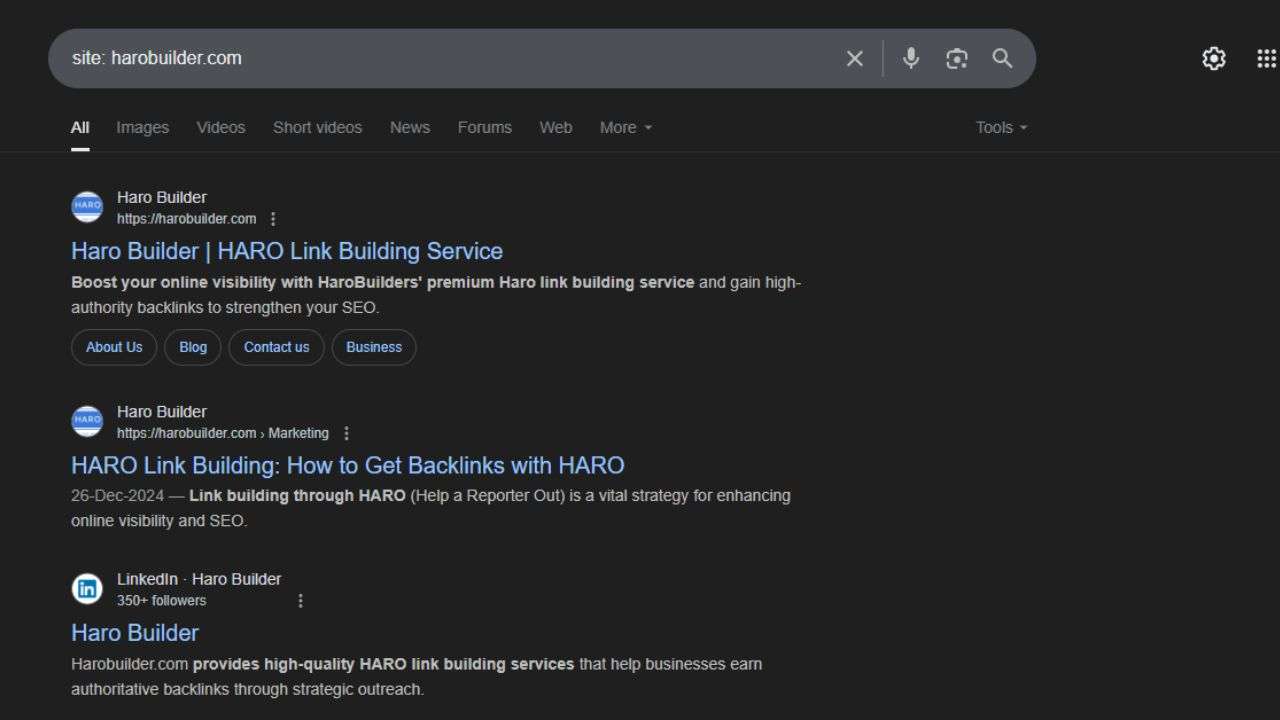
    Using Google Search is a great way to quickly and effectively find all the pages on a website. You can use advanced search operators, such as site:yourdomain.com, to view indexed pages that Google has already listed. This helps you compile a basic list of all the pages that Google has indexed and are appearing in search results. Furthermore, using filters such as keywords or file types can narrow the results to specific website pages.

    Additionally, this method helps uncover hidden pages or orphaned pages that aren’t linked from the homepage. While it’s not comprehensive, it provides valuable insights into the pages that Google sees on your website.

    2. Check the robots.txt file:

    The robots.txt file on the website can help you find or eliminate pages that are blocked from being crawled. Located at yourdomain.com/robots.txt, this file lists URLs or entire sections that are either allowed or disallowed for bots. Although it doesn’t display every page of your website, it gives important clues about what pages search engines are permitted to crawl.

    This step can also alert you to orphaned pages or hidden sections blocked from indexing. Additionally, reviewing this file is particularly important before any website redesign or SEO campaign to ensure proper visibility.

    3. Use a website crawler:

    Using a website crawler is one of the most accurate ways to find all the pages on your website. Tools like Screaming Frog or Sitebulb crawl your entire website URL structure and list every page it can reach. These tools identify broken links, orphaned pages, and pages that Google may not have indexed yet.

    Moreover, a website crawler allows you to extract metadata, header tags, and even the page title of every page. This method is essential during a website audit or when trying to display all the pages on a site.

    4. Use Google Search Console:

    Use Google Search Console

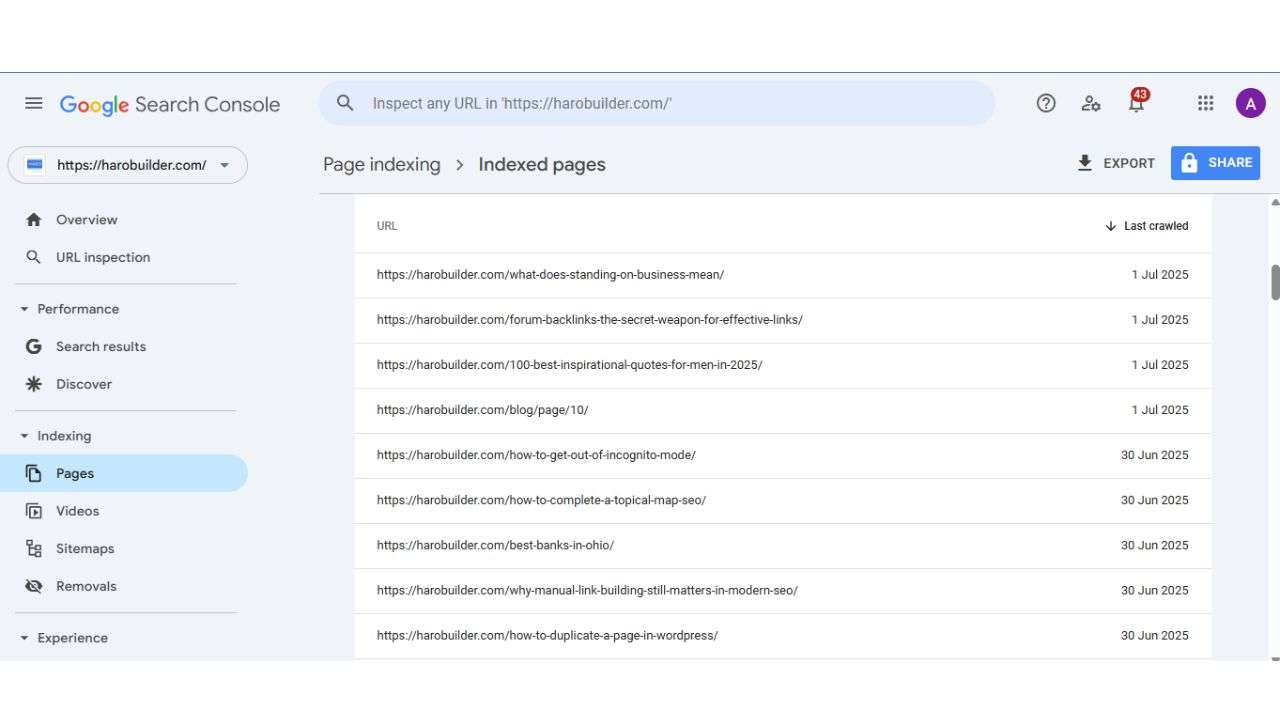
    Google Search Console is a tool for website owners that provides direct data from Google’s indexing systems. It allows you to view all the pages that Google has indexed, as well as those excluded from search results. You can access performance reports, URL inspection tools, and the coverage section to view all the pages of a website.

    Particularly, it’s useful for spotting pages that may have received impressions but are not ranking well. Moreover, this tool helps identify issues with page indexing and shows which URLs were successfully crawled and indexed by Google.

    5. Utilizing Google Analytics:

    Utilizing Google Analytics

    Google Analytics can help you find a list of all your pages that have received traffic over time. Although it doesn’t show every single page automatically, it helps identify pages on your site that users have visited. By viewing behavior flow or all pages under the “Site Content” report, you can extract meaningful insights into pages that matter.

    This method highlights which pages are getting attention and which may be considered orphan pages. Altogether, combining Google Analytics with other tools helps ensure no important pages are missed during a full website audit.

    Conclusion

    Knowing how to find all the pages on a website helps improve structure, indexing, and search engine visibility. Whether you’re planning a website redesign or need to locate orphaned pages, multiple tools can assist you. From checking your sitemap on the website to using Google Search or crawling the entire website, there are many ways to find key URLs. Also, reviewing the robots.txt file and using Webmaster Tools can help you uncover hidden pages. This guide covered some effective ways to see a list of all pages on your website. Which method do you think works best for your specific website?

    FAQs

    1. What is a website crawler used for?
    A website crawler scans all the pages on your site and lists every accessible URL automatically.

    2. How can I find all the pages within my website structure?
    Use tools like Google Search Console or a sitemap on the website to map the internal structure.

    3. Do I need to find orphaned pages during a website audit?
    Yes, you should identify orphaned pages properly to ensure search engines do not overlook them.

    4. Can a sitemap help me see all the pages on the website?
    A sitemap lists all important pages and helps search engines efficiently crawl your website.

    5. What’s the role of the robots.txt file in finding website pages?
    It shows which parts of the website search engines can or cannot crawl, affecting page visibility.

  • What No One Told Us: Startup Advice From Seasoned Founders

    What No One Told Us: Startup Advice From Seasoned Founders

    startup advice

    Starting a business is often portrayed as a thrilling leap into independence, freedom, and success. The stories we see on social media and in the media glamorize startup life, emphasizing breakthrough moments and big wins. But behind every successful entrepreneur is a series of hard-learned lessons, most of which never make it into highlight reels. The truth? Much of what it takes to succeed in business is only learned the hard way—through trial, error, and unexpected setbacks.

    In this in-depth article, we’ve gathered powerful insights from seasoned founders who’ve been through the trenches. From burnout and perfectionism to team-building and go-to-market failures, these entrepreneurs share what they wish they knew before they started. Their experiences, mistakes, and wake-up calls are packed with wisdom for anyone launching or growing a business today.

    Starting Without a Strategy Leads to Burnout

    When launching a business, many founders fall into the trap of believing that hard work alone guarantees success. Hustle culture celebrates waking up early, grinding all day, and sacrificing everything for the dream. But as Danyon Togia, founder of Expert SEO, discovered, effort without direction often results in burnout rather than breakthrough.

    In his early days, Danyon worked nonstop, waking up before dawn, skipping meals, and pushing himself into exhaustion. “I thought success came down to brute force,” he recalls. But over time, he realized this approach was unsustainable. His turning point came when he shifted focus to high-leverage, strategic actions, like targeted outreach and deep work. Slowing down allowed him to think more clearly and operate with purpose.

    Key Takeaways:

    • Work smarter, not harder. Focus on 1–2 high-impact tasks daily.
    • Burnout isn’t a badge of honor. Prioritize sustainable energy and mental clarity.
    • Strategic planning > relentless hustle.

    Outsourcing Key Functions Can Slow You Down

    Speed is a startup’s superpower. Yet too often, founders hand off critical components to outside agencies, thinking it will save time. Imad Ali, founder of Kitt, learned this the hard way during his earlier venture, Alley, where he outsourced all tech development.

    The decision created delays and a broken feedback loop. Every change required external coordination, slowing down releases and frustrating users. With Kitt, Imad built an in-house product team from day one. The difference was night and day: tighter iteration cycles, faster experimentation, and greater user satisfaction.

    Why In-House Teams Win:

    • You control speed, iteration, and feedback.
    • Direct communication enables real-time problem solving.
    • Core functions should stay close to the founder’s vision.

    Perfectionism Is a Business Killer

    Striving for excellence is admirable, but when perfection delays progress, it becomes toxic. Shamil Shamilov, CEO of dNOVO Group, openly admits that perfectionism nearly caused his startup to fail in year one. He obsessed over branding, processes, and internal polish before signing a single client.

    That delay cost him valuable momentum and market feedback. “Perfection is a moving target and the market doesn’t wait,” Shamil warns. Today, he prioritizes testing campaigns in the wild and iterating quickly based on real-world results.

    Mindset Shifts That Accelerate Growth:

    • Launch before you’re ready.
    • Feedback > Flawlessness.
    • Done is better than perfect.

    Marketing Is Just as Critical as the Product

    Many first-time founders fall for the “build it and they will come” fallacy. Jayson DeMers, founder of OutreachBloom, made this mistake with his first startup, focusing exclusively on product development and ignoring marketing until it was too late.

    The result? A great product nobody knew about. In his next venture, he did the opposite, prioritizing marketing from day one. Through aggressive content marketing, SEO, and advertising, Jayson built awareness early and drove results faster.

    Balance Between Product and Promotion:

    • Marketing should start before the product is finished.
    • A great product needs a loud voice.
    • Treat visibility as a core pillar, not a side task.

    Promoting Your Brand Should Never Be an Afterthought

    Even agencies that excel at marketing for clients often forget to apply those same principles to themselves. That was the case for Matthew Goulart, founder of Ignite Digital. Despite delivering top-tier strategies to clients, he undervalued his own agency’s visibility, and it nearly cost them long-term growth.

    The wake-up call came after losing a pitch to a competitor with a stronger online brand presence, not a better portfolio. Since then, Matthew’s team has treated their marketing with the same urgency and investment as they do for their highest-paying clients. “Self-promotion is not ego—it’s survival,” he asserts. By elevating their brand, they now rank nationally, attract larger clients, and operate with the scale and reputation they once only dreamed of.

    Actionable Shifts:

    • Build your personal and business brand with intention.
    • Treat your own business like your best client.
    • Visibility builds trust, authority, and deal flow.

    Conclusion

    Every entrepreneur enters the game hoping for a smoother path than the last. But no amount of reading, planning, or prep work replaces the wisdom gained from experience. The founders quoted in this article didn’t just survive mistakes—they used them as stepping stones to greater clarity, confidence, and results.

    From battling burnout to rediscovering the power of relationships, from letting go of perfection to embracing distribution as a priority, these lessons serve as a compass for new and seasoned founders alike. If you’re on the journey, take heart in knowing you don’t have to learn everything the hard way. The real secret? Listen to those who have already done.

  • Why Is My Business Not Showing on Google? How to Fix It

    Why Is My Business Not Showing on Google? How to Fix It

    why is my business not showing on google

    Ever searched for your business only to see nothing appear—frustrating, right? Nearly 90% of consumers check businesses on Google before deciding, so missing visibility can seriously hurt local reach. If you’ve ever asked yourself, “why is my business not showing on Google”, it could be due to a range of issues: lack of verification, outdated business information, poor website SEO, or stiff local competition. Thankfully, the solution involves simple yet effective steps.

    This complete guide explains how to verify your Google Business Profile, optimize your website, build online citations, encourage reviews, monitor performance, and seek expert help. Follow this comprehensive walkthrough to ensure your business appears prominently on Google Search and Maps, helping customers find your business online.

    Why Is My Business Not Showing on Google

    If you’re wondering why is my business not showing on Google, several factors could be responsible. Common reasons include an unverified Google Business Profile, incomplete or outdated business information, poor website SEO, or recent changes not yet reflected in search results. In some cases, Google may temporarily hide listings that violate guidelines or lack activity.

    High local competition and a newly created business profile can also delay visibility. To fix this, ensure your business is verified, update all details consistently, optimize your website, and encourage customer reviews. These steps help your business appear prominently on Google Search and Google Maps.

    Why Is My Business Not Showing on Google: Common Issues

    A business not showing up on Google can stem from a few key reasons, primarily related to Google Business Profile (GBP) setup and website optimization. The most common issues include an unverified or incomplete GBP, incorrect or inconsistent business information across the web (NAP – Name, Address, Phone Number), and lack of website optimization for search engines. 

    Here’s a more detailed breakdown:

    1. Google Business Profile (GBP) Issues:

    • Unverified Profile: A Google Business Profile needs to be claimed and verified for it to appear in search results and on Google Maps. 
    • Incomplete or Incorrect Information: Google prioritizes businesses with complete and accurate information. Ensure your business name, address, phone number, website, and other details are consistent and up-to-date. 
    • Suspended Profile: Google may suspend a GBP if it violates their guidelines, such as using inaccurate information or engaging in spammy practices. 
    • Recent Changes: If you’ve recently made changes to your GBP, it may take some time for Google to update and reflect those changes. 
    • Low Profile Strength: Google uses a profile strength indicator on the dashboard to encourage businesses to fill out as much information as possible. 

    If you’ve recently asked yourself why is my business not showing on Google, the answer may be hidden in one of these common GBP issues.

    2. Website Issues:

    • Not Indexed: If your website is new, Google may not have crawled and indexed it yet. This can take some time.
    • Poor Website Structure: A complex or confusing website structure can make it difficult for search engine crawlers to understand and index your site.
    • Thin or Duplicate Content: Websites with low-quality or duplicate content may struggle to rank well.
    • Poor Backlink Profile: Low-quality or spammy backlinks can negatively impact your website’s ranking. 
    • Slow Loading Speed: If your website loads slowly, Google may not rank your business well in search results. Speed impacts visibility on Google Search because it affects user experience and bounce rates. 

    3. Other Potential Problems:

    • High Competition: In highly competitive industries, it can be more challenging to rank well. 
    • Lack of Reviews: Google values reviews, so a lack of reviews or an inconsistent review profile can hurt your visibility. 
    • Violating Google’s Guidelines: Google has specific guidelines for businesses, and violating them can lead to penalties or suspensions.

    If you’re still thinking why is my business not showing on Google, the problem could be in any of these overlooked areas.

    How to Troubleshoot and Improve Visibility

    1. Verify and Optimize your GBP:

    Firstly, verify your business through your Google account to ensure your business appears on Google Maps. Until your Google Business Profile is verified, your business might not show in search results. Update your business information regularly to help Google understand what your business offers. Make your business stand out by uploading quality photos, selecting accurate categories, and updating business hours. Furthermore, ensuring your business address, name, and phone number are accurate builds trust with Google.

    Optimization tips:

    • Use keywords like “local business” and “business listing” in your profile description and updates.
    • Regularly post updates to improve visibility on Google and attract customers to find your business.
    • Link to your local business website directly from your Google business profile for stronger signals.
    • Verify your business location precisely to appear on Google Maps and Google search reliably.

    2. Improve Website SEO:

    Your website must support your local search efforts to help your business show up on Google. Ensure your business name and address on Google match the details on your website exactly. Use structured data to help Google understand your business type, hours, and location details. Also, ensure your business information is up to date across the site to avoid data mismatch.

    Use relevant search engine keywords naturally across titles, meta descriptions, and internal links. Altogether, optimizing your Google My Business listing and website increases visibility on Google.

    3. Build Online Citations:

    Online citations improve your local rankings and help your business appear on Google Maps and search. Ensure your business information remains consistent across directories like Google Business Profile and local listings. Also, enter your business name, address, and contact details the same everywhere. Verify your business on each directory to help Google trust your business and rank it better.

    The more accurate citations you have, the easier it is for customers to find your business. Directories boost credibility and increase the likelihood that your business appears in local search results.

    4. Encourage Reviews:

    Google reviews play a vital role in helping your business stand out and attract more visibility. Ask satisfied customers to leave honest feedback to help your business appear on Google Maps. Moreover, respond to reviews consistently to show that your business is active and engaged.

    High-quality reviews help Google understand that your business is trustworthy and worth ranking prominently. Update your Google business profile with review highlights and ratings to build a stronger online reputation. Customers find your business more credible when others leave authentic experiences and ratings.

    5. Monitor Performance:

    Monitor your business performance using Google Insights and other analytics tools within your Google account. Tracking how your business appears on Google Maps and search can uncover visibility issues quickly. Review how many users search for your business and how often your business listing is viewed.

    Additionally, analyze actions like website visits, direction requests, and phone calls through the Google dashboard. If performance drops, verify your business info and update your Google business profile immediately. Regularly monitoring helps ensure your business remains visible and appears prominently on Google.

    6. Seek Expert Help:

    If you’ve implemented changes and still wonder why is my business not showing on Google, seek professional assistance. Experts can help your business rank on Google by auditing listings, content, and technical SEO. They understand what your business needs to compete effectively in local search results. 

    Moreover, an expert can ensure your business appears on Google Maps and Google search consistently. They’ll also help optimize your Google business profile for better engagement and ranking. Altogether, getting support from specialists ensures your business remains visible and continues attracting local traffic.

    Conclusion

    By resolving common issues like unverified profiles, outdated business hours, or poor local SEO, you can reestablish visibility on Google. Keeping your business information up to date and engaging with customers consistently helps Google understand and rank your business. Implementing the strategies in this guide ensures more traffic to your business, better visibility on Google Maps, and improved local search results. Why is my business not showing on Google? now you know, and you can finally take action to fix it.


    FAQs

    1. How can I tell if my business is verified on Google?
    Log in to your Google account and check for the “verified” badge on your business profile.

    2. What happens if I have multiple locations?
    You must verify and manage each business location separately using a single Google Business Profile account.

    3. Can I still appear on Google without a physical address?
    Yes, service-area businesses can appear without showing an address if properly set up in their profile.

    4. How often should I update my Google Business Profile?
    Update it whenever business information changes — especially hours, services, and contact details.

    5. Does adding photos help my business show up?
    Yes, Google favors active listings with regular photo uploads and customer engagement.

    6. Can incorrect categories affect my visibility?
    Absolutely, using the wrong category can reduce your chances of appearing in relevant search results.

  • The Disruption Syndicate: Bold Business Leaders Shaping Growth in 2025

    The Disruption Syndicate: Bold Business Leaders Shaping Growth in 2025

    business leaders shaping growth in 2025

    Introduction

    The year 2025 has become a proving ground for business leaders navigating rapid transformation, technological acceleration, and customer expectations that shift by the minute. Unlike previous decades where growth was often driven by traditional metrics and aggressive scaling, today’s most effective leaders are those who embrace disruption, prioritize authenticity, and lead with strategic foresight. These leaders aren’t simply adapting to the future—they are engineering it.

    What distinguishes these bold business minds is not just their appetite for innovation but their operational courage to pivot, trim fat, and pursue real connections in a digital-first world. Whether leveraging AI to streamline processes or doubling down on human-driven brand narratives, the Disruption Syndicate of 2025 proves that sustained growth comes from daring choices, not safe bets.

    Rising Above the Noise with Authentic Brand Communication

    Modern audiences are overwhelmed by digital clutter, and the brands that cut through the chaos are those that lead with honesty, humanity, and value-driven storytelling. In 2025, authentic interactions are the killer application. Business leaders have realized that audiences crave depth, not just automation, and this is transforming how companies communicate across channels.

    As Paige Arnof-Fenn, Founder & CEO of Mavens & Moguls puts it:
    Who would have thought that the killer application in 2025 would be authentic interactions, not Artificial Intelligence?

    This insight speaks to the larger trend in branding—where personalized, thoughtful content outperforms polished, AI-generated blather. Companies are now investing in thought leadership, original storytelling, and consistent human connection. Whether through webinars, podcasts, or active LinkedIn profiles, the strategy is clear: showcase real experiences, share vulnerabilities, and create trust in a world skeptical of automation.

    Authenticity Is a Key SEO Driver in 2025:

    The search landscape has evolved, with Google emphasizing E-E-A-T (Experience, Expertise, Authority, and Trust). As AI-generated content floods the web, first-hand experience becomes the currency of credibility.

    • Tell your origin story.
    • Share both successes and failures.
    • Prioritize human tone over robotic perfection.

    As Paige highlights: The prevalence of AI-generated content and users’ search for authenticity have made those qualities critical for anyone trying to rank content now.”

    Scaling Smarter Not Bigger with Intelligent Automation

    The leaders shaping 2025 understand that growth doesn’t mean doing more—it means doing things better. Businesses are increasingly moving away from linear scaling models and toward intelligent automation that drives exponential efficiency.

    According to Eric Turney, President of The Monterey Company:
    Our biggest growth driver has been embracing automation and AI… By automating personalized emails and utilizing AI tools like ChatGPT with platforms like Zapier, we’ve reduced manual work while improving the customer experience.

    This reflects a deep shift in operational strategy. Growth is no longer tied to headcount—it’s about maximizing output per resource through intelligent tools. Whether it’s in sales follow-up, customer service, or marketing automation, companies that adopt lean, automated workflows can outpace even their larger competitors.

    Tools that Lead the Automation Charge in 2025:

    Here are some of the most effective tools powering smart automation this year:

    • Zapier – for connecting multiple platforms into seamless workflows.
    • ChatGPT & Claude – to generate email responses, content drafts, and support scripts.
    • CRM automation systems – for tracking sales touchpoints and lead progression without manual updates.
    • Personalization engines – for sending tailored offers and reminders at scale.

    The takeaway? Real growth comes from doing more with less—strategically.

    Navigating Uncertainty by Lowering the Barrier to Entry

    In a climate of economic unpredictability, the boldest leaders aren’t waiting for stability—they’re building resilience through flexibility. Many have abandoned legacy pricing models, replacing them with nimble frameworks that focus on value delivery and short-term results.

    As Rocky Pedden, CEO of RevenueZen notes:
    We are doing more shorter term sprint projects as opposed to annual contracts… and building more AI systems to support our team while trying to bring our pricing down.”

    These leaders understand that customer confidence is fragile, and commitment-phobia is real. By offering modular service packages, GEO/SEO-based optimization, and high-value deliverables, they reduce friction for new clients and open doors to long-term partnerships.

    Growth Agencies Are Reinventing Themselves:

    The smartest agencies of 2025 are not standing still. Instead, they’re:

    • Shifting from long-term retainers to flexible sprint packages
    • Integrating AI into content workflows to speed up production and testing
    • Specializing in high-intent channels like GEO-targeted ads and intent-rich SEO

    In this new model, efficiency and agility beat rigidity and scale.

    Pivoting with Purpose by Targeting New Market Segments

    Great leaders recognize when old markets can no longer fuel growth—and they make the tough call to pivot. Whether due to funding slowdowns, audience fatigue, or shifting buyer behavior, 2025’s strongest companies have leaned into strategic realignment.

    Cache Merrill, founder of Zibtek, shares:
    We hit a wall—our core startup clients started drying up… That meant rebuilding our sales process from the ground up.”

    Zibtek’s pivot toward mid-market and enterprise clients required more than a rebrand. It involved reimagining every stage of their customer lifecycle—from lead gen and sales operations to delivery models and team structure. That kind of shift demands leadership maturity, operational discipline, and a willingness to let go of what’s no longer working.

    From Founder-Led Sales to Scalable Systems:

    One major shift for Zibtek and other growing companies is moving from founder-led everything to structured, process-led growth:

    • Hiring experienced account executives
    • Building predictable CRM pipelines
    • Focusing on Client Lifetime Value (CLTV) over acquisition volume
    • Saying no to poor-fit projects and distractions

    Real growth, as Cache puts it, came not from expansion, but subtraction—by doing fewer things better.

    Scaling with Design-First Thinking and User-Centric Innovation

    In 2025, the most forward-thinking companies are scaling not just through product expansion but by prioritizing design, usability, and differentiated customer experiences. Brands are realizing that standing out in saturated markets requires more than competitive pricing—it demands strategic creativity and operational precision.

    As John Beaver, Founder of Desky, puts it:
    “We had to make changes to our strategy to differ from our competitors… Designing furniture with different desk size and color options separated us from other outlets.”

    Desky’s success came from more than great products—it came from creating an experience that customers genuinely preferred. Their expansion into North America leveraged not only ergonomic design but also a frictionless e-commerce journey that set them apart.

    “Choosing the right people in digital and design played a major role in our achievement,” Beaver adds. The takeaway? True growth comes from designing systems, experiences, and teams that scale smart, without compromising what made the brand valuable in the first place.

    Community-Driven Brands Are Becoming Market Leaders

    In 2025, one of the boldest strategies for growth is rooted in community building. Brands that treat their audience as collaborators—not just consumers—are winning the long game. These companies have created ecosystems of trust, where user feedback influences products, where content is co-created with audiences, and where loyalty is built through shared values and visibility.

    The modern buyer expects more than just transactions—they want connection, transparency, and shared mission. Communities built around a brand’s purpose lead to organic evangelism, higher lifetime value, and more authentic engagement. Business leaders who prioritize community growth alongside revenue growth are discovering that their strongest advocates come not from ad spend, but from invested relationships.

    B2B Brands Are Taking Lessons from Consumer Culture

    The traditional distinction between B2B and B2C branding is blurring. In 2025, leading B2B companies are adopting strategies historically reserved for consumer-focused businesses: emotional storytelling, purpose-driven messaging, and experience-first design. The result? B2B brands that feel human, accessible, and trustworthy—qualities once overlooked in corporate communication.

    Modern decision-makers—especially younger professionals—are driven by experience, not just efficiency. They respond to brands that speak to values, purpose, and culture just as much as technical capabilities. The boldest B2B leaders are infusing their messages with emotion and identity, understanding that even in high-stakes enterprise environments, people want to do business with people who get them.

    Sustainability and Social Impact Are Now Growth Accelerators

    Sustainability has evolved from a CSR checkbox to a central engine of business growth. In 2025, the companies that lead are those embedding environmental and social responsibility directly into their business model. Whether it’s reducing carbon footprints, investing in ethical supply chains, or launching initiatives aligned with the UN’s Sustainable Development Goals, purpose-led strategies are driving not only public favor but also profitability.

    Customers and investors alike are rewarding companies with a clear mission and measurable impact. Employees, too, are choosing to work for organizations aligned with their values. This shift has forced leadership teams to rethink everything—from sourcing and product design to hiring and marketing. For bold leaders in 2025, impact is no longer a differentiator—it’s an expectation.

    Conclusion:

    The bold business leaders of 2025 are writing a new playbook—one that rewards clarity, authenticity, and operational courage. They aren’t chasing vanity metrics, nor are they lost in AI hype. They are carving growth paths that are lean, human-centric, and purpose-driven.

    From Paige Arnof-Fenn’s call for authentic, experience-based storytelling, to Eric Turney’s use of AI-powered automation, to Cache Merrill’s lesson in pivoting and subtracting to scale—these leaders are proof that there’s no one-size-fits-all in modern growth. There is, however, one consistent theme: the willingness to challenge old assumptions and lead with clarity, not clutter.

    If you’re looking to drive real growth in 2025, don’t just follow the trends. Join the disruption.

  • How to Check Backlinks in Google: A Complete Step-by-Step Guide

    How to Check Backlinks in Google: A Complete Step-by-Step Guide

    how to check backlinks in google

    Struggling to keep track of backlinks that point to your website can hinder an effective SEO strategy. Surprisingly, the quantity and quality of backlinks still significantly influence ranking factors, as they pass authority and increase referral traffic. Many site owners fail to utilize their Google Search Console account effectively, often not knowing how to check backlinks in Google, and miss valuable insights from the console’s free tools that provide backlink data. A properly monitored link profile reveals the anchor text of a link, the number of backlinks pointing to your site, and specific details about your links.

    This guide explains how to find backlinks in Google search results and how to cross-check backlink reports in Google Analytics. The complete guide in the article covers direct URL search, using the site operator, cache checks, and using SEO tools.

    The Role of Backlinks in SEO

    Backlinks play a critical role in determining your website’s visibility in search engine results. Google and other search engines view every backlink as a signal of authority, trust, and content quality. When multiple websites link to your site, it improves your backlink profile and overall ranking.

    Google Search Console is a free tool that helps you monitor the number of backlinks pointing to your site. You can check backlinks in Google Search Console under the “Links” section, sorted by incoming links. Additionally, the anchor text of a link and the number of unique websites linking to your site are significant factors in determining your site’s ranking.

    Bad backlinks or unnatural links to your website can negatively impact your ranking factors and SEO strategy. Monitoring backlinks regularly helps identify the spammy links that should be removed or disavowed.

    How to Check Backlinks in Google Search?

    Direct URL Search:

    Direct URL Search

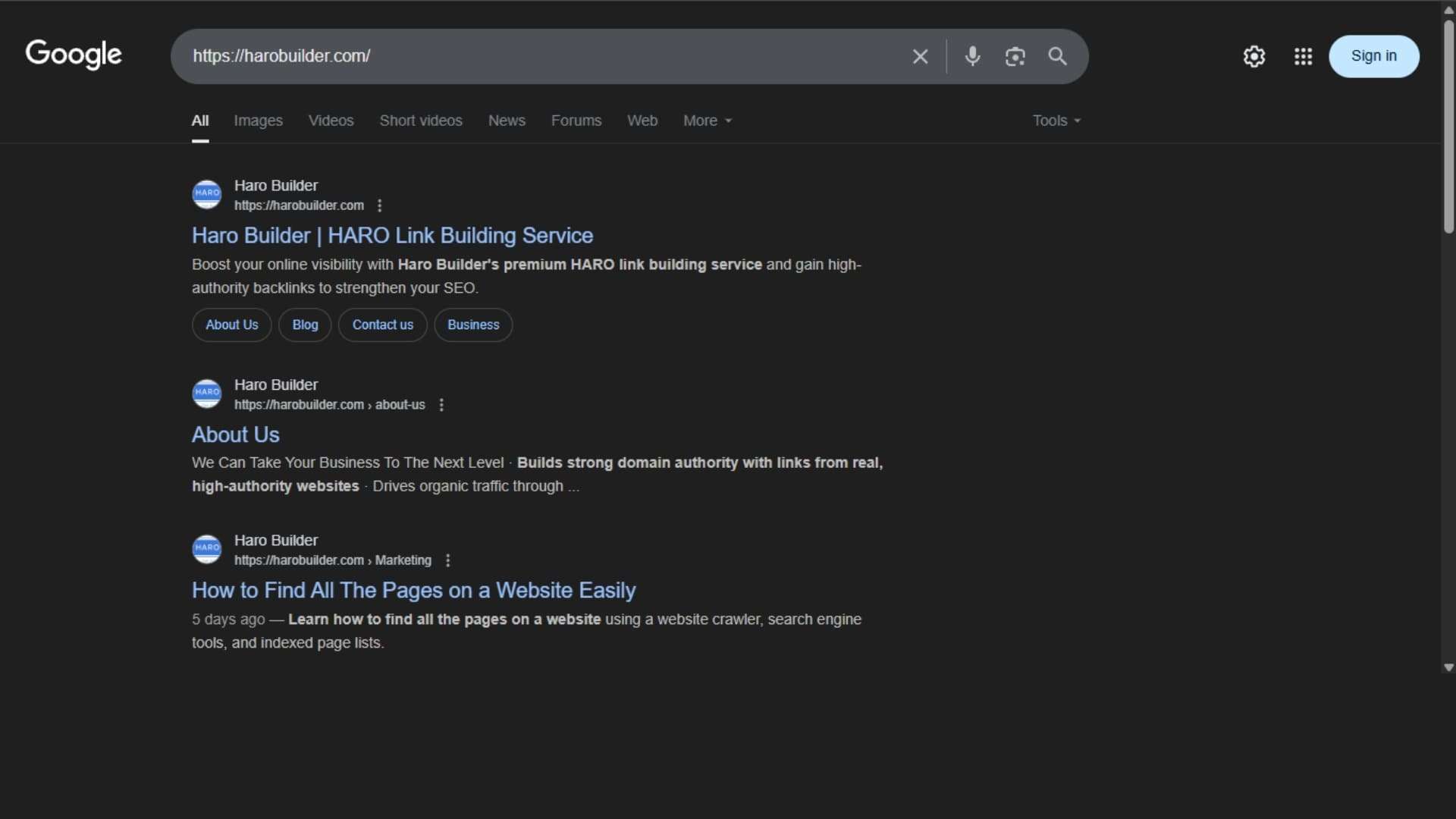
    You can check backlinks in Google Search by searching your full URL directly in the search engine. Type your web page’s exact URL to see which pages from the other site reference it. While this method doesn’t display every backlink, it highlights indexed links that point to your site. Furthermore, it provides a snapshot of how your website appears in Google search results. Although this method doesn’t show detailed backlink data, it’s quick for a basic check. Conversely, using the URL in quotes further refines the results. Hence, it helps spot recent link growth and mentions.

    Using the “site:” Operator:

    Using the site Operator

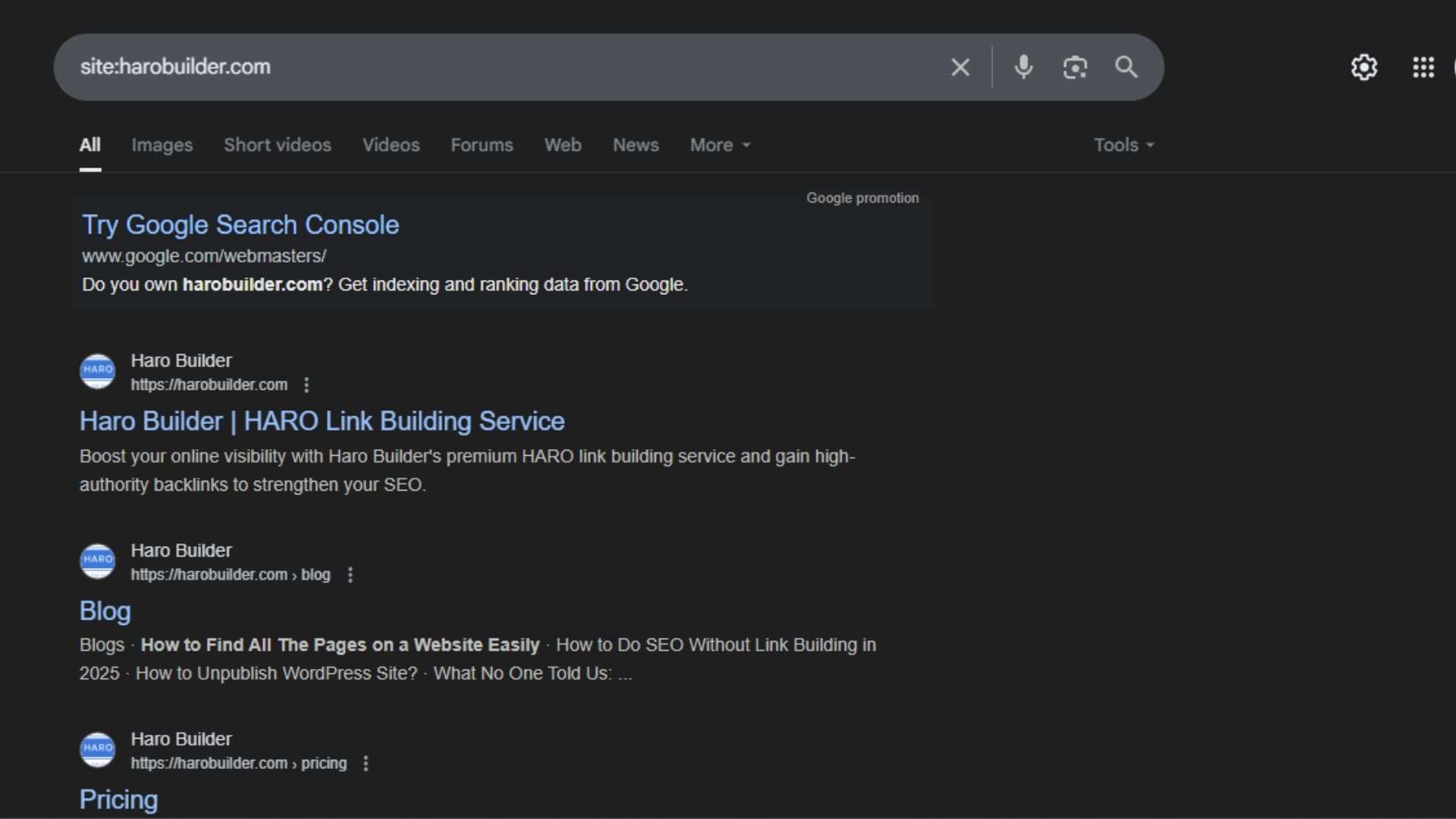
    Using the “site:” operator in Google Search helps identify indexed pages linking to your website. Type site:example.com with your domain or URL to locate web pages that Google has crawled. Although not designed solely for backlink analysis, this operator can help uncover pages linking to your site that are already indexed in Google’s search results. Additionally, it filters out unrelated domains and focuses on a specific website. You won’t get backlink reports, but this method reveals links from unique websites. Thus, it’s beneficial for spotting backlinks pointing to your site when used along with other tools.

    Checking with a Random Sentence:

    Checking with a Random Sentence

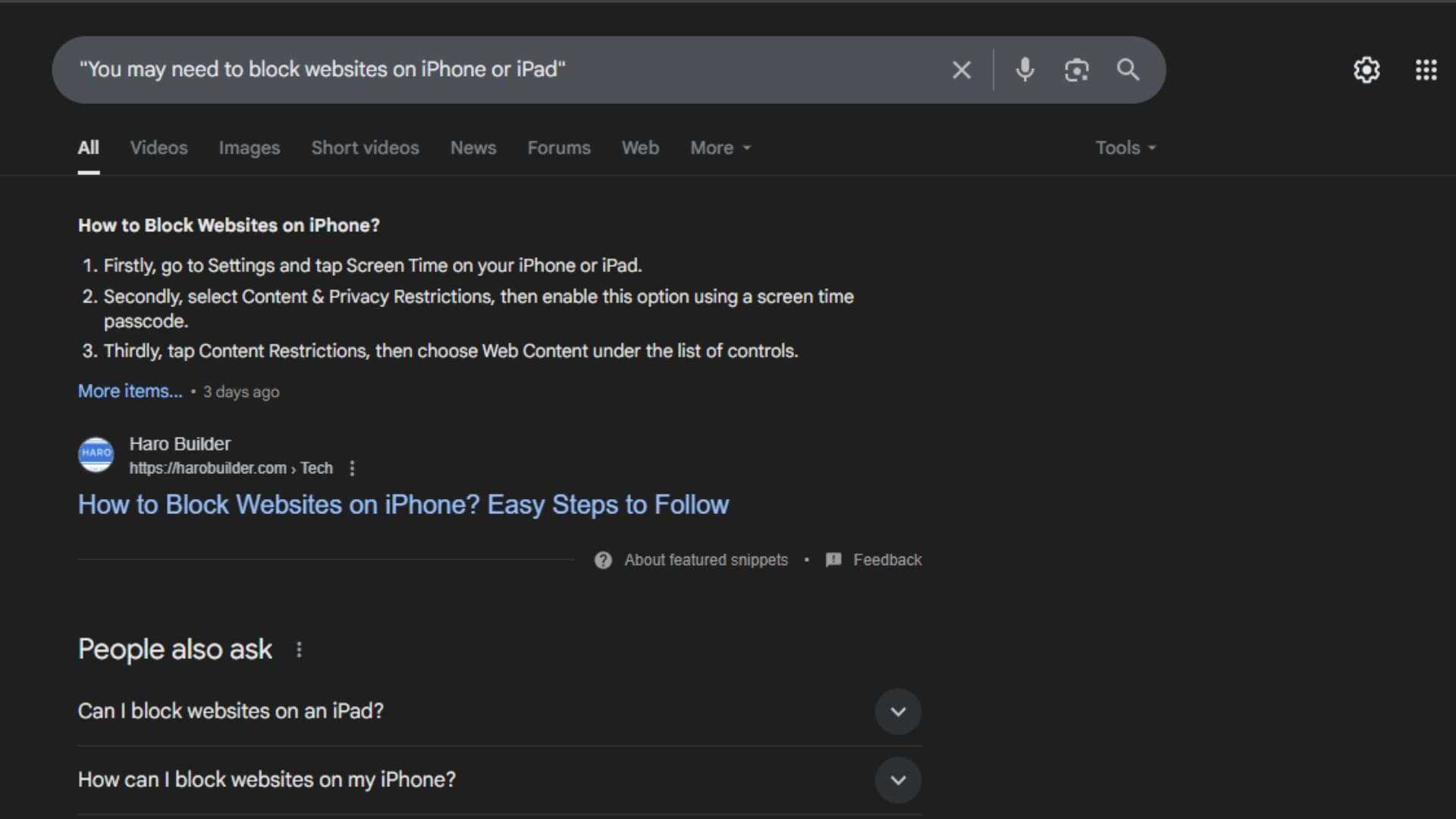
    Another practical method to find backlinks in Google Search is by pasting a random sentence from your article. Google may show websites linking to your content when they quote that sentence. This method, although informal, helps locate backlinks with matching anchor text or quoted text. Besides offering insight into link context, it identifies the specific pages that referenced your material. Comparatively, it can reveal backlinks pointing from forums, blogs, or scraped content. You’ll find this method useful when no tools are available. However, it’s not as comprehensive as a proper backlink report.

    Checking Google Cache:

    Checking Google Cache

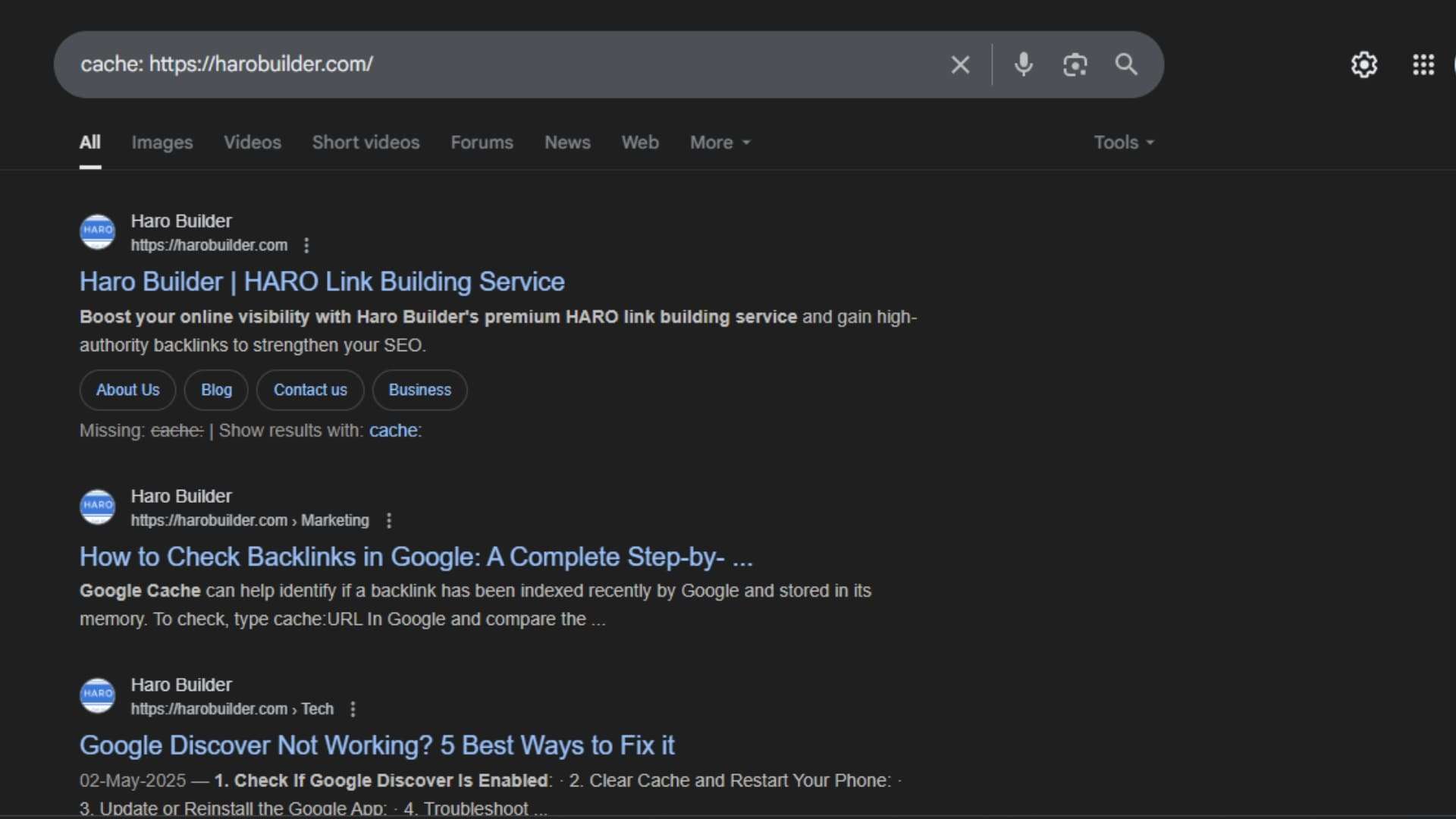
    Google Cache can help identify whether a backlink has been recently indexed by Google and stored in its cache. To check, type “cache: URL” in Google, and compare the cached content to your actual webpage. If the page contains links pointing to your site, they may also appear in the cache. While this isn’t a dedicated backlink checker, it provides information about when the page was last crawled. Thus, it helps monitor your backlinks when you’re checking Google search results manually. However, backlinks in cached versions might not always reflect the most recent link growth.

    Using Google Search Console:

    Using Google Search Console

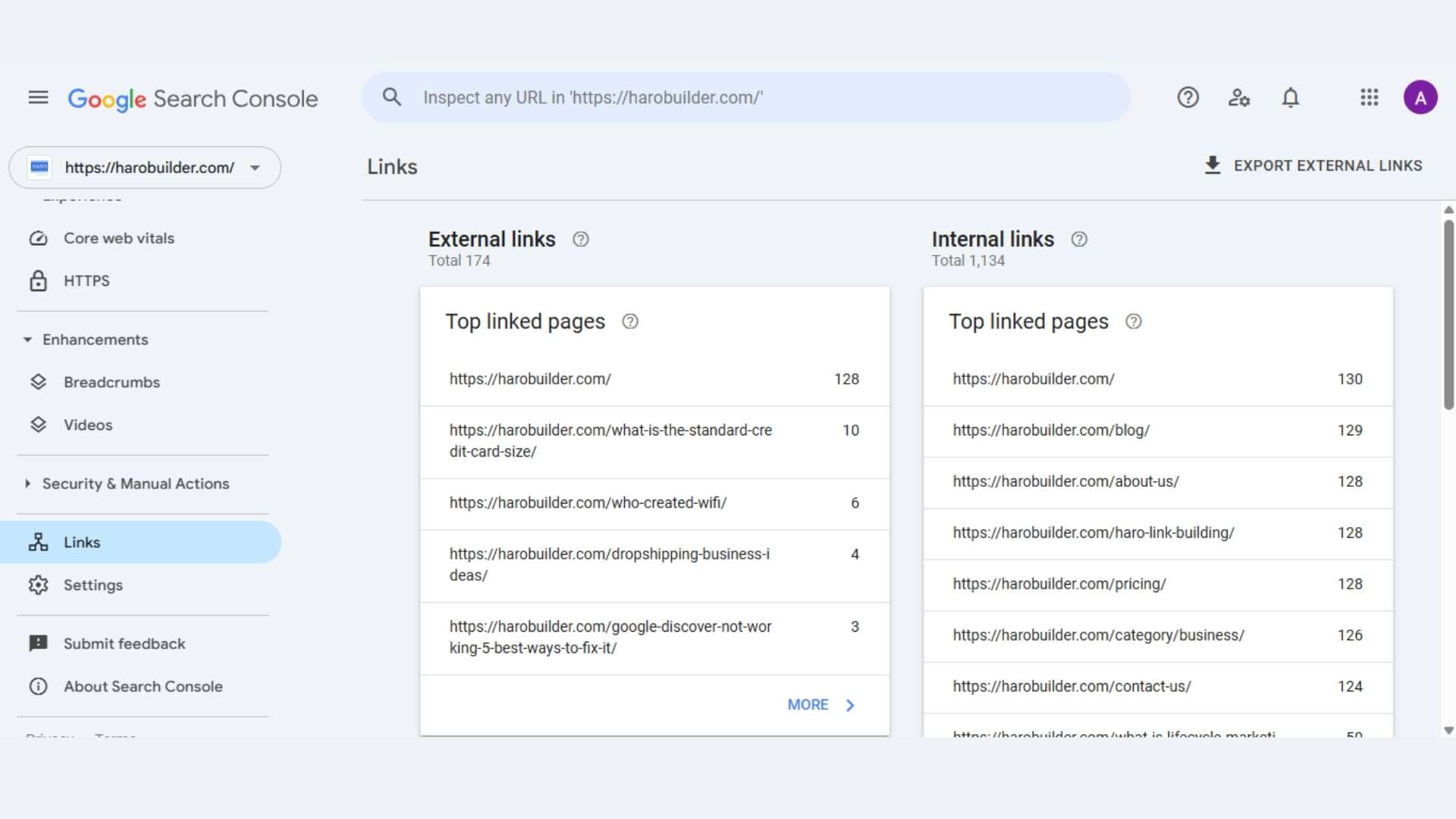
    To check backlinks in Google Search Console (GSC), navigate to the “Links” report within your property. This report provides insights into external links pointing to your site, including top linking sites and top linked pages. You can also export the backlink data for further analysis. 

    Here’s a step-by-step guide:

    1. Sign in to Google Search Console: Access your Google account and select the website property you want to analyze. 
    2. Locate the Links report: In the left-hand menu, find and click on the “Links” section. 
    3. Explore the report: The report is divided into sections, including “Top linking sites,” “Top linked pages,” and “External links.” 
    4. Analyze the data: Review the top linking sites, the pages on your site that receive the most links, and the anchor text used in those links. 
    5. Export the data: If needed, you can download the backlink data by clicking the “Export” button. 

    Using SEO Tools:

    Using SEO Tools

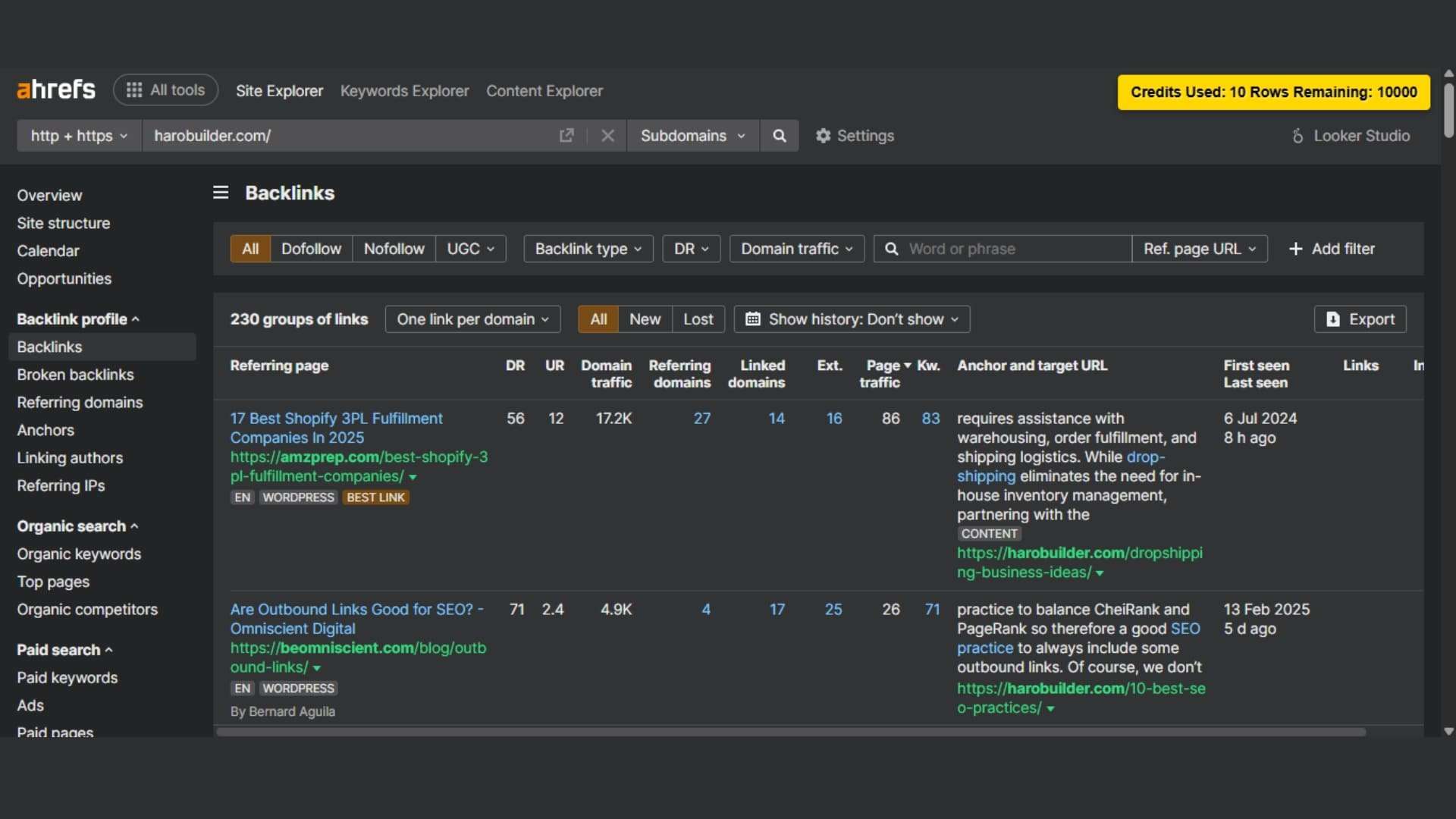
    To thoroughly check backlinks in Google, use third-party SEO tools like Ahrefs, Semrush, or Moz. These tools provide detailed backlink analysis, including link context, anchor text, and linking and target pages. Moreover, they display the number of backlinks and linking sites, helping to identify spammy or low-quality links. Unlike basic methods, these tools offer filtered reports sorted by incoming links and domains.

    Benefits of using SEO tools:

    • Monitor backlink profiles and the quality of your backlink profile
    • Identify backlink data to improve your SEO strategy and avoid bad backlinks

    Conclusion

    Maintaining accurate backlink profiles and monitoring links pointing to your website ensures healthier referral traffic and stronger search engine rankings. Tools like Google Search Console and Google Analytics 4 provide backlink reports to help you track your backlinks and identify spammy or unnatural links. Improving your site’s SEO involves regularly checking backlinks in Google search results, tracking link growth, and refining your link-building strategy to ensure optimal results. You’ll find that identifying the quality of backlinks is one of the most important tasks for your website’s SEO. So, which backlink method will you test first to enhance your backlink analysis? 

    FAQs

    1. What are backlinks in SEO?

    Backlinks are links from other websites that point to your site and impact search engine rankings.

    2. Why should I monitor my backlinks?

    Monitoring helps improve your SEO strategy and identify spammy or low-quality links harming your rankings.

    3. Is Google Search Console free to use?

    Yes, Google Search Console is a free tool that provides backlink data and site performance insights.

    4. How often should I check my backlinks?

    Check your backlinks monthly or after major campaigns to monitor link growth and quality.

    5. What is a backlink profile?

    A backlink profile encompasses all links pointing to your website, highlighting the quantity, quality, and anchor texts used.

  • Google Search Console vs Google Analytics: Which Delivers Better

    Google Search Console vs Google Analytics: Which Delivers Better

    google search console vs google analytics

    Struggling to know which tool better measures your website’s success? Google Search Console vs Google Analytics often report different numbers for clicks, sessions, and keywords. This disparity can frustrate marketers aiming to optimize search traffic and organic search performance. Google Search Console focuses on organic search traffic, search visibility, and search queries before users click your site. Google Analytics focuses on user behavior and post-click interactions, such as conversions and session duration.

    Accordingly, the complete guide below explains integration steps, comparison of search console data versus analytics data, and actionable insights from Google Analytics 4 combined with Search Console. You’ll learn how to use Google Search Console and Google Analytics together effectively to improve search engine optimization and enhance user experience.

    What is Google Analytics?

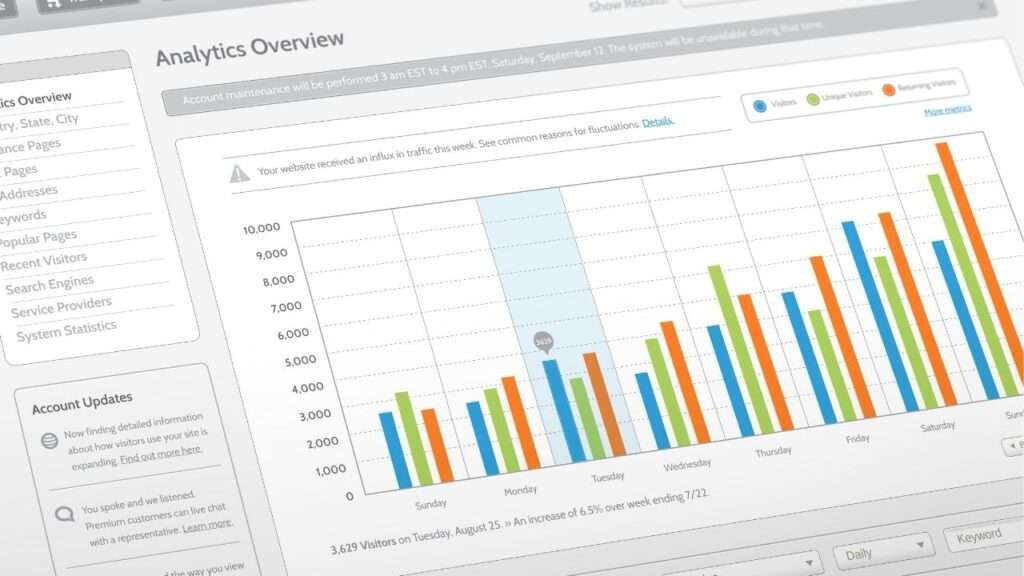
    Google Analytics is a powerful analytics platform that allows you to collect data on website user behavior. This tool focuses on user behavior and traffic data rather than search engine results pages performance. It helps businesses track how visitors interact with their content, which pages perform well, and where users drop off. Google Analytics tracks data on bounce rates, session durations, and real-time active users, making it highly effective for behavioral analysis and insights.

    Google Analytics 4 (GA4), the latest version, emphasizes cross-device tracking and data collection across multiple platforms. This version also provides data on app and web activity simultaneously. Analytics provides detailed visual dashboards that help decode trends and patterns over time. Unlike tools like Google Search Console, Google Analytics focuses on user behavior after a visitor arrives on your site. Analytics data becomes crucial when businesses aim to improve user experience and conversion paths.

    What is Google Search Console?

    Google Search Console provides data directly from Google’s index to help you assess search performance and visibility. This tool focuses specifically on Google search results and how your site performs in search results. It allows you to view clicks, impressions, and search queries users used to find your pages. Search console tracks how well content ranks and shows which pages appear on search engine results pages.

    Google Search Console offers insights into organic traffic, search ranking, and search visibility. It helps site owners monitor performance in Google Search and access data on search indexing and crawling. The platform also provides performance data such as click-through rates and average position. Additionally, you can use Google Search Console to identify and fix data validation errors and mobile usability issues.

    Unlike Google Analytics, the search console provides SEO-specific insights based on data from Google Search rather than user interaction. Google Search Console helps users improve search engine optimization and organic reach by aligning content with what people search.

    Similarities Between Google Search Console and Google Analytics

    google search console vs google analytics

    Website Traffic:

    Both Google Search Console and Google Analytics provide data related to organic traffic and overall search traffic. While Google Analytics tracks user sessions, Search Console tracks the number of clicks from search engine results pages. Additionally, both tools collect data from visitors and reflect how your site performs in search results. Search console data includes impressions and click rates, whereas analytics provides deeper insights on bounce rates and session time. Google Search Console helps analyze search-based visits; analytics focuses on user behavior during those visits. Use Google tools together to see a full picture of traffic data. Although their focus differs, analytics and Google Search Console show how people find and interact with your site.

    Page Performance:

    Both platforms assess how individual pages perform in search results and among site visitors.

    • Google Search Console provides data on impressions, average position, and total clicks per page.
    • Google Analytics tracks bounce rates, average session duration, and user paths on a page.
    • Search console focuses on SEO, helping understand where pages rank and how users find them.
    • Analytics focuses on user behavior, such as actions taken after arriving at a page.
    • Search Console offers a detailed performance report that pinpoints poorly performing URLs in search engine results pages.

    Use both tools to assess what content attracts users and what needs refinement.

    Traffic Sources:

    Both Google Analytics and Google Search Console offer a lens into how users reach your site. Google Analytics focuses on multi-channel attribution, including direct, referral, and Google Ads sources. Meanwhile, search console data emphasizes organic search traffic from search engines like Google. Analytics and Google Search Console differ in scope, but both provide data on inbound paths. Search Console provides detailed information on search engine results pages traffic. Google Analytics vs Google Search Console mainly differ in how each platform defines source and medium. Nevertheless, combining both reveals key differences between Google Search and other acquisition channels. Altogether, using both platforms concurrently ensures a comprehensive overview of all traffic sources.

    User Data:

    Google Analytics focuses on user activity and analytics uses sessions, users, and events to create meaningful metrics. Search console data, while more SEO-centric, still contributes to user data through query clicks and page-level engagement. Google Analytics tracks how users behave once they arrive, including interactions and conversions. Google Search Console focuses on how users reach the site, mainly via organic search. Analytics platform segmentation allows detailed breakdowns by demographics and devices. Use Google Analytics for post-click data; use Google Search Console to measure visibility. Additionally, analytics and Google Search Console together help correlate keyword traffic with on-page behavior. Each tool gathers data from both tools but presents different user insights.

    Tracking Goals:

    Both tools enable goal-setting indirectly, albeit with different data collection and measurement criteria. Google Analytics offers event-based tracking goals, ideal for form submissions, purchases, or time-based interactions. Meanwhile, Search Console provides data on search ranking and performance report metrics that indicate success in organic search traffic. Use Google Search Console to verify if ranking improvements align with content goals. Conversely, analytics provides actionable insights into how visitors convert post-click. Google Analytics vs Google Search Console becomes significant when defining KPIs. Although Search Console offers fewer goal metrics, it supports SEO-based target tracking. Search Console and Google Analytics integration help create comprehensive conversion funnels and compare engagement against visibility.

    Search Queries:

    Google Search Console provides data on specific search queries that generate impressions and clicks. This helps SEO professionals measure keyword alignment and search engine optimization effectiveness.

    • Search console to Google: Identify how people arrive from Google search results using precise queries.
    • Search console tracks impressions, CTR, and average ranking for each search query.
    • Google Search Console shows changes in search performance for newly optimized keywords.
    • Use Google Search Console to refine content that matches high-performing queries.
    • Google Search Console offers detailed visibility into what searchers type before visiting your site.

    This data is not available within Google Analytics, making the console crucial for keyword strategies.

    Differences Between Google Search Console vs Google Analytics 

    google search console vs google analytics

    Metrics:

    Google Analytics focuses on user interactions, including bounce rates, session durations, and pages per session metrics. Conversely, Google Search Console focuses on search visibility, search ranking, and search performance metrics. Google Analytics tracks user navigation, while Console tracks keyword impressions and organic search behavior. Search console data shows how a site performs in search, especially on search engine results pages. Meanwhile, analytics provides more detailed metrics on user behavior and conversion funnels. Use Google Analytics to assess campaign performance and use Google Search Console to optimize search traffic. Console vs Google Analytics 4 also differs in measurement models and data collection logic.

    Use:

    Google Search Console and Analytics have different purposes based on their data source and intended audience. Use Google Search Console to monitor how your website performs in Google search results using specific search queries. In contrast, use Google Analytics to understand what users do after landing on your site. Search Console offers insights for search engine optimization, while Google Analytics is a powerful analytics platform for behavioral analysis. Google Search Console to monitor crawling, indexing, and provides data for SEO adjustments. Conversely, analytics focuses on user behavior, funnel performance, and organic traffic patterns across devices and locations.

    Verification:

    Verifying ownership differs between Google Search Console vs Google Analytics, even though both offer data on search performance. Google Search Console accounts require site verification through DNS, HTML tag, or Google Tag Manager integration. Conversely, Google Analytics integrates seamlessly via embedded tracking codes and analytics platform setups. Analytics and Google Search Console can work together post-verification, but each must be validated independently. The console uses Pacific Daylight Time, which affects report synchronization unless properly aligned. Verification ensures secure access to search console data and analytics data, reducing data validation errors. Google to find verified access routes within each respective dashboard.

    Error Information:

    Google Search Console provides in-depth error alerts for technical SEO and indexing challenges.

    • Search Console helps detect crawl issues, indexing failures, and sitemap validation errors.
    • Google Search Console tracks mobile usability, Core Web Vitals, and HTTPS implementation errors.
    • Use Google Search Console to identify structured data errors and broken internal links.
    • Data validation errors and missing schema tags are shown clearly in the performance and enhancement tabs.
    • Unlike Google Analytics, error reporting in the console relates specifically to search engines and search ranking performance.

    Google Analytics and Search Console combined offer clearer insight into cause and effect.

    Reporting Features:

    Google Analytics vs Google Search Console differ sharply in how each platform presents performance data and reports. Google Analytics provides customizable dashboards and automated event tracking, especially useful for campaigns and e-commerce. Search Console offers performance reports related to search queries, impressions, and CTR data across multiple pages. Google Search Console data is segmented by devices, countries, and query terms. Conversely, Google Analytics tracks real-time traffic and user flow through funnels. Analytics uses visual tools like graphs and flowcharts, while Google Search Console shows tabulated reports focused on search visibility and keyword exposure. Search console, together with analytics, improves decision-making clarity.

    Daily Limits:

    Google Search Console and Analytics have different daily limits affecting data collection and export capabilities. Google Analytics 4 limits API queries and sampling thresholds for free users, especially with large datasets. Search Console to Google also has quota limits when connected to external tools like Data Studio. GSC data exports are limited to 1,000 rows via the interface but are extendable through APIs. Google Analytics tracks more dimensions per session, though heavy usage can trigger data validation errors. Search console uses Pacific Daylight Time, which can skew data alignment if not adjusted. Data from Google Search Console refreshes less frequently than analytics.

    How Do Google Search Console and Google Analytics Work Together?

    Google Search Console and Google Analytics work together by linking search performance data with user interaction metrics. Google Analytics focuses on behavioral insights, whereas Google Search Console focuses on visibility and organic search traffic from search engines. When integrated, these platforms collect data that reveals how users find a website and what they do afterward. Search Console provides data like search queries, impressions, and click volume from search engine results pages. Conversely, analytics tracks bounce rates, session durations, and navigation flow across the site.

    Use Google Search Console to see how your site performs in Google search and use Google Analytics to assess on-site behavior. Google Analytics and Search Console together help marketers correlate search performance data with post-click activity. Console and Google Analytics together enhance insights by joining traffic data with search console data. Google Tag Manager can facilitate smooth integration for improved data collection and clearer SEO measurement.

    Conclusion

    Both Google Search Console and Google Analytics play essential, yet distinct roles in a robust SEO strategy. Search Console monitors search engine results pages, tracking visibility, ranking, and specific search queries. Meanwhile, Analytics analyzes what visitors do on your site, from traffic data to conversions. Together, they offer a unified view, from finding to engagement. This guide showcased how Google Analytics and Google Search Console complement each other to inform smarter decisions. Did this comparison help you decide which tool delivers better value for your goals?

    FAQs

    Do I need both Google Search Console and Google Analytics?
    Yes, both tools serve different purposes and together provide a complete view of your website’s performance.

    Which tool is better for SEO monitoring?
    Google Search Console focuses specifically on SEO, tracking search queries, rankings, and crawl issues.

    Can Search Console replace Analytics for traffic data?
    No, Search Console provides search-related data only, while Analytics tracks full user behavior and traffic sources.

    Does Google Search Console track user engagement?
    No, it does not track engagement metrics like bounce rate, time on page, or conversions.

    How often should I check these tools?
    Check them weekly at minimum, but daily monitoring helps catch traffic drops and indexing issues quickly.

    What data does Google Analytics track that Search Console doesn’t?
    Google Analytics tracks page views, sessions, user flow, bounce rates, goals, and e-commerce events.

  • Effective Ways to Avoid Duplicate Content in Your Writing

    Effective Ways to Avoid Duplicate Content in Your Writing

    If your content sounds like everyone else’s, then what do you think is the charm that makes the reader choose you over the others? 

    Apparently, nothing. 

    If you are unable to make your writing unique and stand out, then no matter how strong or valuable the ideas are, they will lose their impact.

    That’s why originality isn’t optional, it’s essential. It helps you make your content credible and unique. Therefore, if you stick to always producing original content, you can build trust and authority with your audience.

    But the problem is, even if we try to produce original content, it still catches unintentional plagiarism. 

    So, what are the exact steps or strategies that help us keep our content original and credible?

    If you want to learn this, then just keep reading the article. 

    8 Key Strategies to Effectively Avoid Catching Duplication in Writing

    Here are some writing strategies that you need to adopt if you want to avoid catching plagiarism in your writing and maintain the integrity of your words. 

    1. Do Fresh Research Before Writing

    If you want to avoid catching plagiarism in your content, then rather than copying others, start with new research every time you write. Don’t rely on recycled content or old notes. 

    Take time, search for the facts online, gather data from the trusted sources, and then write them in your own words. 

    Trust me, this simple approach helps you a lot in forming unique thoughts and avoiding copying what’s already out there. 

    However, the notable point here is, while gathering the information, don’t just stick to one article, as it increases the chances of plagiarism. Search and explore diverse views and examples that you can use in your content to support your claims.

    2. Share Your Own Understanding

    If you are taking inspiration from other people’s content, then instead of directly copying and repeating how they present their ideas, look into the information and describe what you have extracted from it. 

    Break complex ideas into simple parts and explain them like you would to a friend. This helps you make your content comprehensive, unique, and natural. Remember, readers always appreciate the content that talks to them and shares information as if in a conversation.

    Whereas, copying others makes the content lose its spark and blends it in with the rest of the articles available online. Your voice and insights are what make the content yours. So, don’t just reword, rethink, and then write.

    3. Change How You Present Ideas

    In case you are covering a common topic, try to break the norms and describe the information in a more unique and fun way. Don’t just repeat what others have said. 

    Look for different angles to explore, use a new example, or simplify it further. Even if you don’t change ideas much, make sure your presentation feels different. 

    This keeps your writing original and useful. Readers want something that adds clarity or gives a new point of view.

    4. Use Short Summaries for References

    If you’re using information from a source, don’t copy the explanation. Instead, read it, understand the main idea, and write a short summary in your own words. Keep it simple and to the point. This helps you avoid duplication and makes your writing clearer. 

    A good summary shows that you understand the topic, not just that you can reword it. It also forces you to avoid copying sentence structure. Stay focused on the key point and move on. 

    This technique works well for facts, quotes, or examples from other materials.

    5. Check for Similarities Before Publishing

    Once you are done with writing the content, don’t hit the publish button immediately. Sometimes, even if we don’t deliberately copy content from others, our content still catches unintentional plagiarism. So, if you publish your writing without verifying its authenticity, it might affect your credibility. 

    Therefore, it’s best to conduct a plagiarism test to detect if your content contains any instances of duplication. This test can scan your text and match it with already published resources to find any potential matches. Therefore, it helps you catch potential issues in your content that you might otherwise miss. 

    6. Avoid Using the Same Structure Every Time

    Using the same format or template for every piece makes your content feel repetitive. Moreover, it may also lead to unintentional duplication in structure and flow. Therefore, instead of sticking to the same pattern, adjust how you present ideas based on the topic. 

    Try new ways to open, explain, and close your points. Moreover, use different tones, angles, or examples. Make sure your ideas are clear, refined, engaging, and truly reflect your voice and tone. 

    For this, if you effectively want to cut out the predictable patterns and make your content actually stand out, you can paraphrase text to avoid plagiarism. Paraphrasing gives your content a new, fresher, and refined look while keeping the core idea. This process can help you effortlessly produce original content every time. 

    7. Keep a Record of What You’ve Written

    If you want to avoid discussing the same content, try keeping a record of all your previous research and writings. You might have felt that when we repeatedly cover almost similar topics, we easily mix and match the information or even forget what we have already said. 

    Therefore, it’s best to save your content in an organized folder and use clear file names and notes to keep track of the key ideas and examples that you have already used in your content. 

    Trust me, this simple habit can save you a lot of time and effectively protect you from self-duplication. This simple approach helps you avoid repeating. 

    8. Use an Online Plagiarism Remover Tool

    Even after practicing all these tips, there is a very good chance that your content could have accidental similarities with another post written on the same topic or niche.To ensure 100% originality, it is important that you leverage an AI plagiarism remover tool by SEOmagnifier.

    Plagiarism remover tools rely on natural language processing and advanced machine learning models, which enable them to understand an existing piece of text and reword it differently without changing its intent.

    In case you have found excessive plagiarism in your drafts through an advanced plagiarism detector, you must spin it through a plagiarism remover tool. This would help you enhance originality and save a lot of your valuable time, which you might end up wasting in manual rewriting or editing.

    Final Words

    Original writing doesn’t happen by accident, but it is a choice that you deliberately make every time you sit down to create something. 

    Therefore, if you really want to stand out in this crowded market, then focus more on what you think than on what others have already said. Take time to build ideas that actually add value, and trust me, this simple shift in the mindset plays a major role in setting you apart from the crowd.