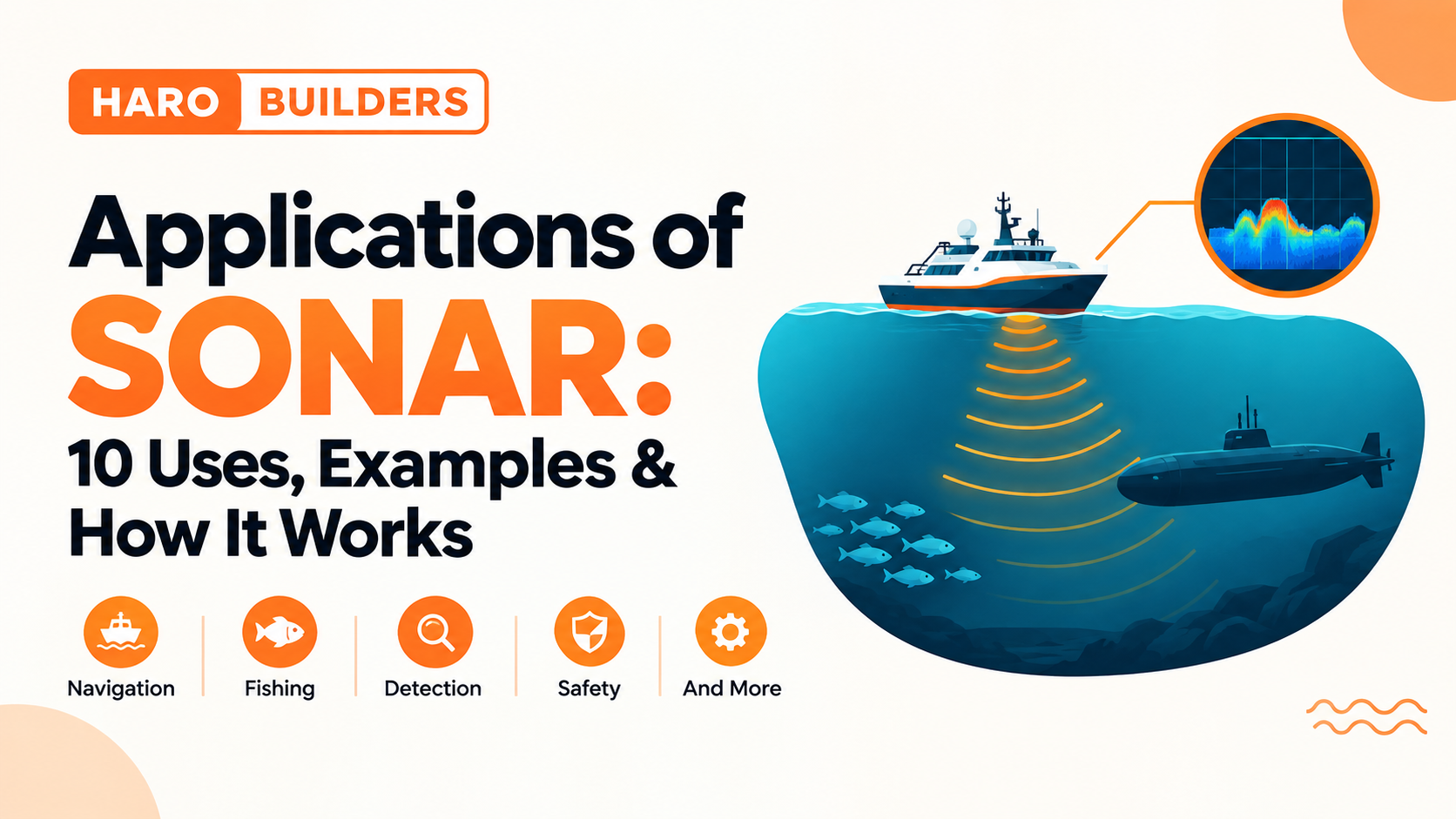
SONAR, short for Sound Navigation and Ranging, uses sound waves to detect objects, measure distances, determine water depth, and create maps of underwater environments. It is used in ships, fishing, oceanography, marine research, underwater archaeology, defense, search operations, and autonomous underwater vehicles.
Unlike radar, which uses radio waves, SONAR relies on sound because sound travels effectively through water.
Quick Answer: What Are the Applications of SONAR?
The main applications of SONAR include underwater navigation, water-depth measurement, seafloor mapping, fish detection, submarine and vessel detection, marine research, underwater archaeology, search and recovery, offshore infrastructure surveys, and autonomous underwater vehicle navigation.
Different SONAR systems are designed for different jobs. Active SONAR sends an acoustic signal and analyzes its return, while passive SONAR listens for sounds produced by objects or animals without transmitting its own signal.
What Is SONAR?
SONAR means Sound Navigation and Ranging. It is an underwater sensing technology that uses sound to detect, locate, measure, or map objects and surfaces.
A basic SONAR system can send an acoustic pulse into the water. When the sound encounters an object or the seafloor, part of the energy can return as an echo. By analyzing the returning signal and the time involved, the system can estimate information such as distance or depth.
SONAR is particularly useful underwater because sound can travel much farther through water than visible light in many situations.
Simple example
Imagine a boat traveling over deep water.
The boat sends a sound pulse toward the seafloor. The pulse travels downward, reflects from the bottom, and returns to the receiver.
The system can use the travel time to estimate how far away the seafloor is.
That basic principle supports many modern SONAR applications.
How Does SONAR Work?
A simplified active SONAR process looks like this:
SONAR transmitter → Sound travels through water → Signal encounters target → Echo returns → Receiver processes signal → Target information is calculated
The system can analyze the returning acoustic signal to determine characteristics such as:
- Distance or range
- Direction
- Relative position
- Signal strength
- Seafloor depth
- Features of an underwater target
For depth measurement, the basic relationship can be represented as:
Distance ≈ sound speed × round-trip time ÷ 2
The division by two is necessary because the measured time includes the sound’s journey to the target and its return.
The actual calculation can be more complicated because sound speed in water changes with environmental conditions such as temperature, salinity, and pressure.
Active SONAR vs Passive SONAR
One of the most important distinctions in SONAR technology is the difference between active and passive systems.
| Feature | Active SONAR | Passive SONAR |
|---|---|---|
| Sends an acoustic signal | Yes | No |
| Listens for sound | Yes | Yes |
| Uses returning echoes | Often | No transmitted echo |
| Can determine range from its own transmitted pulse | Yes | Not from one passive sensor alone |
| Common uses | Mapping, ranging, object detection | Listening and detecting sound sources |
| Example | Seafloor mapping | Detecting vessel or marine-animal sounds |
Active SONAR
Active SONAR transmits an acoustic pulse and analyzes the returning signal.
It is particularly useful when the system needs information about the location or distance of a target.
Active systems include technologies such as:
- Multibeam SONAR
- Side-scan SONAR
- Echo sounders
- Split-beam SONAR
- Sub-bottom profiling systems
Passive SONAR
Passive SONAR does not transmit its own acoustic pulse.
Instead, it listens for sounds already present in the environment. These may come from vessels, submarines, marine animals, or other underwater sources.
Passive systems can be useful when the objective is to monitor an acoustic environment without transmitting an active signal.
10 Major Applications of SONAR
1. SONAR in Ships and Underwater Navigation
One of the most familiar applications of SONAR is helping vessels understand what is beneath or around them.
Ships can use acoustic systems to obtain information about:
- Water depth
- Underwater hazards
- Seafloor features
- Submerged objects
- Nearby underwater structures
An echo sounder, for example, can help a vessel determine the depth below its hull.
This information can be particularly important in areas where shallow water, rocks, wrecks, or other underwater hazards could create navigation problems.
SONAR does not replace every other navigation technology. Instead, it provides an additional source of information about the underwater environment.
2. SONAR for Water-Depth Measurement
SONAR is widely used to determine how deep water is.
An echo sounder sends an acoustic pulse toward the bottom and measures the time required for the echo to return.
The longer the round-trip time, the greater the distance to the seafloor, assuming the relevant sound-speed conditions are accounted for.
Why depth measurement matters
Accurate depth information is useful for:
- Nautical charting
- Hydrographic surveys
- Ship navigation
- Harbor management
- Coastal mapping
- Ocean research
This is one of the simplest and most established practical applications of SONAR.
3. SONAR for Seafloor Mapping
SONAR can do much more than measure depth at one point.
Modern systems can collect large amounts of acoustic information to build detailed representations of the seafloor.
Multibeam SONAR
Multibeam systems send multiple beams in a fan-shaped pattern. This allows a survey vessel to collect depth measurements across a wider area rather than measuring only directly below the vessel.
The resulting data can be used to create bathymetric maps showing underwater terrain.
Side-scan SONAR
Side-scan SONAR is commonly used to create detailed acoustic images of the seafloor.
It can help reveal features such as:
- Shipwrecks
- Rocks
- Debris
- Geological structures
- Other objects resting on or near the seabed
The two technologies are therefore useful for different but related mapping purposes.
4. SONAR in Fishing and Fisheries
SONAR is an important tool in commercial fishing and fisheries research.
Fish and other organisms can produce detectable acoustic returns when sound interacts with them. Specialized echo-sounding systems can help identify fish schools and estimate their distribution.
A fishing vessel may use a fish finder to help locate areas where fish are concentrated.
Researchers can also use acoustic surveys to study fish populations without having to visually inspect the entire water column.
Example
A fishing boat moving through an area can send acoustic signals downward.
If the returning signals indicate a concentration of potential targets at a particular depth, the crew can investigate that area further.
The strength and characteristics of the return can provide additional information, although interpreting acoustic data is more complicated than simply assuming every echo represents a fish.
5. SONAR in Submarines and Naval Operations
SONAR has a long history in underwater defense and submarine operations.
Submarines and naval vessels can use active and passive acoustic systems for different purposes.
Active systems
Active SONAR can transmit a signal and analyze its return to obtain information about an underwater target.
Passive systems
Passive SONAR listens for sounds generated by vessels or other underwater sources.
This distinction is important because passive systems do not reveal themselves by transmitting their own acoustic pulse.
The specific performance of a SONAR system depends on factors such as equipment, water conditions, target characteristics, background noise, and operating environment.
6. SONAR in Oceanography and Marine Research
Scientists use SONAR to investigate underwater environments that are difficult to study directly.
Applications include:
- Mapping underwater terrain
- Studying seafloor features
- Measuring water depth
- Surveying geological structures
- Studying organisms in the water column
- Monitoring underwater acoustic environments
Large areas of ocean can be difficult and expensive to inspect visually. Acoustic sensing allows researchers to collect information over broad areas and at depths where ordinary optical observation may be limited.
For this reason, SONAR has become an important part of oceanographic surveying.
7. SONAR in Marine Biology
SONAR and related acoustic technologies can also support marine biology.
Researchers can use acoustic methods to study animals and their environments, including fish and marine mammals.
Passive acoustic systems are particularly useful for listening to naturally occurring sounds.
Depending on the research objective, scientists may investigate:
- Animal presence
- Distribution
- Movement
- Acoustic behavior
- Population patterns
- Environmental sound
Acoustic monitoring can therefore complement visual observation, tagging, sampling, and other research methods.
8. SONAR in Underwater Archaeology
Underwater archaeology is another important application.
Shipwrecks, submerged structures, and archaeological sites may be located in environments where visibility is poor or where the objects are spread across large areas.
SONAR can help researchers locate and map these features before conducting more detailed investigations.
For example, side-scan or multibeam systems can survey a large section of seabed and identify unusual structures that deserve further examination.
This allows researchers to investigate underwater cultural heritage more efficiently than relying only on divers or optical cameras.
9. SONAR for Search, Recovery, and Underwater Object Detection
SONAR can help locate submerged objects when direct visual searching is difficult.
Potential targets include:
- Lost equipment
- Shipwrecks
- Aircraft debris
- Containers
- Submerged vehicles
- Other man-made objects
Search teams can survey an area acoustically and then investigate promising targets using divers, remotely operated vehicles, cameras, or other equipment.
This makes SONAR particularly valuable when water depth, darkness, turbidity, or distance limits direct visual inspection.
10. SONAR for Offshore Infrastructure and Autonomous Underwater Vehicles
Modern underwater operations increasingly involve autonomous and remotely operated systems.
SONAR can support:
- Underwater surveys
- Pipeline inspections
- Cable-route surveys
- Seabed assessments
- Obstacle detection
- AUV navigation
- ROV operations
- Offshore infrastructure inspection
An Autonomous Underwater Vehicle (AUV) may use acoustic sensors to understand its surroundings while operating without continuous direct control from a surface operator.
This is particularly useful when the vehicle needs to operate over large areas or in environments where satellite positioning cannot be used directly underwater.
What Can SONAR Detect Underwater?
What SONAR can detect depends on the type of system, operating frequency, target characteristics, water conditions, distance, and other factors.
Depending on the application, SONAR can help detect or map:
Natural features
- Seafloor terrain
- Rocks
- Geological formations
- Underwater slopes
- Seamounts and other seabed features
Man-made objects
- Shipwrecks
- Submerged vessels
- Debris
- Cables and pipelines
- Underwater structures
Biological targets
- Fish
- Fish schools
- Marine mammals
- Other organisms that produce or reflect detectable acoustic energy
It is more accurate to say that SONAR detects acoustic signatures or reflected sound rather than simply “sees” everything underwater.
Main SONAR Applications by Industry
| Industry | Common SONAR Application |
|---|---|
| Maritime | Navigation and depth measurement |
| Hydrography | Bathymetric surveying |
| Fisheries | Fish detection and population studies |
| Defense | Underwater detection and acoustic monitoring |
| Oceanography | Seafloor and water-column research |
| Marine biology | Acoustic monitoring |
| Archaeology | Shipwreck and submerged-site detection |
| Search and recovery | Locating underwater objects |
| Offshore engineering | Infrastructure and seabed surveys |
| Robotics | AUV/ROV navigation and obstacle detection |
Advantages of SONAR
SONAR offers several important advantages for underwater work.
1. Works where visibility is limited
Sound can provide useful information even when underwater visibility is poor.
2. Covers large areas
Survey systems can collect acoustic data over broad sections of the seafloor.
3. Supports distance measurement
Active SONAR can estimate range using the timing of transmitted and returned signals.
4. Supports underwater mapping
Multibeam and other sonar technologies can produce detailed information about underwater terrain.
5. Can detect objects without direct visual contact
An acoustic signal can reveal the presence of an object even when a camera cannot provide a clear image.
Limitations of SONAR
SONAR is powerful, but it is not perfect.
Environmental conditions matter
Sound propagation underwater changes with conditions such as temperature, salinity, and pressure.
Acoustic noise can interfere
Natural and human-made sounds can make it harder to interpret some signals.
Different systems provide different information
A side-scan sonar image is not the same as a bathymetric map from a multibeam system.
Interpretation can require expertise
A sonar return does not automatically identify exactly what produced it. Researchers may need additional data to classify a target confidently.
SONAR is not the same as an optical camera
A sonar image represents acoustic information. It should not be interpreted as a normal photograph of an underwater object.
SONAR vs. RADAR
SONAR and RADAR both use waves to detect or locate objects, but they operate with different types of waves and are commonly used in different environments.
| Feature | SONAR | RADAR |
|---|---|---|
| Full name | Sound Navigation and Ranging | Radio Detection and Ranging |
| Main signal | Sound waves | Radio waves |
| Common environment | Underwater | Air, land, and space |
| Typical uses | Underwater detection and mapping | Aircraft, weather, navigation, and object detection |
| Main medium | Water | Air or space |
The key difference is the physical signal used.
SONAR relies on acoustic energy, while RADAR relies on electromagnetic radio waves.
SONAR Applications: Real-World Examples
Here are several simplified examples showing how the technology is applied:
Example 1: Hydrographic survey
A survey vessel uses multibeam SONAR to collect depth measurements across a section of seabed and create a bathymetric map.
Example 2: Fishing
A fishing vessel uses an echo sounder to identify acoustic returns associated with fish concentrations.
Example 3: Shipwreck search
Researchers scan the seafloor with side-scan SONAR and investigate unusual acoustic features for possible wrecks.
Example 4: Ocean research
Scientists use acoustic systems to study underwater terrain or marine organisms across a large survey area.
Example 5: Autonomous underwater vehicle
An AUV uses sonar data to understand nearby obstacles and underwater terrain while carrying out a survey mission.
Frequently Asked Questions About SONAR Applications
What are the applications of SONAR?
SONAR is used for underwater navigation, water-depth measurement, seafloor mapping, fish detection, submarine and vessel detection, marine research, underwater archaeology, search and recovery, offshore surveys, and autonomous underwater vehicle operations.
What is SONAR used for?
SONAR is mainly used to detect, locate, measure, or map objects and surfaces underwater using sound. Common uses include measuring depth, mapping the seabed, locating underwater objects, finding fish, and monitoring underwater sounds.
How does SONAR work?
Active SONAR sends an acoustic pulse through water and analyzes the returning echo. The time and characteristics of the returned signal can provide information about the target’s distance, direction, or other properties.
How does SONAR measure water depth?
An echo sounder sends a sound pulse toward the seafloor and measures how long the echo takes to return. By accounting for the speed of sound in water and dividing the round-trip distance by two, the system can estimate water depth.
How is SONAR used in fishing?
Fish-finding SONAR and echo sounders detect acoustic returns from fish and other targets in the water. Fishermen can use the information to identify potential fish concentrations, while researchers can use acoustic surveys to study fish distribution.
How is SONAR used in submarines?
Submarines can use active SONAR to transmit acoustic signals and analyze echoes, while passive SONAR listens for sounds generated by other vessels or underwater sources. The two approaches serve different purposes.
What can SONAR detect underwater?
Depending on the system and conditions, SONAR can detect or map underwater objects, seafloor features, fish, vessels, wrecks, debris, and underwater infrastructure.
What is the difference between active and passive SONAR?
Active SONAR transmits an acoustic signal and analyzes its return. Passive SONAR does not transmit a signal; it listens for sounds already present in the environment.
Is SONAR used for ocean mapping?
Yes. Multibeam and other sonar systems are widely used to collect information about underwater depth and seafloor features. These measurements can be processed into bathymetric maps and other representations of the underwater environment.
What are some examples of SONAR technology?
Examples include echo sounders, multibeam SONAR, side-scan SONAR, split-beam SONAR, sub-bottom profilers, and passive hydrophone-based systems.
Key Takeaways
- SONAR stands for Sound Navigation and Ranging.
- It uses sound to obtain information about underwater environments.
- Active SONAR sends acoustic signals and analyzes returning echoes.
- Passive SONAR listens for existing underwater sounds.
- SONAR can measure water depth and support nautical charting.
- Multibeam SONAR is useful for broad seafloor mapping.
- Side-scan SONAR can help identify objects and features on or near the seabed.
- Fisheries use acoustic systems to locate and study fish.
- Marine researchers use SONAR to study underwater environments and organisms.
- SONAR can help locate shipwrecks and other submerged objects.
- Modern underwater vehicles can use sonar for navigation, obstacle detection, and surveying.
- SONAR is an important sensing technology, but its results depend on the system and underwater conditions.
Conclusion
The applications of SONAR extend far beyond simply finding submarines. The technology is used to measure water depth, map the seafloor, locate underwater objects, support fishing, study marine life, investigate shipwrecks, conduct oceanographic surveys, and guide underwater vehicles.
The most appropriate SONAR system depends on the task. Active systems are useful when transmitted signals and their echoes are needed, while passive systems are designed to listen to sounds already present in the underwater environment.
For readers exploring broader technology topics, you can continue with HaroBuilder’s technology resources for additional guides.